Full version with all templates and detailed checks. Back to the main article
SEO for tradespeople: how your business gets found locally
Someone planning to renovate their bathroom searches Google for a business nearby.[a] On the business's website, they want to see whether the work on offer fits their plans. The service area and how to arrange an initial discussion should also be clear.[1]
This is where SEO for tradespeople starts. Search engine optimisation helps search engines understand your content and people find the information they need.[2] For a small business, a well-explained service with a clear local connection can be a sensible starting point. Bathroom renovation is the example here; the same thinking applies to electricians, roofers and joinery businesses.
Two tasks are connected here: people need to find the page and then understand why your business is right for them. An enquiry only happens if getting in touch works too. So it is worth looking at your website from the customer's perspective before adding more and more text.[1] [3] [b]
SEO, Google Maps and Google Ads: the basics
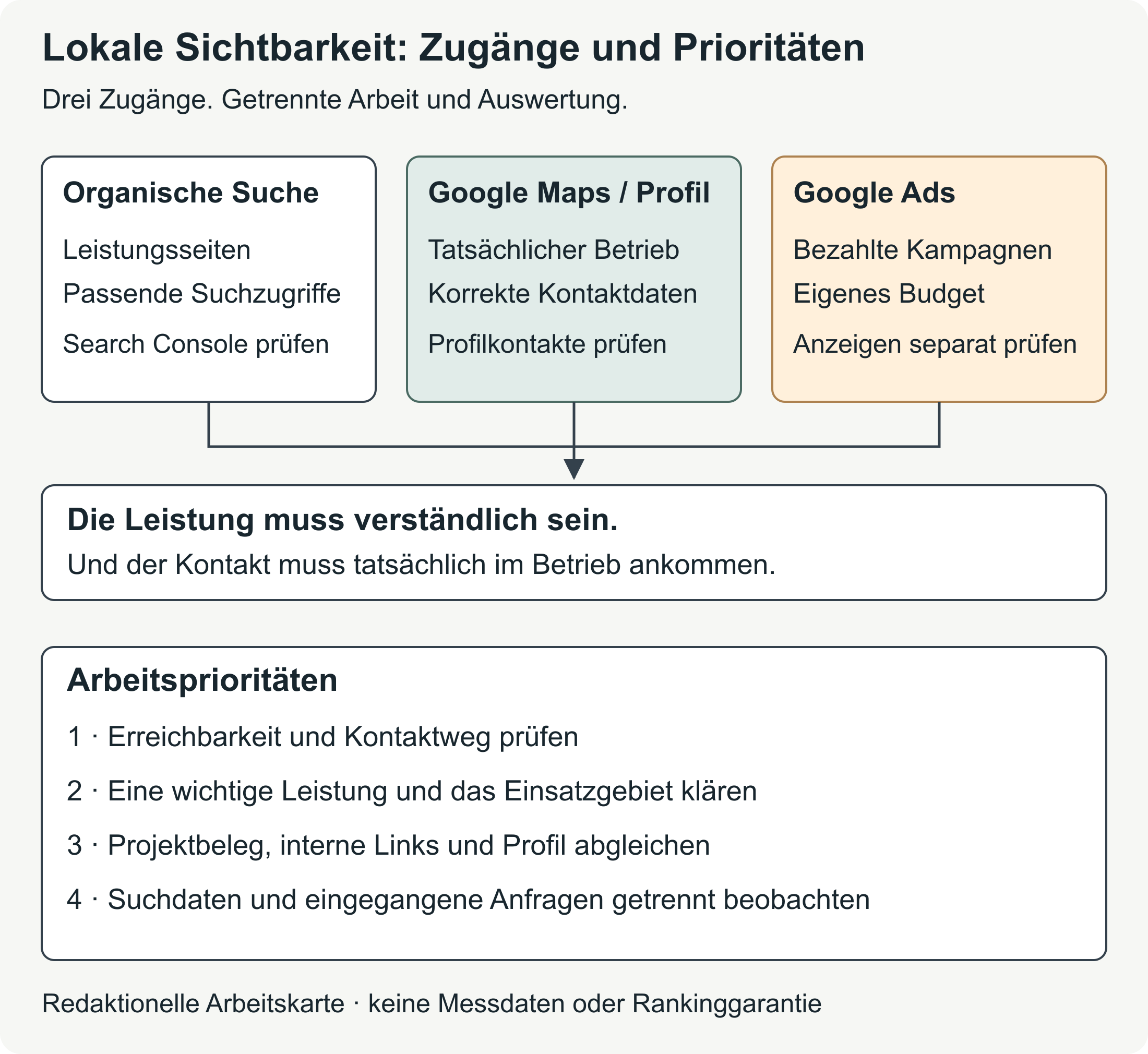
A potential customer can reach you in different ways. They might open a service page from Google's normal results. They might find your Business Profile on Maps and call you directly. Or they might click a paid ad.[4] [5]
These routes serve similar customer needs, but each involves different work. Organic search results are the unpaid results. SEO improves your website for those results. Google Ads are paid advertisements; your Google Business Profile is the listing with information about your business in search and on Maps.[4] [6]
| Route to your business | What you work on | What you monitor separately |
|---|---|---|
| Organic Google search | Service pages, helpful guides, accessible content and clear internal links | Appearances of your pages in search (impressions) and organic clicks by page and search query[7] [8] |
| Google Maps and local results | Accurate information about the actual business and a suitable connection to the website | Actions on the profile and contacts that can be traced back to them[5] |
| Google Ads | Paid campaigns with a budget and a destination page of their own, meaning the page reached after an ad click[9] | Ad clicks, campaign costs and attributed enquiries[4] [10] |
Your website gives you space to explain a service in detail. A call from your Business Profile can happen without someone visiting your website first.[5] That matters when you evaluate the results later.
Ads and unpaid results remain separate: paying for advertising does not buy a better organic position.[4] This is also explained in Google's help on paid and organic search. A position in search results is called a ranking. SEO guarantees neither a particular position nor a set number of new jobs.[11] [b]
Where your business should start
The work to tackle first depends on the state of the website. An important page that cannot be reached at all or has accidentally been blocked needs a technical fix first. More text will not solve that problem. You can check whether the page works in your browser and with URL inspection.[12] [13] A URL is a page's address.
If the page can be reached, the next question is what a visitor understands from it. An unclear description of the work and service area needs better information. Someone outside the business can help: they should be able to understand the offer and the area you cover without already knowing your business.[1] [b]
Sometimes it is mainly the connection that is missing. The service is described, but there is no relevant project example or clear way to get in touch. Connecting the offer, project example and enquiry can help.[1] [14] [b] A broken form should also be fixed early, because your business cannot deal with a message it never receives.[3]
Once these basics work, you can move on to another important service. Recording the date of a change and the results observed afterwards makes it possible to see later what you actually worked on.[b]
Keywords and service pages: explain what you offer
You use technical terms within the business, while customers often describe what they want to do.[2] [b] So it is worth looking at the words people use in conversations before a site visit. Place names and recurring questions can also provide relevant search terms. These words and phrases are called keywords.
Every search has a purpose. Someone searching for 'bathroom renovation Vienna' may be looking for a business that provides a specific service. 'Shower instead of bath' is more likely to suggest questions about possibilities and limitations. 'Bathroom renovation process' is about the steps before an enquiry. These examples explain search intent; their frequency has not been measured here.[a]
Similar questions may belong on the same service page. A separate page for each phrase would spread the explanation out unnecessarily. A detailed guide, though, suits a question that needs more space. Search intent helps you make that decision.[2] [b]
Search Console, Google's tool for data about your website in search, shows existing search queries.[7] [8] Search suggestions can provide more ideas, but do not establish demand on their own.[15] And the words must match the actual offer: an advertised emergency service or specialist job needs a business that really provides it.[16]
What customers need to know on a service page
An overview such as 'Our services' first shows what work your business offers. If needed, an important service can have its own page, accessible from this overview. There is room there for the questions that arise before an initial discussion.[17] [1] [b]
For a bathroom renovation, that includes the scope and limits of the work. The customer also wants to understand whether the service fits their starting point and whether your business works in their area. Describing the site visit and how the work is agreed helps them prepare their first enquiry. How you prepare a quote should be clear too.[1] [b]
A relevant project example can add to this explanation.[14] The way to get in touch then follows from what the visitor has just read. Technical terms become clear when you explain what they mean for the project, for example when coordinating several trades. The processes you describe must match what the business can actually provide.[1] [16]
Page title and description
A suitable page title could be 'Bathroom renovation in Vienna and the surrounding area | Business name', provided the service and area are accurate. Every important page needs its own clear title. The meta description is the short description of the page.[2] [a]
Both guide how the page should be described in search. Google may, however, use other parts of the website for the title or text. The Google guide to SEO explains these basics.[2]
Local SEO: your service area and Google Business Profile
A customer from a particular municipality needs reliable information about whether you work there. A clear description of your service area can explain a great deal. If availability depends on the project, include that too.[16] [1]
A separate location page makes sense if it offers useful information about that place. This could be an approved project example or an explanation of the process. Lots of identical pages where only the place name changes give visitors little extra guidance.[18] [b]
Pages intended simply to funnel visitors to the actual destination page may count as doorway abuse.[18] The Google's spam policies describe this boundary. For a small business, one good service page with a clear service area may initially be more useful than numerous barely different location pages. Extra pages make sense when they answer specific questions of their own.
Your location and service area are different pieces of information. Taking on work in a municipality does not mean you have a branch there.[16]
How Google Business Profile complements your website
Google Business Profile shows information about your business directly in search and on Maps. The business name, contact details and services must reflect what is actually available.[6] [16] Conflicting information makes it harder for someone interested to find the right answer.[1]
Google names relevance, distance and prominence as the main factors for local results. Relevance describes how well the business matches the search. Complete, accurate information can help Google make that match; it does not guarantee a particular position. The Google help page on local visibility explains these factors.[6]
For a new profile, see the guide to creating a Google Business Profile. For an existing listing, see the guide to maintaining and checking your Business Profile.
Project examples: make your offer easier to understand
A service description explains what you offer. A project example can show what completed work looks like. Visitors need some context for this: the starting point, your own contribution and what changed as a result of the work.[14] [b]
Approved project photos can help, including as a before-and-after comparison. The captions explain what the photos show.[2] [14] Generated images still need to be labelled as illustrations; they are not evidence of a completed customer project.[c] You also need the rights to publish other text and images.[19]
Fictional example: service page, project example and contact
A service page called 'Bathroom renovation in Vienna' could explain the scope of the work and the actual service area. A descriptive link would lead from there to an example of a completed bathroom renovation. That project page would document the starting point and the business's own work, with approved photos. It would link back to the service and offer a way to enquire.[a]
This is an imagined page structure, not a real customer project. Actual project evidence requires completed work. Contact could be by phone or form, with an explanation of which details help you deal with the enquiry, such as the location and the renovation required.[a] [b]
This keeps the connection between the offer and the evidence clear. Specific link text says more about the destination than a general 'Find out more'.[17] This follows Google's recommendations for internal links. The structure for website project examples helps you prepare the content.
Technical basics and a way to get in touch that works
Even a clearly written service page needs to be accessible to Google. Googlebot is the program Google uses to visit webpages.[20] The page needs a working response with HTTP status 200 and content suitable for inclusion in the search index. Even a technically sound page will not necessarily be included.[12] This is explained in Google's technical requirements.
Crawling means Google visits and reads the page. These visits can be blocked in robots.txt.[21] The noindex instruction concerns inclusion in the search index instead. Google must be allowed to read the page to recognise noindex.[12] Private areas still need appropriate access controls.[21]
A focused technical check helps with unintended blocks. It should also cover readable content that is not only available as an image, and working links from the navigation or other pages. Google needs to be able to follow those links.[20] [17]
The URL Inspection tool in Search Console shows information about the version already indexed and offers a live test of the current page. A successful live test does not establish inclusion in the search index.[13] A sitemap, a list of important page addresses, can help Google find them and supplements internal links.[22]
Getting in touch on a smartphone
Once the explanation is clear, the next step towards an enquiry should work well on a smartphone too. The text must be readable, the phone number accessible and the form possible to complete in full. A covered button can be enough to stop someone finding the next step.[23] [3]
A labelled button such as 'Enquire about a bathroom renovation' makes the purpose clear.[23] The form only needs the information your business requires to deal with the enquiry.[3] Only mention a free consultation or a fixed response time where your business has actually committed to it.[b]
Getting in touch also includes delivery. A success message initially only shows what the website reports; the test message also needs to reach your business.[24] So the test should include error messages and the whole process through to receipt.[3] [b] The guide to building an enquiry form covers this in more detail.
If people already visit but suitable enquiries fail to come in, see the guide to diagnosing a website with no enquiries. It looks at the route from the visit to the response from your business.
Planning SEO and understanding the results
The work can be spread over four weeks. This is a way to organise it, not a deadline for rankings or new jobs.[b]
Week 1 focuses on an important service, the service area and the current situation. That includes technical accessibility and the way to get in touch. Week 2 gives you time to rework that service page and align the questions, page title and next step.
In week 3, add approved evidence from a real project. Internal links and the route to an enquiry on mobile belong here too. Week 4 is for documenting changes, reviewing the data available and planning the next task.
Any technical block or broken contact process you find takes priority. The order matters more than the calendar date.
Making sense of search data and enquiries
Search Console shows, among other things, how often a page appears in search and how often someone clicks it. These appearances are called impressions.[7] This search data describes an earlier part of the process than an enquiry or a job.
For a useful comparison, keep the service page, the period and the date of the change together. You can filter search impressions to that page and also examine organic clicks by period and search query.[8] [7] The Search Console help page on the performance report explains the options.
Contact actions on your website need their own measurement, where this has been set up.[25] A click on a phone number does not confirm a conversation.[26] Your business's records show which enquiries actually arrived. Their source may remain unknown. Whether an enquiry is suitable depends on the service and service area; you need to set the counting rules for this in advance.[b]
Keep quotes and confirmed jobs in a separate overview. A job may be confirmed later than the initial contact. Enquiries from other channels should also remain separate from the search data when you evaluate the results. Visibility, clicks and jobs each describe something different.[25] [b]
Holidays, a new service or changes in capacity can affect a comparison.[27] When there are few enquiries, individual cases change the picture considerably. An increase after a website change does not establish the cause on its own, but can point to something worth investigating next.[27]
Do SEO yourself or get support?
Which SEO tasks can I do myself?
You know your services and your customers' questions. That gives you information a website needs, including your actual service area and the enquiries your business can take on. You can use this knowledge to correct service descriptions and prepare evidence from real projects for publication.[11] [b]
Technical blocks and faulty contact processes need an appropriate check. A specific finding helps a provider more than a general instruction to 'optimise the website for Google'. Responsibility for changes and checks is part of the agreed scope of website support.[11] [b]
How do I compare SEO proposals with different monthly prices?
A single service page and ongoing work on several pages are different tasks. The price only tells you something useful about the proposals once their scope is comparable.[b] That includes a description of the current situation, specific deliverables and an explanation of how the provider checks changes.[11]
Your contributions belong in this agreement too: the content you provide, responsibility for website access and clear reports on changes. A guaranteed position or set number of jobs does not replace this description of the service.[11] [b]
The next step for your business
One important service page gives you a manageable place to start. It brings together what your business offers, where it works and which questions remain before someone enquires. Evidence from a relevant project then makes the description more tangible.[1] [14] [b]
This creates a page that helps someone understand how their plans fit. When they understand what work you take on and how to get in touch, the next step towards your business becomes clearer.[1] [3] [b]
Sources and publication date
- Google: SEO Starter Guide
- Google: spam policies
- Google: local visibility
- Google: crawlable links
- Google: minimum technical requirements
- Google Search Console: URL Inspection Tool
- Google Search Console: performance report
- Google Ads: paid and organic search
Publisher: BrandHoop. Sources on features and rules checked on 12 October 2026. The page example and four-week plan are editorial working aids. Text version for style review dated 15 October 2026.
Source cross-check added on 15 October 2026. The numbers beside statements link directly to the sources; the letters explain illustrative examples and recommendations. The original text remains unchanged.
[a] Illustrative examples. The opening, example search terms, sample title and suggested page structure illustrate possible situations. They are not a survey of bathroom renovation customers in Austria or a measurement of search frequency.
[b] Practical recommendations. The suggested page structure, order of checks, evaluation, division of work and four-week plan are editorial working aids based on the sources cited. Their specific effect on enquiries or jobs has not been measured here.
[c] Labelling illustrations. In this guide, labelling generated images as illustrations is an editorial rule for transparency. The source review does not establish a general legal duty to label every generated image.
Sources and context (27 sources)
- 'About Us' Information on Corporate Websites — Nielsen Norman Group
Qualitative UX research into clear company information. Applying this to a trades business's services, area and process is an editorial interpretation; the research did not measure an increase in enquiries from this.
- Startleitfaden zur Suchmaschinenoptimierung (SEO) — Google
SEO basics, different search terms, clear page titles and snippets generated by Google. Applying this to individual trade services is an editorial interpretation.
- Forms Tutorial — World Wide Web Consortium
W3C WAI recommends asking for necessary information, labelling fields, giving clear instructions and providing helpful feedback on errors or successful input.
- Leistung aus der bezahlten und organischen Suche messen — Google
Paid and unpaid results and their metrics are separate. Spending on ads does not buy a better organic ranking.
- Understand your Business Profile performance & insights — Google
'Calls' counts clicks on the call button, not confirmed conversations. Profile data may include organic results and Google Ads; actual contacts need to be checked separately against your records.
- Ranking in lokalen Suchergebnissen auf Google verbessern — Google
Local results in search and Maps, complete business information, and relevance, distance and prominence as the main factors. These do not guarantee a particular position.
- Leistungsbericht (Google-Suchergebnisse): Übersicht und grundlegende Einrichtung — Google
Definitions of search impressions and clicks, with breakdowns by page and search query. The report does not record jobs received by the business.
- Leistungsbericht (Suchergebnisse): Erweiterte Filterung und Vergleich — Google
Filters and comparisons by page, search query and period. For privacy reasons, not every individual search query appears in the report.
- Landingpage — Google
A landing page is the destination after an ad click. This does not mean a new page built solely for ads is required in every case.
- Conversion-Analyse — Google
Google Ads explains how to set up conversion actions and attribute website, call and offline actions. A recorded action must be evaluated according to its actual definition.
- Benötigst du einen Suchmaschinenoptimierer (SEO)? — Google
Google recommends asking specific questions about the work, measurement and communication, and warns against guaranteed top positions. The suggested contractual arrangements are editorial recommendations.
- Technische Anforderungen für die Google Suche — Google
Googlebot access, HTTP status 200 and indexable content are minimum technical requirements. Meeting them still does not guarantee indexing.
- URL-Prüftool — Google
The version stored in the index and the live test are different. A successful live test does not confirm inclusion in the index.
- Photos as Web Content — Nielsen Norman Group
Eye-tracking observations show the usefulness of informative images. The choice of project photos and before-and-after examples here is an editorial application of that research.
- So funktioniert die automatische Vervollständigung von Google — Google
Suggestions are based on factors including actual searches, language, location and previous activity. On their own, they show neither search volume nor an intention to buy.
- Richtlinien für die Präsentation Ihres Unternehmens auf Google — Google
The name, services, phone number, actual location and service area must reflect the real business. These location rules are not a general legal definition of a branch.
- Link best practices for Google — Google
Crawlable links, descriptive link text and internal links between important pages. The specific example structure in this article is an editorial application of that guidance.
- Spamrichtlinien für die Google Websuche — Google
The section on doorway pages describes doorway abuse. Not every location page or ordinary redirect falls into this category.
- Urheberrechtsgesetz: §§ 18a and 74 · Urheberrechtsgesetz § 74 — Rechtsinformationssystem des Bundes (RIS)
§ 18a governs making protected works publicly available; § 74 concerns photographs. Rights, licences and statutory permissions must be observed. A customer's permission does not automatically cover the photographer's rights.
- Einführung in die Google Suche: Entwicklerleitfaden — Google
Googlebot as a crawler, accessible text and discoverable links. Images can supplement content; important information should also be available as text.
- Einführung zu robots.txt-Dateien — Google
robots.txt controls crawler access and does not replace access controls for private content.
- Was ist eine Sitemap? — Google
A sitemap helps important page addresses to be found and supplements internal links. It guarantees neither crawling nor indexing.
- Web Content Accessibility Guidelines (WCAG) 2.2 — World Wide Web Consortium
W3C criteria for reflow, clear labels and visible controls. The criterion on obscured focus concerns keyboard use in particular; it is not a promise of conversions.
- RFC 5321: Simple Mail Transfer Protocol — IETF / RFC Editor
SMTP acceptance and final delivery are different steps. Testing the form all the way through to receipt is a practical recommendation derived from this.
- [GA4] Recommended events — Google
Contact and lead events need to be set up accordingly. Google distinguishes submitted, qualified and closed leads; these events do not confirm email delivery.
- Klicks auf Telefonnummern auf einer mobilen Website erfassen — Google Ads Help
This Google Ads feature records clicks on phone numbers rather than actual calls. For your own website, what the data tells you depends on the measurement you have actually set up.
- Top Challenges from the first Practical Online Controlled Experiments Summit — ACM SIGKDD Explorations, Volume 21, Issue 1; author copy hosted by Microsoft Research
This methodological paper explains suitable comparisons, random variation and outside influences such as seasonality. It does not examine any specific website from this article.