A website for your trades business: structure, content and features
Reading time: about 5 minutes for the main text. Use templates and details as needed.
Full version with templates, calculations and further checks
Your website should tell a prospective customer which jobs you take on and whether you work in their location. This gives you the basis for a page plan: each page answers a customer question and leads to relevant information or a way to get in touch. You can use this plan to build the website yourself or discuss having it built. [b]
The example uses a fictional bathroom renovation business in the Graz area. The pages and wording are planning aids, rather than a real client project or an offer of trades services from BrandHoop. [a]
Which pages your business needs
A simple map is enough for the first draft. In the example, a visitor should be able to move from the homepage to bathroom renovations and see how their project fits the service. Examples of your own work can support the explanation. [a]
| Page | What the visitor learns there | Next step |
|---|---|---|
| Homepage | Services and area covered | View a service or get in touch |
| Bathroom renovation | Scope, requirements and process | Send a project enquiry |
| About the business | Who handles the work and the enquiry | Get in touch |
| Project examples, if available | Which jobs the business has completed | Go to the relevant service or send an enquiry |
| Contact | Contact options and availability | Call, email or submit a form |
| Legal notice and privacy information | Website operator and data processing | Read the mandatory information |
This is not a fixed page count. If your range of services is small, several types of content can share a page. A separate service page is worthwhile when it answers different customer questions in more detail. Putting a new heading above the same text is not enough. The area you cover can also start as a section. [b]
The map forms the basis of the menu. Labels such as 'Services', 'About us' and 'Contact' should match the content of the page they lead to. Using the same terms in the menu item and page heading makes the connection clear. The wording you choose depends on your content. [b]
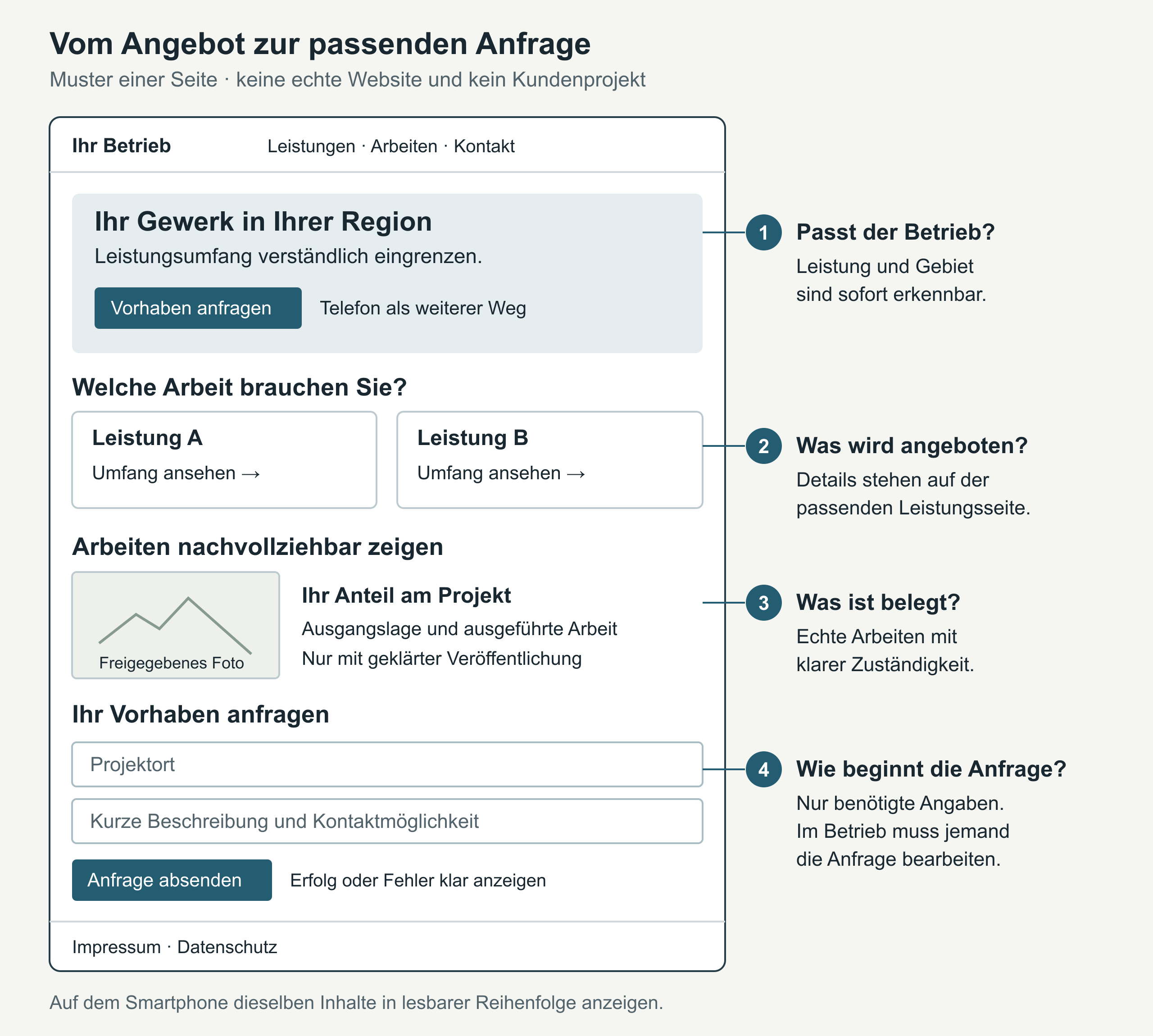
The detailed page list also shows how a service overview or partial renovation could fit into the range offered.
For the area you cover, name specific towns or a clearly defined region. 'By arrangement' may suit more distant locations if that reflects how your business works. An additional location page needs its own accurate information. Simply swapping the place name gives visitors little new guidance. [b]
Explaining a service: the bathroom renovation example
The homepage could say 'Bathroom renovation for property owners in the Graz area', provided the service and area are accurate. A link below leads to the service page. A phone number can sit alongside it if the business can take calls. [a]
Below the introduction, you can briefly describe your main services. Each link to further details should lead to the relevant content. Large images should not push this information or the contact options out of the way. An elaborate animation can wait until the services and enquiry process are clear. [b]
On the service page, visitors first need to understand the scope. Does the business take on the whole renovation or individual jobs? If it coordinates different trades, the text explains which businesses are involved and who coordinates their work. 'Everything from one provider' must not promise more than is actually offered. [b]
Next comes what needs to be clarified before a quotation. In the sample, this might include the condition of the pipework and possible structural constraints. Any necessary site visit belongs here too. A firm completion date requires the relevant conditions to be established; the sample therefore makes no general promise about timing. At the end, 'Enquire about bathroom renovation' leads to the contact page. [a]
You can also explain the steps leading to an order. In the sample, the business receives the enquiry, discusses the project and checks the existing conditions. It then agrees the scope and quotation and organises the work. Your text follows your business's own process. Whether residents can use the bathroom during the work needs an answer that reflects the particular job. [a]
You can compare the complete sample structure with the questions that come up in your customer conversations.
Showing your work and preparing material
Beside each planned page, note which texts or photos you already have and who will supply anything missing. A project example needs work that has actually been completed and a description of your own contribution. An attractive bathroom photo or an image created with artificial intelligence does not prove that work was done. If you have no project ready to publish, the projects page can wait. [b]
On 'About us', you can show what your business specialises in and who handles enquiries. The business history needs accurate details. Professional titles and claims about experience need evidence to support them. This establishes which supporting material you still need to prepare for the page. [b]
You need the necessary rights to use other people's images and text. For photos of people, personality rights and data protection also need to be considered. [6] The guide to project examples on your website helps you choose and describe a project.
A project description can begin with the initial situation and use it to explain your work. This lets readers compare the project with their own plans. [b] In the bathroom renovation example, the intended changes to the bathroom therefore belong alongside the tasks the business actually carried out. Any outstanding permissions remain noted in the page plan. [a]
Checking the contact process through to your inbox
Decide where enquiries will arrive and who will respond. A chat or appointment booking feature also needs someone to handle the requests. Your stated availability must match how requests are actually handled. [b]
A tappable phone link can prepare a call on a smartphone. [7] An email address offers another way to get in touch. As you plan, check which contact options your business can actually manage. [b]
A form should only ask for information you need at this stage. The W3C also recommends this. [8] For an initial assessment, the project location, a short description and a way to get in touch may be enough; the choice depends on your process. [b]
Open your website on a smartphone. The text should be readable without moving each line from side to side. [11] Can you find the menu and contact options? Menu items and buttons need to be clearly recognisable. [3] Deliberately leave a required field blank in the form: the error message must explain what needs correcting. A successful submission also needs clear feedback. [9]
The test covers the whole journey from the homepage through the service page to contact. In the incomplete attempt, any information already entered should be retained. [b]
Then send a complete test enquiry and check the intended inbox. A success message on the website alone does not confirm receipt. [b] The guide to enquiry forms takes you through the checks in more detail.
Clarifying mandatory information before publication
Plan for your legal notice (Impressum) and privacy information from the start. The required details about the website operator depend, among other things, on the legal form of the business and the applicable rules. [1] They must be easily and directly accessible. [13] According to the WKO's explanation, an email address alone is not enough; a further contact option is required, such as a phone number or web form. [4]
The privacy notice must match the data actually processed and the services used. [2]
Cookies that are not technically necessary require valid prior consent. [14] The solution your website needs can only be determined by looking at its services. Another business's legal notice or a generic privacy notice cannot replace this assessment. [b] The detailed guidance for Austria sets out the basis and limits of this overview.
Using your page plan to get started or choose support
Add the missing material and the people responsible to the map. Also note who will handle later changes. Open questions can remain visible. The complete commissioning checklist helps you work through them. [b]
If a quotation refers to a 'homepage', ask for the scope to be specified. Here, the term means the main page; the website includes the other pages too. Your page list makes clear what you actually want to commission. [b]
With a website builder, you assemble your website from templates and building blocks. This can suit a small number of pages if you have time to do it yourself. Check whether it lets you present your content clearly and set up the contact process. External support becomes worth considering when you need help coordinating the page plan, content and technology. The agreed scope is what matters. [b]
For a website builder, this includes checking whether the form you need is available on your chosen plan. With an agency or independent service provider, clarify who supplies and revises the text. Also agree how you will check the finished website together. This is called the acceptance check. [b]
Compare both approaches using the same page list and features. Include your own working time and ongoing fees. Also clarify the handover of your web address, administrative access and rights to use the content. The website builder or agency comparison table brings these questions together. [b]
The technical description should include HTTPS, which means an encrypted connection. [12] The quotation should also name the software used and state who will prepare the images appropriately. Information still needs to be kept up to date after handover. The website maintenance overview helps you agree these ongoing tasks. [b]
With the plan complete, you can carry on yourself. And if you need help building the website, you can use the BrandHoop service overview to describe the support you would like.
Sources for the previous version checked on 16 October 2026; editorially revised on 17 October 2026. Numbers lead to sources; letters explain editorial examples or recommendations. Each note states what the source supports.
[a] Editorial examples. Content described as a sample or fictional illustrates possible situations. These are not real client cases or evidence of a measured effect.
[b] Practical recommendations. The suggested processes and decision aids are editorial applications of the principles cited. Their specific effect on enquiries or orders has not been measured here.
[c] Editorial illustration. The illustration explains a relationship. It is neither a real client project nor evidence of a measured effect.
Sources and context (14 sources)
- Das korrekte Website Impressum — Wirtschaftskammer Österreich
The freely accessible overview explains the different areas covered by the UGB, GewO, MedienG and ECG and provides templates for different legal forms. It supports the point that the required details depend on the business; it is not an individual assessment, and the linked brochure was not reviewed in full. Checked: 2026-10-16.
- DSGVO für KMU: Datenschutz kompakt erklärt — Wirtschaftskammer Österreich
Confirms the relevance of the actual processing of personal data, along with privacy notices, cookies and tracking and analytics tools on business websites. It does not make a general determination of the legal basis for a particular contact form or assess an actual hosting setup or a specific website. Checked: 2026-10-16.
- Menus Tutorial — W3C Web Accessibility Initiative
Original WAI guide to recognisable menu structure, usability and clear presentation of states. Supports the design recommendation for clear menus; the specific menu wording and grouping of pages are editorial suggestions, rather than empirically measured effects on conversion. Checked: 2026-10-16.
- Informationspflichten nach dem E-Commerce-Gesetz (ECG) — Wirtschaftskammer Österreich
The WKO explains general information requirements and, referring to the OGH, states that an email address alone is not enough and a further contact option is needed. The statement is explicitly presented as the WKO's explanation. The page lists additional requirements for online shops; these are not applied to every informational website. Checked: 2026-10-16.
- Creating helpful, reliable, people-first content — Google Search Central
Google states that it has no preferred word count and describes SEO as helping search engines find and understand content. No required word count, specific page count or prediction of success is inferred from this. Checked: 2026-10-16.
- Urheberrecht und Website eines Unternehmens — Wirtschaftskammer Österreich
Explains the rights needed to use other people's website content, along with personality rights and data protection for photos of people. Supports the question of permission and rights; it proves neither a business's qualifications nor the authenticity of a particular project example. This is not an individual assessment or a general claim that every publication must rely solely on consent. Checked: 2026-10-16.
- The Anchor element: Linking to telephone numbers — MDN Web Docs / Mozilla
Documents phone links and explains how their behaviour depends on the device. Supports the cautious wording that a phone link can prepare a call on a smartphone. It is not evidence of a conversation, enquiry or order. Checked: 2026-10-16.
- Forms Tutorial — W3C Web Accessibility Initiative
Recommends asking only for the information needed for the task in question. The suggested fields for project location, description and contact details are an adaptable editorial proposal. This is not a study of a trades business and includes no abandonment or enquiry rate measured for this article. Checked: 2026-10-16.
- User Notification: Forms Tutorial — W3C Web Accessibility Initiative
Supports clear success and error feedback after form submission and guidance on correcting errors. The guide proves neither that a message reaches an inbox nor that it is handled. The article states this limit immediately after the source marker. Checked: 2026-10-16.
- Mobile site and mobile-first indexing best practices — Google Search Central
Confirms mobile content as the basis for indexing and ranking, along with Google's recommendation for responsive web design. The recommendation is not a promise of a particular position or evidence of more enquiries. The introduction, configurations and equivalence of mobile content were read. Checked: 2026-10-16.
- Understanding Success Criterion 1.4.10: Reflow — W3C Web Accessibility Initiative
Explains that text should reflow in a narrow viewing area so that lines remain readable without having to scroll horizontally back and forth. The criterion has exceptions, for example for content that needs a two-dimensional layout. The article proposes a text readability test and claims neither full WCAG compliance nor a new legal obligation. Checked: 2026-10-16.
- HTTPS: MDN Glossary — MDN Web Docs / Mozilla
Defines HTTPS as encrypted HTTP communication using TLS. The article uses only this explanation; it infers neither complete website security nor compliance with data protection requirements from it. Checked: 2026-10-16.
- E-Commerce-Gesetz § 5: Allgemeine Informationen — Rechtsinformationssystem des Bundes, Republik Österreich
Primary legislation on easy and direct access to information about the operator, and on rapid contact, including an email address. The additional contact option is supported separately by the WKO's interpretation, as it does not appear in this wording in § 5 Abs. 1 Z 3. Checked: 2026-10-16.
- Bescheid der Datenschutzbehörde vom 28. Oktober 2024, D124.0507/24, GZ 2024-0.633.166 — Österreichische Datenschutzbehörde
The published decision explains the requirement for valid prior consent for cookies that are not technically necessary. The relevant extracted sections D.8 and D.9 of the accessible 21-page PDF were read, particularly D.9; no claim is made to a complete legal analysis or an assessment of specific website services. Checked: 2026-10-16.