CRM for trades businesses: keeping website enquiries organised
Reading time: about 5 minutes for the main text. Use templates and details as needed.
Full version with templates, calculations and further checks
For every website enquiry, your business needs a record people can find and someone to take the next step. A shared spreadsheet may be enough. A CRM is worth considering when a task you need repeatedly goes undone or takes too much effort. Staff numbers alone offer no useful threshold for making the switch. [b]
CRM stands for Customer Relationship Management. This software can bring together contacts and previous conversations. [1] Start with an open enquiry in the system you use now. A colleague covering for someone should be able to see what was agreed and what to do next. [b]
Each enquiry needs its own case
First check whether the contact already exists. Give the new request its own record with a unique identifier, the enquiry ID. This keeps different projects for the same customer separate. The customer record holds the basic contact details; the enquiry records the work on this particular request. [b]
To handle the enquiry, record the service requested and the location of the work. Include a way to reach the customer and link the original message. You should be able to trace when the enquiry arrived and the channel it actually came through. If you cannot establish how the prospective customer originally found you, leave that source as unknown. [b]
If the customer lives somewhere other than the site of the work, keep the contact address and property address as separate details. Documents also belong with the relevant request. When there are several projects, the customer ID alone does not show which enquiry an agreement concerns. Names cannot replace these identifiers either, because different customers can share a name. [b]
Your team adds the status, which shows the stage of the enquiry. The record also needs a named person responsible and a specific next task with a date. Customers do not need to fill in these internal details on the form. Keep missing project information visible and ask for clarification when needed. [b]
The full handover note template helps you set up your records. To get started with a spreadsheet, use the Excel customer database.
Check the path from receipt to the next task
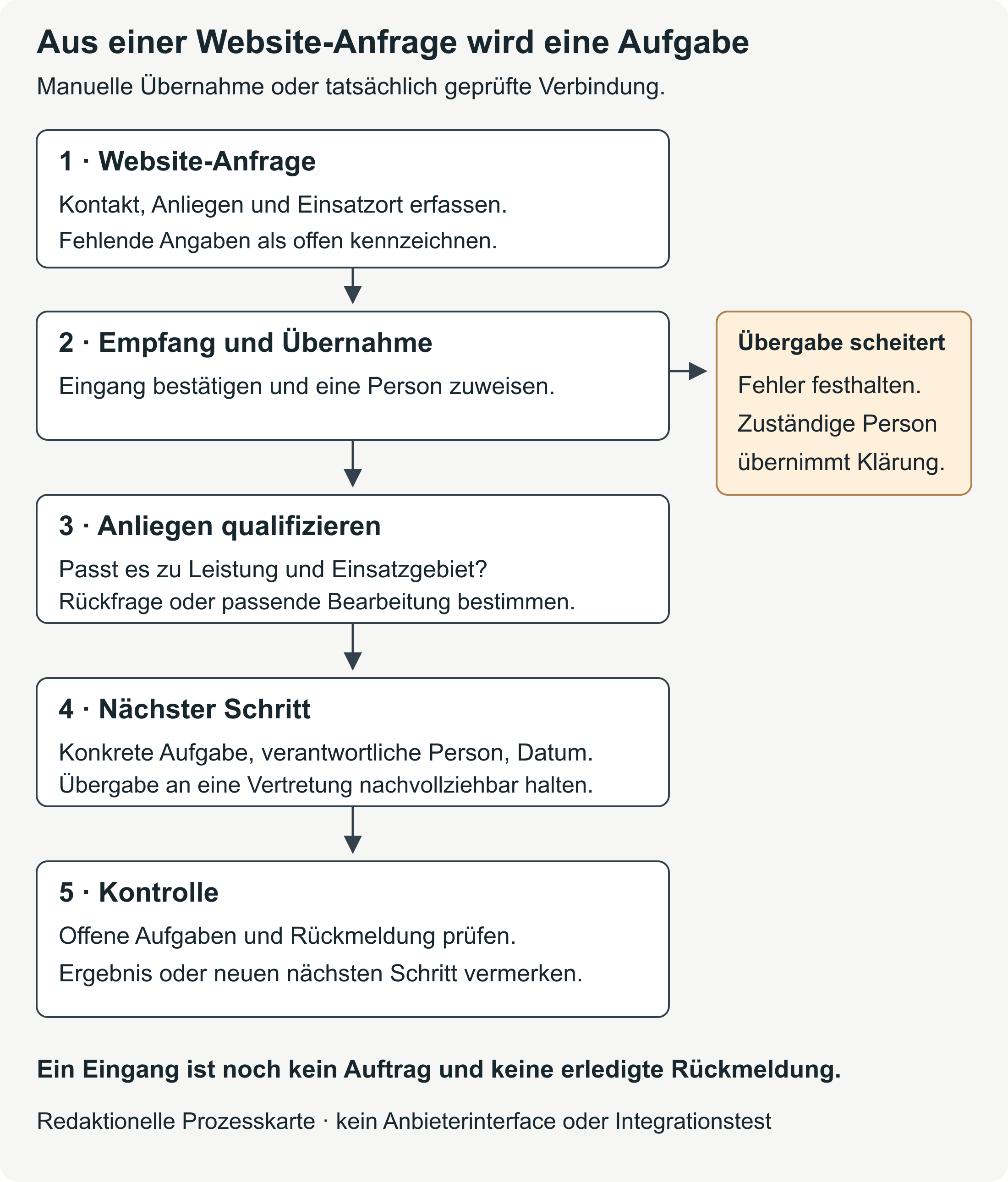
A success message after submission does not show that anyone in the business is handling the message. Follow an entirely fictional test enquiry through to its record in your system. It must be linked to the right contact there. Then check with the person responsible that they can see and carry out their next task. [b]
Initial handling includes checking whether your business can provide the requested service at the location given. After a conversation, a factual note records who spoke to the customer, when they spoke and what was agreed. And an internal status change does not replace a reply to the customer. [b]
An internal note may contain details that are unnecessary in the reply to the customer. Write the reply to address the enquiry, and check the recipient and attachments before sending it. Record the open task against the enquiry as well, so a colleague covering for someone can find it in the task list. [b]
If the systems are connected automatically, include a failed handover in the test. It must be clear when a message has arrived but is missing from the task list. Someone needs to be responsible for this too. Missing required fields and duplicate transfers are further test cases for the connection. [b]
Fictional example: keeping quotes and jobs separate
An entirely fictional bathroom renovation business records the customer as K-001 and the enquiry as AN-001. Each of the roles “Office” and “Business management” refers to a specific person responsible. The dates illustrate the workflow and are not recommended response deadlines. [a]
On 12.10.2026 , AN-001 arrives with the status “New”. The office takes responsibility for calling back on 13.10.2026 to clarify the request and the location of the work. After the initial conversation, the status becomes “Site visit arranged”. Business management is now responsible and confirms the handover; the site visit is scheduled for 16.10.2026 . The outcome of the conversation and the agreed scope remain linked to K-001 and AN-001. After the visit, the enquiry has the status “Quote in preparation”. Business management is due to send the quote on 20.10.2026 . [a]
On 20.10.2026 , the quote has been sent. AN-001 has the status “Quote pending”. The office takes responsibility for the agreed call back on 23.10.2026; the version of the quote sent can be found in the case record. Sending a quote still does not mean the customer has confirmed the job. [a]
During the call back on 23.10.2026 , a question comes up. AN-001 changes to “Clarification pending”. Business management takes responsibility for replying about the requested change on 26.10.2026. The new agreement is added to the earlier conversation record. A colleague taking over later needs this current agreement and the relevant version of the quote. The original quote alone would give an incomplete picture. [a]
In this example, confirmation is received on 27.10.2026 . Only then is AU-001 created and linked to K-001 and AN-001. The enquiry is closed with the status “Job confirmed”. The job has the status “Planning pending”; business management is due to agree the date for the work on 29.10.2026 . If the customer declined, this job would not exist. No reply would also be a different status. [a]
On 02.11.2027 , the same customer makes another enquiry. This creates AN-002 , with a call back scheduled for 03.11.2027. The earlier cases keep their existing status. A colleague covering for someone now needs both the earlier agreements and the new task. The full sample case shows every handover. [a]
AN-002 starts again with the status “New”, with the office responsible. K-001 is reused, while the new task belongs to AN-002. This lets someone look up the earlier project without changing the closed status of the earlier enquiry. A colleague covering for someone can still see which request is currently being handled. [a]
Spreadsheet or CRM: compare the same task
Use this case to assess both options against the same criteria. The CRM column describes requirements to check in a demonstration, rather than features guaranteed in every product. Features depend on the product, plan and actual configuration. [b]
| Task | Shared spreadsheet | Check in the CRM demonstration |
|---|---|---|
| Find the open task | Keep the status, person responsible and date up to date; check the list regularly. | Does the task appear for the person responsible and, after a handover, for the colleague covering? |
| Understand the history | Link conversation records and documents using unique identifiers. | Can the earlier agreement and the current version of the quote be found in the right case? |
| Limit access | Check the actual file and sharing permissions. | Use separate test accounts to try permitted and blocked actions, including export. |
For the demonstration, a colleague covering for someone can take over AN-002. They should be able to find the earlier history under K-001 and then open the new task. In a spreadsheet, this requires clear links and suitable document storage. Check the same route in the CRM demo. Whether records are linked automatically and a required reminder works must be demonstrated separately. A general product description does not answer these questions about your workflow. [b]
The detailed comparison also covers areas such as collaboration and data transfer. It helps you identify a missing personal task view as a specific gap. Any uncertainty about who is responsible must first be resolved within the business. [b]
Use a test case to make your decision
Work through the sample case in your spreadsheet or a CRM demo. Use entirely fictional contacts. For each task you need, record the result along with the date and the plan or product version tested. “Met” means the workflow was demonstrated. A feature that has not been tested or has only been announced remains unresolved. [b]
Before the demonstration, decide which tasks your business must be able to carry out and which would simply be useful. If AN-002 can be found but the open task does not appear for the colleague covering, that requirement has not been met. Record the gap in the results so it remains visible when you make your decision. [b]
Before using real customer data, you must also clarify access and data protection. The detailed guidance lists the documents you need for this. In Google Sheets, sheet and cell protection is not a security measure; protected content can still be copied or exported. Check how the file is actually shared. [6]
The intended permissions depend on which data each person needs for their work. Arrangements must also cover revoking access later. The test should show which cases a separate account is allowed to read or edit. [b]
Compare costs over the same period and for the same number of users. Include setup and internal upkeep alongside licences and any connections needed between systems. Before switching, check that all required cases and documents will be transferred with their links intact. Use the data migration and cost checks. [b]
A complete quote should also cover data cleaning and training, as well as support and help with a later export. For a free plan, establish whether the features you need are included and what limits apply. Even if you already have a spreadsheet licence, the internal upkeep still takes work. [b]
An exported contact list alone does not show whether open tasks and conversation notes will also be transferred. In a test migration, the attachments you need and their links must be retained. If identifiers change, there must be a clear mapping to the previous IDs. After the switch, decide which system is authoritative and who will continue maintaining the records. [b]
If your spreadsheet presents the case clearly and the upkeep remains manageable, you can keep it. Otherwise, you have a specific task for the next software demonstration: the exact step that does not work today. [b]
Sources reflect the previous version dated 16 October 2026; editorially revised on 17 October 2026. Numbers link to sources; letters explain editorial examples or recommendations. Each note states what its source supports.
[a] Editorial examples. Content labelled as a sample or fictional illustrates possible situations. These are not real customer cases or evidence of a measured effect.
[b] Practical recommendations. The suggested workflows and decision aids are editorial applications of the principles cited. Their specific effect on enquiries or jobs has not been measured here.
Sources and context (7 sources)
- Erste Schritte mit Salesforce CRM — Salesforce Trailhead
Supports the definition of CRM as Customer Relationship Management and the tracking of interactions; also describes records and relationships in the Salesforce data model. The distinction between customer, enquiry and job in this article is an editorial working model. It does not mean that all CRM products have identical objects, plans or automated workflows. No product recommendation or measured effect. Checked: 2026-10-16.
- Regulation (EU) 2016/679: General Data Protection Regulation — European Union, Official Journal on EUR-Lex
Articles 5 and 6 concern purpose, storage limitation and lawfulness; Article 28 governs processing on behalf of a controller and the use of further processors, and Article 32 appropriate safeguards. The related selection and testing steps in this article are practical recommendations. No full legal assessment of a business, specific retention period or product compliance confirmation is provided. The HTML sections were read, rather than a complete PDF commentary. Checked: 2026-10-16.
- Format import files — HubSpot Knowledge Base
Documents required properties in HubSpot, unique identifiers for updating records or avoiding duplicates, and associations between records and activities. This cannot be applied to any website connection without checking; import mode and object type affect the behaviour. The article's advice on test cases and IDs is editorial. No live connection, plan or import was tested. Checked: 2026-10-16.
- [GA4] Recommended events — Google Analytics Help
Documents the separate recommended events generate_lead, qualify_lead, working_lead and close_convert_lead. Reading the guide or using a CRM does not itself set these up. It does not establish delivery, data protection compliance, correct counting, attribution or increased conversions for a particular business. The business results overview is an editorial recommendation. Checked: 2026-10-16.
- Begriffserklärungen zur DSGVO — Wirtschaftskammer Österreich, DSGVO4KMU
Explains identifiability, pseudonymisation, processors and data processing agreements. Pseudonymised data remains personal data; only entirely fictional test data is used here. The classification of a particular provider and its legal suitability are not assessed. The GDPR text, read directly, is also used as a legal source. Checked: 2026-10-16.
- Tabellenblätter schützen, ausblenden und bearbeiten — Google Docs Editors Help
Google explicitly states that sheet and cell protection is not a security measure and that protected spreadsheets can still be copied or exported. This concerns protection against editing in Google Sheets. The reader's actual file sharing, licence and user permissions have not been checked. Checked: 2026-10-16.
- Export your records — HubSpot Knowledge Base
Documents exports of current property values and associations in HubSpot, and points to separate export methods for contact activities such as calls and notes. A contact or record export therefore does not prove that all content has been backed up. Attachments, version history and the completeness of a real migration were not tested. No claim is made that every CRM system has a universal export function. Checked: 2026-10-16.