Full version with all templates and detailed checks. Back to the main article
CRM for trades businesses: keeping website enquiries organised
A bathroom renovation enquiry arrives through your website. The prospective customer has given their location and a number to call back. The message now needs a place within the business: someone takes responsibility for replying, clarifies the scope and records what has been agreed next. This workflow is where you can see whether a spreadsheet is enough or a CRM would be useful. [a]
A CRM is software for managing customer relationships. It can bring together contacts and their related conversations. [1] For a small trades business in Austria, the decision therefore starts with everyday work: can a colleague covering for someone find the open enquiry and see what to do? A fixed threshold based on staff or enquiry numbers is of little help. A spreadsheet works as long as your team can find the current case and complete the open tasks. Anything repeatedly missing becomes a task for a CRM demo; the comparison of spreadsheets and CRM helps you name that gap. [b]
What a CRM should do for your business
With Customer Relationship Management , you should be able to find customer information and records of previous contact. [1] When handling website enquiries, the following distinction is useful and also works in a spreadsheet: [b]
- Customer: basic customer details (master data) and contact people, with a unique number (customer ID).
- Enquiry: a specific request from this customer, with its own enquiry ID, status (stage of handling), person responsible and next step.
- Job: a confirmed instruction to proceed, with its own job ID and a reference to the related enquiry.
A customer may enquire again later. The customer record stays the same, while the new request gets its own enquiry. Several jobs can also be linked to one customer this way. The request remains an enquiry until the customer confirms the job. Only then is the related job created in this working model. If the customer declines, the enquiry is given the corresponding outcome. [b]
The link between enquiry and job remains after confirmation. This lets you trace which request led to the work. [b] You may only retain the customer record for as long as, and on a basis under which, its continued storage is lawful. Purpose and the necessary storage period form part of the data protection requirements. [2]
Further software may be needed to plan and carry out the work. Here, the initial focus is the handover from the website to the person handling the enquiry.
Handle new website enquiries
For an initial reply, your business needs a way to reach the customer and enough information about the project. For a bathroom renovation, this might be the work requested and the location. The same basic rules can also apply to telephone or email enquiries. The information actually required depends on how you handle enquiries at the outset. [b]
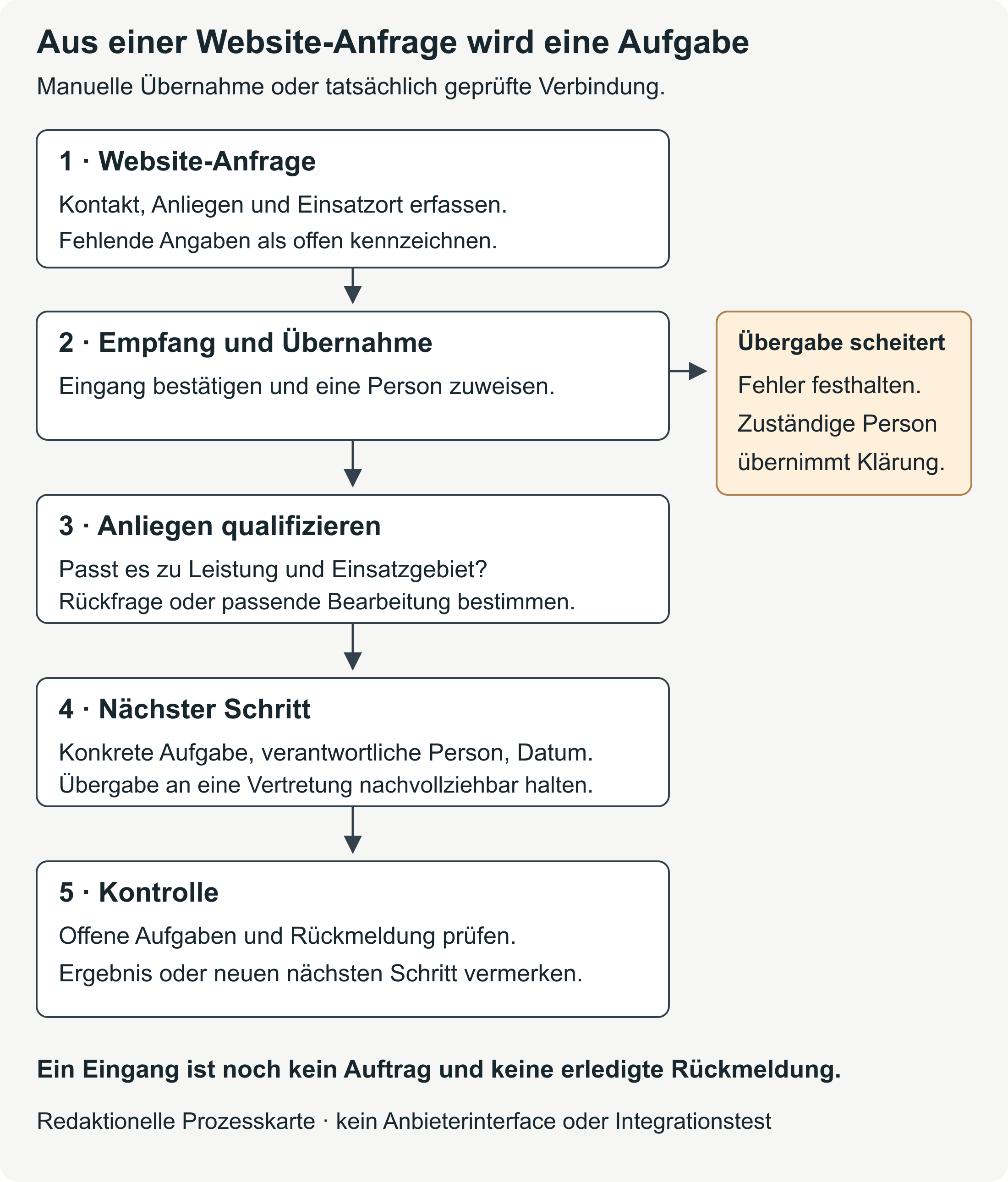
When entering an enquiry manually, the person responsible first checks whether the contact already exists. They then create a separate enquiry for the new request. The status and next task belong to this enquiry, so the current request stays clear even when one customer has several projects. [b]
An automatic transfer needs the same links. It also raises technical questions: which details are transferred? What happens if a required field is missing or the same message arrives twice? These rules vary by system and transfer method. [b] HubSpot's documentation illustrates this for imports: unique identifiers are used to match records and avoid duplicates. [3] For your website, the actual setup must demonstrate how these cases behave in a test. [b]
A confirmation on the website does not establish that the business is handling the enquiry. A test enquiry should make the whole route visible: the message arrives, is linked to the right contact and is assigned to a person with a specific next task. Assessing the enquiry includes checking whether the service and location fit, or whether clarification is needed first. Even a successful transfer with an enquiry ID is not yet a confirmed job. [b]
Keep these stages separate in reporting too. [b] In its recommended events, Google Analytics distinguishes between a submitted enquiry, a qualified lead, contact being made and a customer being won. [4] Your business records should therefore show the outcome actually reached at each stage. The source remains marked as unknown if it cannot be traced. [b]
A handover failure also needs someone responsible. They must be able to see that an enquiry arrived on the website but is missing from the task list, and investigate the cause. Whoever connects the website and customer records should be able to demonstrate both receipt and the failure case. The guide to diagnosing a website with no enquiries helps you narrow down a gap along this route. [b]
Template for a new enquiry
The handover note brings together what the next person responsible needs to know. Details of the project come from the customer's message. Your team adds responsibility and status. These internal fields therefore do not all automatically belong on the website form. [b]
| Field | Entry and purpose |
|---|---|
| Enquiry ID | [Assign a new unique identifier to this request.] |
| Customer link | [Check for an existing contact and link it; keep different requests separate.] |
| Contact and reply channel | [Include a way to reach the customer and any agreed arrangements for calling back.] |
| Service and location | [Record the requested work and the location details needed from the message; mark missing information.] |
| Receipt and channel | [Document the time of receipt and the actual channel; do not guess the source.] |
| Request and supporting record | [Summarise the request factually and link the original message where required.] |
| Status | [For example: new / clarification pending / contact made / closed; agree the meanings within the team.] |
| Person responsible | [Name one specific person responsible for the open enquiry.] |
| Next step and date | [Enter a task that can be carried out, with its planned date.] |
| Handover and check | [Confirm that someone has taken over; if the connection fails, record the error and the person responsible for it.] |
Handing the record to a second person responsible shows whether it is understandable. They should be able to find the original message and the history so far, and see which task is open. The guide to the enquiry form helps you choose the information the customer needs to provide. [b]
Spreadsheet or CRM?
A shared spreadsheet can support the workflow described. A CRM is worth considering when a feature you need is missing or the upkeep takes too much effort. The comparison below helps you define that gap more clearly. The right-hand column contains requirements for your test; the particular solution must meet them in the version and plan you intend to use. [b]
| Task | Shared spreadsheet | CRM solution: what to check |
|---|---|---|
| Customer search | Clearly named fields and filters; your team maintains the structure. | Search using contacts, property addresses and linked enquiries. |
| Customer history | Separate contact log with customer ID; documents need a clear filing system. | A combined view of conversations, notes, tasks and related documents. |
| Open tasks | Fields for status, responsibility and date; check the list regularly to keep it up to date. | Personal task view, cover arrangements and the reminders you need. |
| Collaboration | Set rules for editing and establish which file version is authoritative. | Test simultaneous editing and whether the team can trace changes. |
| Access permissions | Check file and sharing permissions against your actual needs. | Check visibility and editing permissions against people's work in the business. |
| Data transfer and export | Keep columns, IDs and links consistent. | Test importing and fully exporting every record you need. |
| Connections between systems | Manual handover or a separately configured connection; include the work involved. | Check existing integrations and how they behave when errors occur. |
| Costs | Include existing licences, setup, upkeep and any additional services. | Include the plan, users, introduction, training, connections between systems and ongoing support. |
As long as your team can carry out its tasks well with the spreadsheet and the upkeep stays manageable, it may be the right solution. If personal task views are missing, for example, or permissions do not fit people's roles in the business, you can test that exact requirement in a CRM demo. A demo is a demonstration of the software. [b]
Find earlier conversations and jobs
Customer history describes what has happened with a customer so far. A useful note shows when contact took place, who handled it and what was agreed. Include the type of contact, the subject and the outcome. Record the next task against the open enquiry as well, so it also appears in the task list. [b]
For a bathroom renovation, the first message might concern a partial renovation. The scope is discussed in more detail during the site visit, and the quote changes later. A colleague taking over the case needs the current agreement and the related version of the quote. They should not have to search every email to find them. [a]
If the customer lives somewhere other than the site of the work, keep the contact address and property address as separate details. Relevant documents and conversation notes belong with the right case. When there are several enquiries, linking them only to the customer is not enough to identify the current agreement clearly. [b]
Customer feedback should also be factual and useful for further handling. “Call back after 16:00 as agreed” describes a specific arrangement. A comment such as “difficult customer” tells a colleague covering for someone little about their task. [a]
Unique IDs keep records connected
An ID is a unique identifier for a record. During an import, these identifiers can recognise records and link them together; the HubSpot guide describes this for its own data model. [3] In your working model, customers, enquiries and jobs each receive their own numbers. Names alone are unsuitable: different people can share a name, and the same customer can enquire more than once. [b]
In the example below, K-001 remains the same customer. AN-001 identifies their first enquiry and AU-001 the job that resulted from it. A later enquiry receives a new number, such as AN-002, and also refers to K-001. This retains the earlier history without creating a second customer file. [a]
Fictional example: from enquiry to confirmed job
The bathroom renovation business below and all its contacts are entirely fictional. No real contacts are processed. Each of the roles “Office” and “Business management” represents a specific person responsible. The dates only illustrate the workflow; they are not recommendations for response or renovation times. [a]
The website enquiry is linked to customer contact K-001 and recorded as AN-001 . From receipt to confirmation of the job, the status changes; a next task stays visible at each handover.
12.10.2026 – Receipt: AN-001 has the status “New”. Responsible: Office. Next step: call back on 13.10.2026 to clarify the request and the location of the work.
13.10.2026 – Initial conversation: AN-001 has the status “Site visit arranged”. Responsible: Business management; the handover is confirmed. Next step: site visit on 16.10.2026. The outcome of the conversation and the agreed scope are recorded in the history of K-001 and AN-001.
16.10.2026 – Site visit: AN-001 has the status “Quote in preparation”. Responsible: Business management. Next step: send the quote on 20.10.2026. The documents needed are linked to the case.
20.10.2026 – Quote sent: AN-001 has the status “Quote pending”. Responsible: Office. Next step: agreed call back on 23.10.2026. The version of the quote sent has a traceable link to the case.
23.10.2026 – Follow-up question: AN-001 has the status “Clarification pending”. Responsible: Business management. Next step: reply about the requested change on 26.10.2026. The new agreement is added to the original conversation record.
27.10.2026 – Job confirmed: In this example, the customer has confirmed the job. AU-001 is linked to K-001 and AN-001. AN-001 is closed with the status “Job confirmed”. AU-001 has the status “Planning pending”. Responsible: Business management. Next step: agree the date for the work with the customer on 29.10.2026.
If the customer had declined, AN-001 would have been closed with that outcome and there would be no job AU-001. “No reply” must also remain visible as a separate status, whether the business keeps the case open or closes it under its own rules. That does not yet constitute confirmation of a job.
What needs to be visible at the next call
In this fictional example, the same customer enquires on 02.11.2027 about another service. The office finds K-001 and can see the earlier enquiry AN-001, job AU-001, the outcomes of those conversations and the versions of the quote. It creates AN-002 for the new request: status “New”, responsible: Office, next step: call back on 03.11.2027.
The new enquiry adds to the customer history. AN-001 and AU-001 keep their previous status. This case works well for a demo because a colleague covering for someone needs to find both the earlier history and the current task. In a spreadsheet, that requires records with clear links and suitable document storage. In the CRM, the relationships and views must support the workflow; automatic linking and reminders need separate tests. The Excel customer database offers a practical starting point for working with spreadsheets. [b]
Software test checklist
Use K-001, AN-001, AU-001 and AN-002 to work through a possible solution without using real contacts. Before the demo, decide which tasks your business must be able to carry out and which would simply be useful. The table turns general product promises into tasks you can observe. [b]
| Requirement | Specific demo task | What to record as the result |
|---|---|---|
| Customer search | Find K-001 using the contact details or property address; filter open enquiries in your service area. | Search method, relevant results and fields needed. |
| Customer history | Open the earlier conversation, version of the quote and job under K-001; add AN-002. | The links, date and person who handled it can be traced. |
| Tasks | Assign AN-002 to a person, set a date and hand it over to a colleague providing cover. | The open task appears for the person responsible. The handover remains traceable. |
| Export | Export customers, enquiries, jobs, tasks and history; check documents separately. | Formats, fields included, links and anything missing. |
| Permissions | Use a second test account to open and edit only the cases it is meant to access. | Permitted and blocked actions, including export. |
| Data transfer | Import fictional records with IDs; import the same contact a second time. | Record matching and the handling of duplicates or import errors. |
| Price | Request a complete quote for your number of users and the features you need. | One-off and ongoing costs, plan limits and contract terms. |
| Integrations | Transfer a fictional website enquiry; ask to see a failed handover. | Data mapping, error display, person responsible and handling of duplicate transfers. |
For each check, record the date, product version or plan, and result. Here, “Met” means the workflow you need was actually demonstrated. “Not tested” remains unresolved; a feature announced for later receives a separate note. This keeps the choice grounded in what you can already assess. [b]
Use entirely fictional data for this first test. [b] Simply replacing real names with numbers is pseudonymisation. According to the WKO glossary of GDPR terms , the data remains personal data as long as the person can still be identified. [5]
Check access and data protection
Roles within the business determine which customer data each person needs for their work. This gives you a basis for setting read and edit permissions. Separate test accounts show whether that boundary also works in the application. There must also be a defined process for revoking access when someone leaves the business. [b] Appropriate measures against unauthorised access are among the GDPR requirements. [2]
Locking a cell does not automatically prevent people from seeing its contents. Google explicitly states that sheet protection is not a security measure : protected spreadsheets can still be copied or exported. Confidentiality therefore depends on how the file is actually shared and who can see it. [6]
If an external provider processes personal data on your behalf, it acts as a processor. The WKO explains the agreement under Article 28 GDPR, which governs that processing. [5] You also need to clarify which other service providers are involved and what measures protect the data. [2]
Your selection process should therefore address storage locations and possible access, as well as suitable retention and deletion rules. A general promise of “GDPR compliance” does not replace the specific measures and agreements needed for your use. These documents should be available and reviewed before you transfer real customer data. [2] [b]
Transfer data and compare costs
When switching systems, customer records comprise more than a contact list. The data you need may also include open enquiries, tasks and conversation notes, together with the relevant attachments. A CSV export is a spreadsheet file for transferring data. What it contains depends on the export. [b] HubSpot, for example, distinguishes between record exports containing field values and associations, and separate methods for contact activities such as calls and notes. [7]
For a test migration, being able to open a file is only part of the check. It must contain the records and documents you need, still linked correctly. If the existing IDs are not retained, there must be a clear mapping to the new identifiers. A small test import shows whether the counts and relationships are correct before the rest of the records follow. [3] [b]
After the switch, decide which system is authoritative and who maintains the data. Keeping two differing customer lists in parallel over the long term creates extra coordination work. That upkeep also belongs in your decision. [b]
When comparing prices, use the same period and number of users for both solutions. To compare the same scope, include: [b]
- the licence or subscription, including any additional features needed;
- setup, data cleaning and data transfer;
- training and internal staff time;
- connections between systems, support and ongoing assistance;
- export or help with a later switch.
An existing spreadsheet licence may limit additional software costs. Setup and upkeep still take staff time. For a free CRM plan, establish whether the features you need are included and what limits apply. A complete quote for the workflow you have described gives you a basis for comparison. [b]
How to make your decision
You can keep the spreadsheet if your team can find customers and enquiries, understand the current position and reliably handle open tasks. Permissions must fit people's roles too. But if a personal task overview is repeatedly missing, or the conversation history takes too much effort to find, you have a specific requirement for the CRM test. [b]
First, the workflow needs clear responsibilities and status values everyone understands. New software cannot decide for your team who should reply or when a case counts as closed. [b]
One specific case is enough for the next step: the point where a website enquiry currently gets stuck. If that case demonstrably works in the demo and your team can take on the ongoing upkeep, you can assess the possible solution on firmer ground. [b]
Frequently asked questions about website enquiries
Does the website form need every field from the customer records?
The customer provides the information needed for initial handling. Your team adds internal responsibility, status and the next task. If the CRM requires additional fields, establish where that information will come from before connecting it. Keep missing customer details visible as missing; invented values would only make a transfer appear successful. [b]
Can an internal note simply be forwarded as a reply to the customer?
An internal conversation note serves a different purpose from a reply to a customer enquiry and may contain details that the reply does not need. The customer reply should address the specific request. Check the recipient and attachments before sending. An internal status change is not yet a response to the customer either. [b]
Sources and publication date
The following starting points explain the basic terms used. Further evidence appears alongside the relevant statement.
- Salesforce Trailhead: the meaning of CRM · What Customer Relationship Management means.
- WKO: GDPR glossary · Identifiability, pseudonymisation and processing by a processor.
- Google: protecting sheets · The distinction between protection against editing and confidentiality.
The original sources were current as of 12 October 2026. The working comparison, handover note and demo workflow are editorial aids. The example business and all contacts are entirely fictional.
Sources reflect the previous version dated 16 October 2026; editorially revised on 17 October 2026. Numbers link to sources; letters explain editorial examples or recommendations. Each note states what its source supports.
[a] Editorial examples. Content labelled as a sample or fictional illustrates possible situations. These are not real customer cases or evidence of a measured effect.
[b] Practical recommendations. The suggested workflows and decision aids are editorial applications of the principles cited. Their specific effect on enquiries or jobs has not been measured here.
Sources and context (7 sources)
- Erste Schritte mit Salesforce CRM — Salesforce Trailhead
Supports the definition of CRM as Customer Relationship Management and the tracking of interactions; also describes records and relationships in the Salesforce data model. The distinction between customer, enquiry and job in this article is an editorial working model. It does not mean that all CRM products have identical objects, plans or automated workflows. No product recommendation or measured effect. Checked: 2026-10-16.
- Regulation (EU) 2016/679: General Data Protection Regulation — European Union, Official Journal on EUR-Lex
Articles 5 and 6 concern purpose, storage limitation and lawfulness; Article 28 governs processing on behalf of a controller and the use of further processors, and Article 32 appropriate safeguards. The related selection and testing steps in this article are practical recommendations. No full legal assessment of a business, specific retention period or product compliance confirmation is provided. The HTML sections were read, rather than a complete PDF commentary. Checked: 2026-10-16.
- Format import files — HubSpot Knowledge Base
Documents required properties in HubSpot, unique identifiers for updating records or avoiding duplicates, and associations between records and activities. This cannot be applied to any website connection without checking; import mode and object type affect the behaviour. The article's advice on test cases and IDs is editorial. No live connection, plan or import was tested. Checked: 2026-10-16.
- [GA4] Recommended events — Google Analytics Help
Documents the separate recommended events generate_lead, qualify_lead, working_lead and close_convert_lead. Reading the guide or using a CRM does not itself set these up. It does not establish delivery, data protection compliance, correct counting, attribution or increased conversions for a particular business. The business results overview is an editorial recommendation. Checked: 2026-10-16.
- Begriffserklärungen zur DSGVO — Wirtschaftskammer Österreich, DSGVO4KMU
Explains identifiability, pseudonymisation, processors and data processing agreements. Pseudonymised data remains personal data; only entirely fictional test data is used here. The classification of a particular provider and its legal suitability are not assessed. The GDPR text, read directly, is also used as a legal source. Checked: 2026-10-16.
- Tabellenblätter schützen, ausblenden und bearbeiten — Google Docs Editors Help
Google explicitly states that sheet and cell protection is not a security measure and that protected spreadsheets can still be copied or exported. This concerns protection against editing in Google Sheets. The reader's actual file sharing, licence and user permissions have not been checked. Checked: 2026-10-16.
- Export your records — HubSpot Knowledge Base
Documents exports of current property values and associations in HubSpot, and points to separate export methods for contact activities such as calls and notes. A contact or record export therefore does not prove that all content has been backed up. Attachments, version history and the completeness of a real migration were not tested. No claim is made that every CRM system has a universal export function. Checked: 2026-10-16.