Create a job sheet: a template for trades businesses
Reading time: about 5 minutes for the main text. Use templates and details as needed.
Full version with templates, calculations and further checks
A job sheet records which work has been agreed and what still needs to be clarified, so the office and team can refer to it. The blank template with 20 fields and the change sheet can be copied. To start, take one record and work through it with the team carrying out the work.
The scope may already be agreed while the dates are still open. If a request for different tiles comes in later, it must remain distinct from what was previously agreed. The fictional bathroom renovation below shows how to keep these details together. BrandHoop's template helps with internal organisation; it is neither a universal contract template nor a finished job confirmation ready to send to customers.
First, clarify what has actually been agreed
An enquiry initially describes a proposed project and outstanding questions. A quotation sets out the proposed work and terms. The internal job sheet then records the scope actually agreed, so the team can work with it. You can create the sheet earlier, provided the status says something like "Enquiry being clarified". [b]
A reference to the original message helps when handing work over in the office. It contains the proposed project and the questions that still need answers. A website enquiry form captures this first contact. In the later job sheet, the team needs to be able to find what was actually agreed. [b]
An internal status does not replace the actual agreement. Under §861 ABGB, a contract is formed through an offer and valid acceptance; ongoing negotiations alone do not form a contract. In Austria, agreements are generally not subject to a prescribed form, so they can also be made verbally. Statutory or agreed requirements as to form must still be observed. A signature is therefore not a general requirement for every job. [2] [1]
For your sheet, this means referring to the relevant quotation version and the documented confirmation. Verbal agreements also belong in the documentation. A missing signature alone does not turn an agreement into an unresolved enquiry. The job sheet documents what your business has recorded about it. [2] [1]
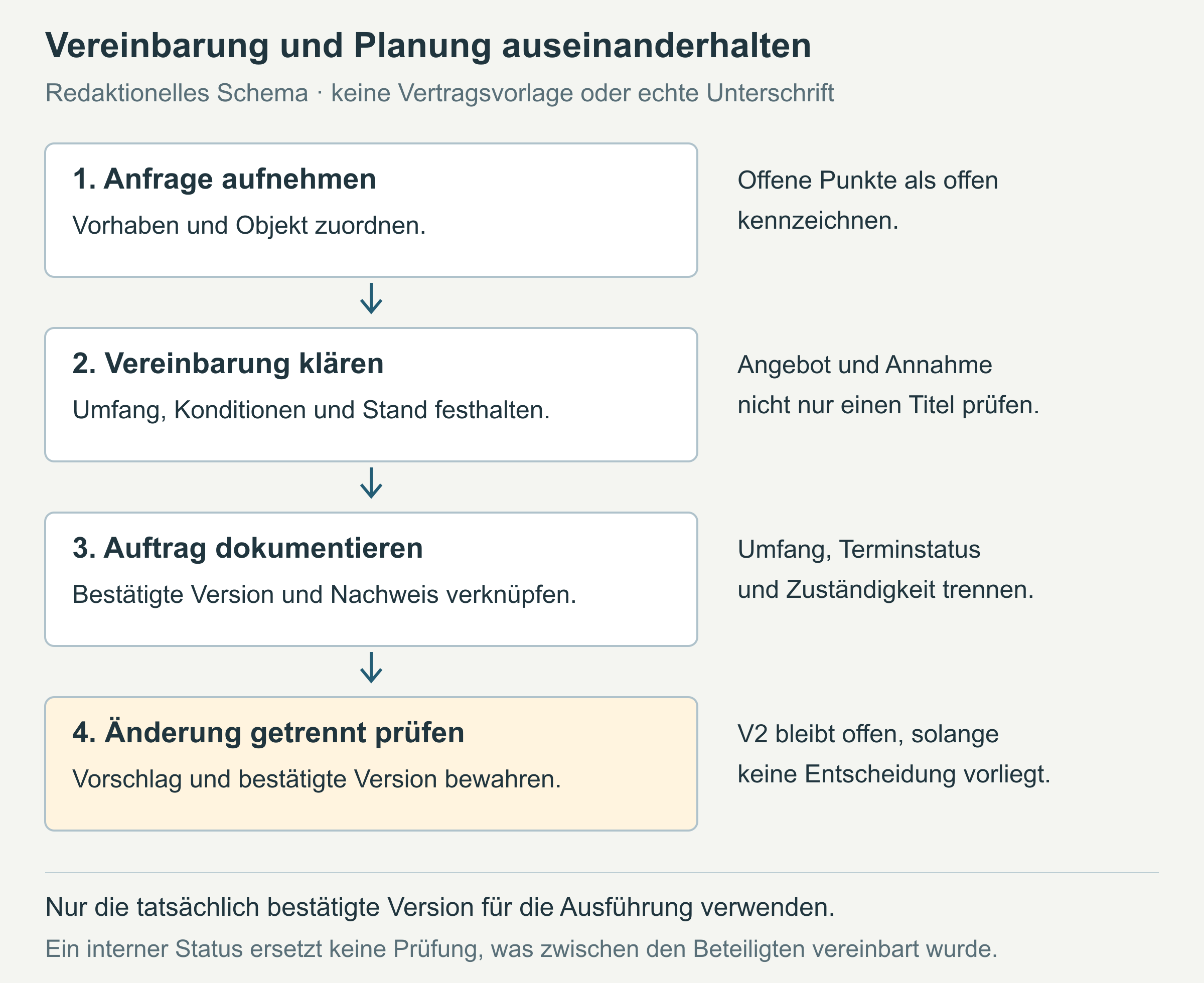
Our own workflow illustration, with no real customers or signatures. The form documents the current position; unconfirmed dates and change requests remain explicitly unresolved. [c]
Use the template to create a record
Copy the complete template into an editable document. Use it to create one record for one site. An ID is a unique identifier that helps you find the right record again: the job ID identifies the record, and the site ID identifies the location of the work. The customer ID links sheets belonging to the same customer. If there are several work locations, each site gets its own sheet; the customer's address or billing address may differ from the work location. [b]
Include a description of the work location that lets the team identify the right site. The fictional entry here reads "Example site Alpha, upstairs bathroom; entirely fictional work location". The identifier F-O001 therefore leads to the bathroom. Customer ID F-K001 alone would not show which site the recorded work belongs to. [a]
Start with the confirmed quotation and read through the agreed work. Describe any work that is explicitly excluded as well. A version number is of little use if nobody can find the content it refers to. Mark missing information as "unresolved".
Add further fields where the work on site calls for them. These might include material notes or details of key handover. Photos and plans can be linked as attachments. A reference then leads to the right document without copying all its contents into the job sheet. [b]
The following extract from the completed example shows these links. All identifiers, roles, documents and dates are invented; there are no real customer or contact details. The planning information is current as of 12.10.2026. [a]
| Field | Fictional entry |
|---|---|
| Job ID | F-A2026-001 |
| Customer ID | F-K001 |
| Site ID | F-O001 |
| Quotation or schedule of work: number, date, version | Sample quotation F-AN001 dated 05.10.2026, version V1 |
| Confirmed scope of work | Remove the old washbasin unit, adjust pipework as shown in sample plan F-P01, fit the new washbasin unit, replace wall tiles in the agreed area |
| Work explicitly excluded / scope boundaries | Electrical work and work in the separate WC; no extension to other rooms |
| Current confirmed scope version | V1; proposed V2 not yet confirmed |
| Confirmation: content, date, parties involved, document reference | Example customer K01 confirms the scope of F-AN001 V1 on 09.10.2026; fictional supporting record F-FR001 |
The fully completed bathroom renovation job sheet also includes the remaining fields. This extract does not replace the full sheet.
The different dates show how the record developed: the sample quotation is dated 05.10.2026, and the scope was confirmed on 09.10.2026. The office recorded the job on 12.10.2026. These dates describe different steps. Quotation version V1 and supporting record F-FR001 relate to the confirmed scope. A colleague should be able to follow these references to the relevant documents. [a]
Record scheduling and job status separately
In the example, the period from 20.10.2026 to 23.10.2026 is planned but has not yet been agreed. It still needs to be coordinated with the customer and team. The job status therefore reads "In planning; scope V1 confirmed, dates unresolved". Confirming the scope of work does not turn a planned period into confirmed dates. [a]
The last-updated field also helps a colleague covering the work understand the record. In the example it reads "12.10.2026 / Office role B1". This shows when the information was recorded and who entered it. That date answers a different question from the planned start of work, so it belongs in its own field. [a]
Distinguish between requested, planned and confirmed dates. The recording date only tells you when the sheet was created. Job status answers a separate question too: in this working aid, "In progress" means that work is under way. "Work reported" records that feedback has been received and the team is checking outstanding points. It does not yet mean that all the agreed work has actually been carried out. The full internal status definitions help everyone use the same terms. [b]
The team needs more than a status for the next task. A short entry from the original example reads: "Check material availability – Role P1 – 13.10.2026". It names the task, the person responsible and the due date. With "Contact customer", responsibility and the date remain unclear. A colleague taking over the record must also be able to see who is handling it. [a]
Record the tile request as a pending change
The example customer wants a different wall tile format in the area already agreed. Change sheet Ä01, dated 12.10.2026, records this for job F-A2026-001 and site F-O001. V1 remains the confirmed scope; V2 is proposed and has not yet been confirmed. Material availability and the work needed to make the change must be checked. The effects on costs and timing remain unresolved. [a]
The corresponding status on the change sheet reads "Awaiting clarification; no confirmation of V2 documented". The original job is in planning at the same time. These statuses are consistent: the unresolved effects concern the new tile request, while the previously confirmed scope remains clear. If only the version number were overwritten, the team might read the proposal as the confirmed position. [a]
"Different tiles" leaves it unclear which material and area are meant. Use the change sheet to describe the request for the right site and record the decision still to be made. In this example, confirmation for the bathroom does not include work in the separate WC.
If a quotation covers several sites, each sheet needs a reference to the relevant quotation items. A shared project overview can link the job IDs. Each individual sheet still specifies exactly which work belongs to that site. This keeps the relationship clear across several work locations. [b]
The next task in the example is to check the effects, obtain a decision and document it. Project lead role P1 is responsible, with a due date of 13.10.2026. The affected details are only updated once the decision has been documented. The completed change sheet shows the full entry. [a]
Review the sheet with your team and keep it up to date
Ask the office and the team carrying out the work to read the example independently. Both should identify the same scope, recognise that the planned dates are unresolved and refer the tile request for review. Different answers show which wording or reference is still missing. You can then try the template with one of your own records. [b]
When trying it with your own record, include opening the attachments it refers to. In the fictional example these are labelled F-P01 and F-FR001; the documents are not attached as actual files. A correct identifier in the text is of little use at handover if the team cannot find the file. Outdated versions should remain distinguishable from the current confirmed version when someone reads the record. [b]
An editable document can be used for individual jobs, with a spreadsheet providing an overview and links to the detailed sheets. A PDF captures a particular version. The editable file is still needed for later changes. Choose a fixed storage location and appoint someone to enter changes.
Word or Google Docs suit an individual detailed sheet. Alongside it, Excel or Google Sheets can hold one record per row. When trying new software, use the same example as a test: can the team find the right site and the confirmed version? Include the required access permissions in the test too. The number of jobs alone does not determine which tool suits your business. [b]
Limit personal information to the specified purpose and what is necessary. These principles are called purpose limitation and data minimisation. [3] [4] A reference to the customer record can avoid unnecessary copies. The team on site still needs the contact and site information required for the work. The customer overview for small businesses explains the link between a customer and individual records. [b]
Editorial version dated 16.10.2026. Numbers link to sources; letters explain editorial examples or recommendations. Each note states what the source supports.
[b] Practical recommendations. The proposed processes and decision aids are editorial applications of the cited principles. Their specific effect on enquiries or jobs has not been measured here.
[c] Editorial illustration. The illustration explains a relationship. It is neither a real customer reference nor evidence of a measured effect.
[a] Editorial examples. Content labelled as a sample or fictional illustrates possible situations. It does not describe real customer cases or provide evidence of a measured effect.
Sources and context (4 sources)
- Form von Rechtsgeschäften — Wirtschaftskammer Österreich
WKO information on the general freedom from prescribed form, including verbal legal transactions, and on statutory or agreed requirements as to form. It does not confirm the validity of a specific job agreement, a general requirement for signatures or the completeness of our template. Checked: 2026-10-16.
- ABGB § 861: Abschließung des Vertrages — Rechtsinformationssystem des Bundes (RIS)
Statutory text on mutual consent, a promise and valid acceptance; ongoing negotiations alone do not form a contract. The conclusion that an internal status cannot replace the parties' actual statements is an editorial interpretation limited to this template. It does not provide a full assessment of any specific consumer contract. Checked: 2026-10-16.
- DSGVO: Artikel 5, Grundsätze für die Verarbeitung personenbezogener Daten — European Union / EUR-Lex
Article 5(1)(b) and (c) establish purpose limitation and data minimisation. Referring to a linked customer record is our own organisational recommendation; the document does not thereby declare all of a business's data processing lawful. Checked: 2026-10-16.
- Datenschutzgrundsätze im Überblick — Wirtschaftskammer Österreich
Primary WKO information for businesses, dated 08.10.2026. The sections read explain the GDPR principles of purpose limitation and data minimisation. They do not establish a specific statutory list of fields, validate this particular job sheet template or identify a suitable software product. Checked: 2026-10-16.