Project status report: template for ongoing trades jobs
Reading time: about 5 minutes for the main text. Use templates and details as needed.
Full version with templates, calculations and further checks
“Materials are missing” explains why work on site has stalled. But it leaves the next working day unclear: who will check the delivery, and which work depends on it? A useful project status report connects the current position with that next step. Every open point needs a person responsible and a deadline for resolving it. [b]
A text document or spreadsheet is enough. Start with one ongoing job and the supporting records you already have. Keep unresolved points visible. Where information is missing, record the next step needed to obtain it.
Set up the report for one job
First enter the job ID and the reporting cut-off, meaning the date and time to which the reported status applies. Add the reporting period, version and person responsible for the update. The confirmed scope of work, together with the plan version, defines which tasks belong in the overview. Record the agreed completion date separately from the current date forecast. [b]
The cut-off is a snapshot. The reporting period defines which work you list as newly completed in this report. The version number helps distinguish one report from another. Information received later may call for an update; keep the earlier version for comparison. [b]
The overall status in the report header needs an explanation. “At risk” alone leaves the reader wondering what threatens the date and which work is affected. Describe the cause and its effect together. The task rows can then show the planned action or enquiry. [b]
Give each task a row below the header. You can copy this extract from the template:
| Task / Status | Plan and actual | Evidence or outstanding prerequisite | Next step / Person responsible / Deadline |
|---|---|---|---|
| [Work] / [Status] | [Original plan; actual work carried out or conditional forecast] | [Inspection note, photo, report or missing prerequisite] | [Specific action; person; date/time] |
Replace the square brackets with your own information. The evidence column points to the relevant record for the job. The last column describes the action needed next. This keeps a missing document connected to the person who needs to obtain or complete it. [b]
The full report template to copy also includes outstanding decisions and changes to the scope. Before sharing the report, decide who needs which information. The European Commission’s PM² training materials recommend sharing project information to suit the recipient and the time when it is needed. [1]
The team mainly needs to know the prerequisites for the next piece of work. The client wants to understand the current position and possible effects on dates, and see where their response is still needed. A detailed daily note can record a single event. The report explains what that event means for the rest of the job. [b]
Record the actual task status
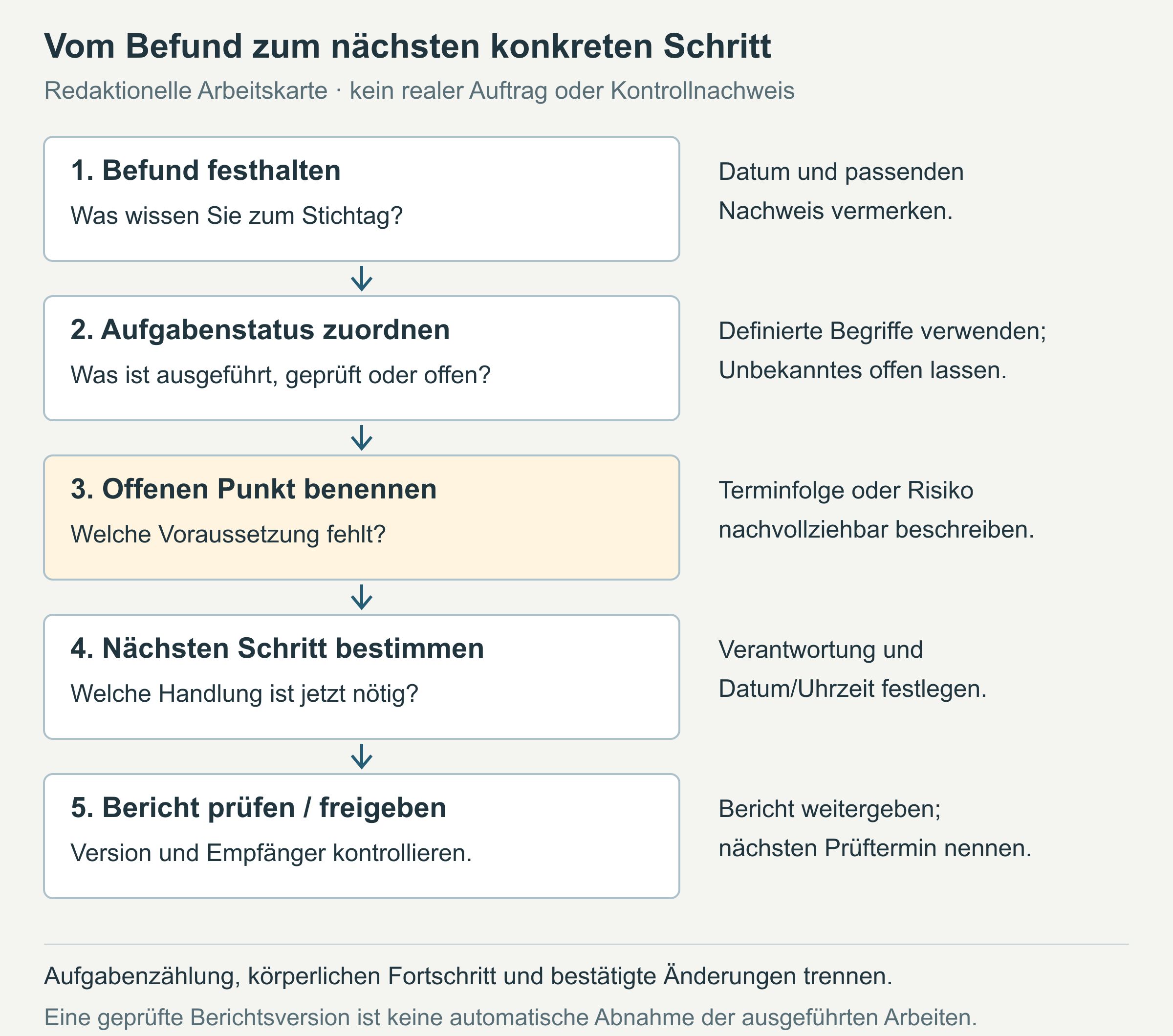
Use the same status terms in every report. In this template, Planned means an agreed task has not yet started. In progress describes work that is under way but not yet complete. Under review applies to a task reported as carried out while the agreed check or documentation is still missing. [b]
Waiting means a prerequisite is blocking the start or continuation of work. Name that obstacle. Complete applies to a defined work step only once it has been carried out, checked against the agreed internal criteria and documented. Any agreed handover or acceptance is documented separately. [b]
A photo shows a visible condition; whether it is sufficient evidence depends on the agreed check. If information is missing, explicitly mark it as “open” or “unknown”. Add who will clarify it and by when. A task marked “In progress” can still be running late. That effect on dates needs its own explanation.
The new status alone is not enough for comparison with the previous report. Record what has changed since then and what supports that change. Include a delay and its effect on the next step in the overview, even if the work itself is continuing. [b]
In the example: a delivery blocks the next step
All details, roles and supporting records in the MUSTER-BAD-026 case are fictional. The dates illustrate the report; they do not prescribe how long the technical work on a bathroom renovation should take. [a]
The report header names this version “Status report 2”. Its overall status is “Completion date at risk”, because the planned tile delivery date will be missed and the replacement date is still unconfirmed. This explanation applies at the reporting cut-off; it does not claim that a new completion date has been confirmed. [a]
At the cut-off of 12.10.2026, 16:00, the job comprises six defined tasks under the plan dated 02.10.2026. Two are complete. The following extract shows the two work steps that are immediately outstanding:
| Task / Status | Plan and actual or forecast | Evidence or obstacle | Next step / Person responsible |
|---|---|---|---|
| 3. Substrate/waterproofing / Under review | Plan: 12.10.; reported as carried out on 12.10. | Inspection note still outstanding; therefore not counted as complete | Responsible trade adds the inspection note by 13.10., 15:00 |
| 4. Tiling / Waiting | Plan: 14.–16.10.; forecast: 16.–20.10.2026, conditional | Materials missing; delivery date of 15.10. still unconfirmed; task 3 must have been checked | Job lead clarifies delivery arrangements by 13.10., 12:00 |
This makes clear what is missing before tiling can start. Delivery alone is not enough; task 3 must also have been checked. The full task overview shows the later steps that depend on them. [a]
For each of the two completed tasks, the example names supporting evidence: fictional photos and an internal check note dated 06.10. for the strip-out, and a fictional test report with the updated installation plan dated 08.10. for the pipework. The inspection note for substrate/waterproofing is still missing. The work reported as carried out therefore remains visible in the report without being counted as complete yet. [a]
The overall position is: 2 complete, 1 under review, 1 waiting, 2 planned. That makes 6 tasks in total. This count describes task status, rather than a weighted measure of physical construction progress. Individual tasks can involve different amounts of work. During the reporting period 07.–12.10.2026, only the pipework was newly completed, on 08.10.; the strip-out of 06.10. belongs to the earlier overall position. [a]
Keep plan, actual and forecast separate
The plan records what was agreed. Actual records describe what demonstrably happened. A forecast estimates what comes next, subject to stated prerequisites. Keep the original plan visible when adding a new estimate. [b]
For the pipework, both the planned and actual dates in the example are 08.10.2026. Substrate/waterproofing was planned for 12.10. and reported as carried out on that day. The outstanding inspection remains visible alongside it. A date when work was carried out does not replace the missing inspection note. [a]
In the example, delivery information dated 12.10. states that the original delivery date of 13.10. will be missed. The replacement date of 15.10. is still unconfirmed. If delivery and inspection are confirmed in time, tiling is expected to start on 16.10. This gives the example its conditional completion forecast of 23.10.2026. The agreed date remains 21.10.2026; a new completion date has not been confirmed. [a]
The effect on dates extends beyond the tiling. The original plan of 19.–20.10. remains visible for the final sanitary fitting installation, alongside the conditional forecast of 21.–22.10.2026. The plumber will confirm attendance only once the prerequisites have been clarified. The joint walkthrough with a snagging list is planned for 21.10. and conditionally forecast for 23.10. in the example. It depends on tasks 3–5. [a]
If the supplier gives different delivery information, the job lead reviews the schedule again. The detailed separation of fact and forecast records the conditions. If a new date is later confirmed, the report needs the confirmation date and a reference to the decision.
Check and follow up the next step
At the next update, check the open points against the responses and supporting records received. Change a status only when the defined criteria have been met. If the information is still missing, the point stays open. In the example, the job lead is responsible for the next update on 13.10.2026 at 16:00. [a]
The example also lacks confirmation of the grout colour. The client is asked to respond by 13.10.2026, 12:00. The job lead checks whether a missing decision would create an additional obstacle to the next step. Here too, the report shows which answer is missing and who will assess its effect on the job. [a]
And keep change requests separate from the confirmed scope. The heated towel rail requested in the example has not yet been approved, so it is not one of the six tasks. The outstanding decisions in the example show who is responsible for each one. The internal job form helps keep the confirmed scope and the change request in their proper place.
The heated towel rail was requested on 09.10. By 14.10., 12:00, the job lead prepares a decision on its scope and effects on dates. If additional work is agreed, a new plan version records the change. This explains why the task base has changed; it does not retrospectively expand the previous total of six tasks. [a]
Before sharing the report, check that every open point has a next action, a person responsible and a deadline. Check the task base and reporting period, and keep the previous report version. If a critical delay arises, inform the person affected as soon as a decision is needed. Waiting for the regular report date would postpone the necessary clarification. [b]
Sources for the previous version checked on 16.10.2026; editorially revised on 17.10.2026. Numbers link to sources; letters explain editorial examples or recommendations. Each note states what the source supports.
[b] Practical recommendations. The suggested processes and decision aids are editorial applications of the principles cited. Their specific effect on enquiries or jobs has not been measured here.
[a] Editorial examples. Content labelled as a sample or fictional illustrates possible situations. These are not real client cases or evidence of a measured effect.
Sources and context (4 sources)
- Introduction to PM²: Project Reporting and Information Distribution — European Commission, Centre of Excellence in PM²
The 2018 training slides explain the purpose of project reporting and how it relates to recipients. They do not substantiate construction processes or the legal effects of a report for a trades job. The sections named here were read, rather than all the slides or the complete current PM² Guide. Checked: 2026-10-16.
- PM² Project Management — European Commission, Directorate-General for Digital Services
The official overview describes PM² as an adaptable project management method. This does not establish a mandatory report format in Austria or validate the professional suitability of our own short template. No promises of success have been taken from the page. Checked: 2026-10-16.
- PM² Artefacts — European Commission, Directorate-General for Digital Services
The HTML page read lists the reporting, change and acceptance templates named here separately. The complete artefacts PDF was not read because it exceeded the web reader’s size limit. The list does not establish any legal effects of acceptance or any mandatory fields for our own template. Checked: 2026-10-16.
- What is CRM (customer relationship management)? — Microsoft
Used only for the brief definition of CRM software as support for customer management and customer relationships. The vendor’s page is not an independent study of benefits; no specific features, automation or product suitability are claimed or recommended here. Checked: 2026-10-16.