Create a revenue report: orders, invoices and payments at a glance
Reading time: about 5 minutes for the main text. Use templates and details as needed.
Full version with templates, calculations and further checks
Money arrives in your account, but some of it relates to work from the previous month. For a useful revenue report, each figure needs its own place. Separate newly confirmed business from work performed and money actually received. You can then trace what lies behind a monthly total. [b]
The Excel template below demonstrates this with fictional events for August and September 2026. You can use it to prepare an internal monthly overview and flag unresolved data questions. It does not produce a complete set of accounts or calculate profit for tax purposes. [a]
First, define what each figure means
Net means excluding value added tax (VAT), and gross means including VAT. [1] State this directly beside each metric.
For management revenue in this template, work that has been performed and confirmed counts once, at its net value and on the date it was performed. Later invoices or payments do not increase it. Revenue adjustments belong to the month of the adjustment; earlier monthly reports remain unchanged. [a]
These definitions must stay the same when comparing two months. If you use work performed as revenue in one month and receipts in the next, the meaning of the figure itself changes. Record the counting rule you have chosen in the report, along with how you handle later adjustments. [b]
The other metrics each have their own sources:
| Metric in the template | What counts in the month |
|---|---|
| Net order intake | Newly confirmed orders less recorded order cancellations |
| Net invoice volume | Invoices issued, including advance invoices, less credit notes; the invoice date determines the month |
| Gross customer transaction balance | Actual customer receipts less refunds |
Adding these figures together does not produce a meaningful total. Some of them describe the same event. Subtracting the allocated costs for the same period from management revenue gives the template's simplified management result. This is not profit for tax or commercial accounting purposes. [a]
As the WKO explains, Austrian income and expenditure accounting (Einnahmen-Ausgaben-Rechnung) generally follows the cash flow principle, subject to exceptions. The internal counting rule used here does not determine your tax accounting method. [2]
Download and open the Excel template
Download the sample report as an XLSX file
Save your own copy. The sheet 'Monatsbericht' (Monthly report) contains the two months; 'Daten' (Data) contains the 27 fictional events. The formulas use data rows 6–32. If you add rows, you must extend every related formula range and check. The table retains the technical name 'FiktiveBelege' (Fictional records) and its column identifiers: 'Datum' (Date), 'Art' (Type), 'Bezug' (Reference), 'Netto EUR' (Net EUR), 'USt EUR' (VAT EUR), 'Brutto EUR' (Gross EUR), 'Beschreibung' (Description) and 'Datenprüfung' (Data check). The workbook notes explain its scope. [a]
To get started, find the entries for invoice R01 in the 'Daten' (Data) sheet. The invoice and payments appear as separate events. The first payment, Z01, and the later payment, Z02, both relate to R01. Their unique numbers help you allocate each payment exactly once. In 'Monatsbericht' (Monthly report), you can then see the month in which each transaction is included. [a]
Changing a part payment in the workbook affects the payment balance and outstanding invoice balance. Management revenue already confirmed is unaffected. You can also copy the tables on this page, although they do not calculate automatically here. [a]
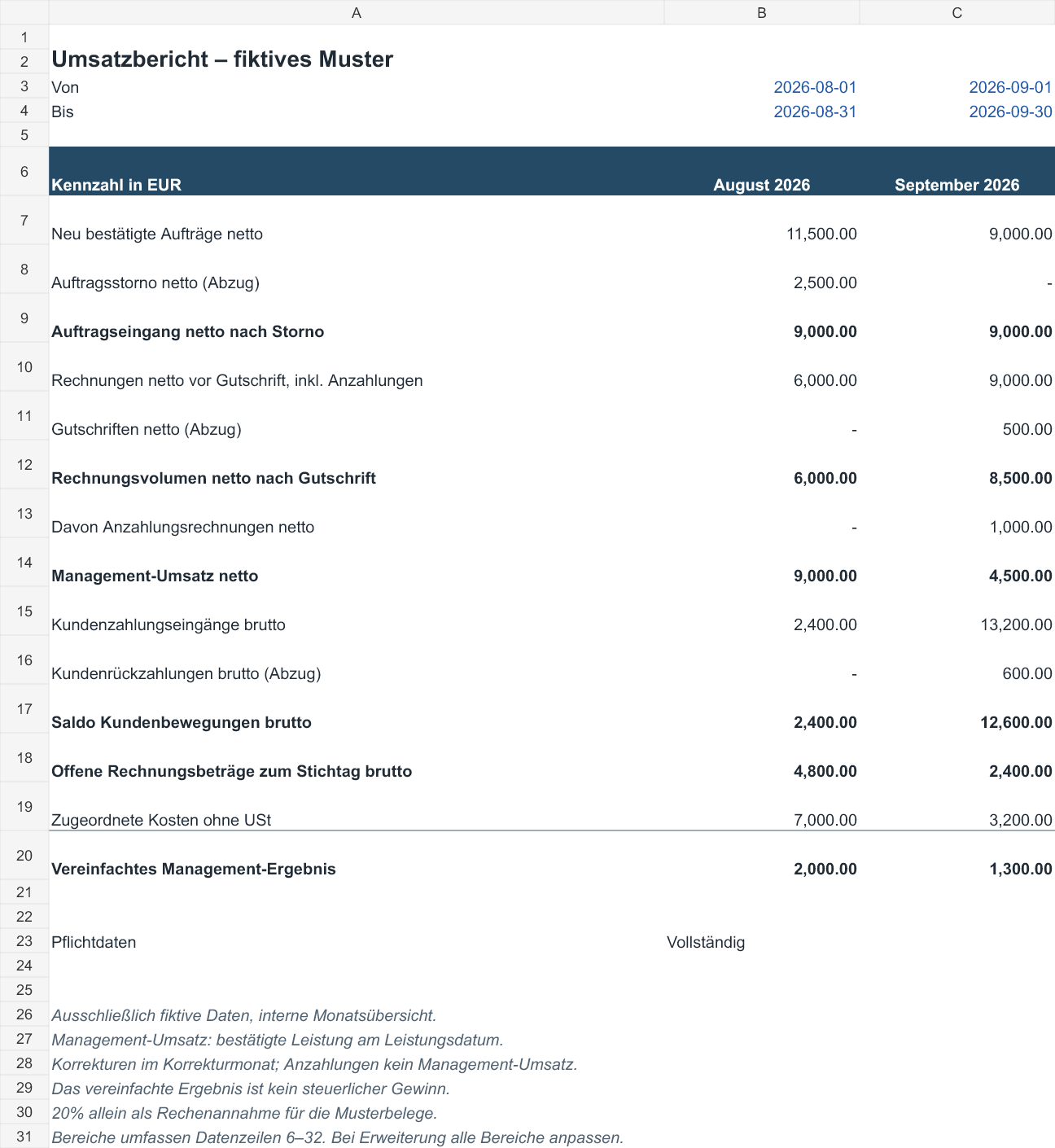
August and September 2026 in the example
All example figures are invented. They do not show market prices or the results of a real business. The assumed 20 per cent VAT applies only to this calculation exercise and does not confirm a tax rate for any particular service. [a]
| Metric in EUR | August 2026 | September 2026 |
|---|---|---|
| Net order intake after cancellations | 9 000.00 | 9 000.00 |
| Net invoice volume after credit notes | 6 000.00 | 8 500.00 |
| Net management revenue | 9 000.00 | 4 500.00 |
| Gross customer transaction balance | 2 400.00 | 12 600.00 |
| Gross outstanding invoice amounts at month end | 4 800.00 | 2 400.00 |
| Allocated costs excluding VAT | 7 000.00 | 3 200.00 |
| Simplified management result | 2 000.00 | 1 300.00 |
The costs in the template belong to the month being reported. Their payment dates are not analysed here. In August, EUR 9,000.00 in management revenue less EUR 7,000.00 in costs gives a simplified result of EUR 2,000.00. For September, the calculation is 4,500.00 − 3,200.00 = EUR 1,300.00. This exercise does not confirm whether a real business has recorded all its costs and allocated them correctly. [a]
For sample order A02, the work and invoice fall in different months. The work performed on 28.08.2026 counts towards August management revenue at EUR 3,000.00 net. Invoice R02 is not issued until 02.09.2026, so it counts towards September invoice volume. The receipt, in turn, belongs in the payment overview. [a]
September management revenue includes confirmed work A04 at EUR 5,000.00 net, less revenue adjustment G01 of EUR 500.00 net. Invoice R02, issued in September, still relates to work performed in August. Invoice volume can therefore rise while less management revenue is recorded under the template's fixed rule. [a]
A03, worth EUR 2,500.00 net, has already been deducted from August order intake: the order was cancelled before any work, invoice or payment. September advance invoice R04 for EUR 1,000.00 net belongs in invoice volume. The work for A05 has not yet been performed, so it generates no management revenue in the template. [a]
Payment Z05, received on 15.09.2026 for EUR 1,200.00 gross, relates to advance invoice R04. It appears as a customer payment. Even when the work is recorded later, the advance does not become additional new work; it remains allocated to the original order. [a]
September's higher payments include settlement for earlier work. At the same time, management revenue falls by 50 per cent. [a] Two months do not explain a seasonal effect or the effect of advertising. If revenue in the previous period was zero, no meaningful percentage growth rate can be calculated. [b] The full worked example shows all the related lists.
Check an invoice with part payments and a credit note
Invoice R01 relates to work A01, confirmed on 20.08.2026 at EUR 6,000.00 net. The invoice dated 21.08.2026 is for EUR 7,200.00 gross. An initial EUR 2,400.00 is received on 25.08.2026, followed by EUR 4,800.00 on 10.09.2026. Together, the two payments settle the same invoice. Each is recorded once; the value of the work counts as management revenue once. [a]
G01 follows on 25.09.2026: a discount of EUR 500.00 net, or EUR 600.00 gross. In the template, it reduces both September invoice volume and September management revenue. The refund on 26.09.2026 is recorded separately as −EUR 600.00 gross. R01 is settled after the credit note and refund. The September outstanding balance of EUR 2,400.00 gross relates entirely to R03. [a]
To check the full September balance, use the outstanding August balance as your opening figure. At the end of August, EUR 4,800.00 gross was still outstanding on R01. This remainder therefore belongs in the September reconciliation. Add new invoices at their gross amounts, then deduct credit notes and payments received. Add refunds back. For the events in this template, the calculation is: [a]
4,800.00 + 10,800.00 − 600.00 − 13,200.00 + 600.00 = EUR 2,400.00 gross. [a]
The final EUR 600.00 has a plus sign in the reconciliation because the credit note has already reduced the outstanding balance. The refund relates to that adjustment. The EUR 13,200.00 in customer receipts and EUR 600.00 in refunds also remain visible as separate transactions; their payment balance is EUR 12,600.00 gross. [a]
This check applies to the events in the template. Any other change in the invoice balance also needs a supporting document so that the reconciliation remains traceable. [b]
The detailed reconciliation with formulas takes you from the opening balance through each transaction to the closing balance. Unresolved overpayments and customer credit balances remain separately visible. [b]
Build and check your own monthly report
A clearly defined period is enough for your first report. Record the currency and the date to which the data is current. For outstanding invoices, include the opening balance and older documents that have not yet been paid in full. Unique IDs, meaning individual reference numbers, connect orders and work performed to the documents. Each payment also needs its own ID. [b]
Linking IDs is particularly important for part payments. If you enter the full invoice amount again for each payment, calculated invoice volume grows with the number of payments. In your report, keep the invoice as one document, with its individual payments and outstanding remainder shown beneath it. To record confirmed orders, use the order form. [b]
Before adding up the figures, check for missing amounts and duplicate IDs. Unknown document references and inconsistent dates also need clarification. An empty field is not a confirmed zero amount. A missing work date may mean that evidence is missing; 'not yet performed' must remain identifiable. And estimated costs need to be marked. If significant costs are missing, the result remains unresolved. [b]
A total of zero does not prove that the underlying data is complete. A missing event can be invisible in the total. Include unresolved data questions and remaining differences in the report before using the figures to make decisions. [b]
The file displays 'Check' for missing required amounts and duplicate event IDs. It cannot detect an event that is entirely absent from an export. Compare the entries with your original lists. In the reconciliation, net plus VAT must equal gross, and part payments must reconcile to the outstanding remainder. The guide to creating your own report takes you through these checks. [a]
The customer transaction balance still covers customer money only. It is not a complete cash flow statement showing all money entering and leaving the business. Supplier payments and loan transactions are absent here. [a] Once an outstanding invoice amount has been reconciled, you can use the payment reminder template. [b]
Editorial version dated 16.10.2026. Numbers lead to sources; letters explain editorial examples or recommendations. Each source note states what the source supports.
[b] Practical recommendations. The suggested processes and decision aids are editorial applications of the principles cited. Their specific effect on enquiries or orders has not been measured here.
[a] Editorial examples. Content described as a sample or fictional illustrates possible situations. It does not represent real client cases or evidence of a measured effect.
Sources and context (3 sources)
- Einnahmen-Ausgaben-Rechnung — Unternehmensserviceportal (USP); content responsibility: Federal Ministry of Finance
Confirms the general basis of actual cash flows, subject to exceptions, and that gross includes VAT while net excludes it. This does not confirm that the 20 per cent assumed in the template is the tax rate for any particular service. Checked: 2026-10-16.
- Das Geldflussprinzip in der Einnahmen-Ausgaben-Rechnung — Wirtschaftskammer Österreich (WKO)
Confirms the general cash receipts and payments principle for income and expenditure accounting for tax purposes, and its exceptions. Does not establish an individual method of calculating profit, any management metric or any figures in the fictional workbook. Checked: 2026-10-16.
- Steuerliche Gewinnermittlung — Unternehmensserviceportal (USP); content responsibility: Federal Ministry of Justice and Federal Ministry of Finance
Confirms different methods of calculating profit and the record-keeping requirements that depend on them. This overview does not establish the tax treatment of the reader's business or confirm the simplified management result. Checked: 2026-10-16.