Full version with all templates and detailed checks. Back to the main article
Create a revenue report: orders, invoices and payments at a glance
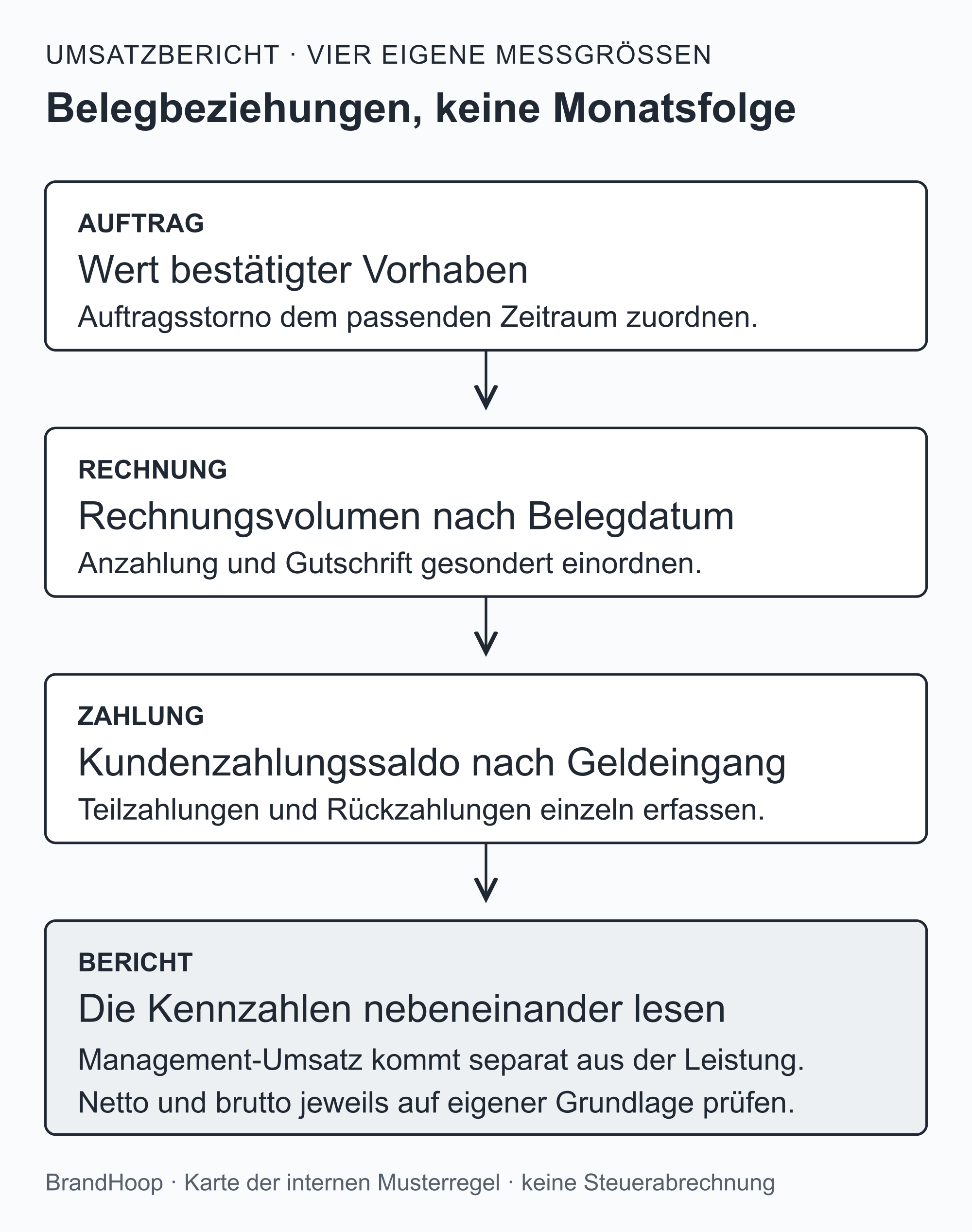
At month end, you want to see which orders came in, which invoices you issued and how much money arrived. A revenue report can answer these questions side by side. Keep the figures separate, even when they relate to the same order. Individual IDs, or unique numbers, make the connection between an order, a document and a payment traceable. [b]
You need a fixed rule for what counts as revenue. In this template, confirmed work counts once at its net value on the date performed. A later invoice or payment generates no additional management revenue. The same work can therefore appear in the report before the invoice is written or the money received. [a]
The fictional report for August and September 2026 demonstrates this through 27 events. You can copy the tables or download the Excel file. It provides an internal overview with a simplified management result. It does not calculate profit for tax purposes. [a]
What belongs in a revenue report?
A metric answers a specific question about your business. Net means excluding value added tax (VAT), and gross means including VAT. [1] To keep the overview readable, the metrics in this template are defined as follows.
Net order intake includes orders newly confirmed during the month, excluding VAT. Order cancellations recorded in the same month are deducted. It therefore describes newly confirmed business. Under the template's rule, an order alone does not generate management revenue.
For net invoice volume, the invoice date determines the month. This includes invoices issued during the month, including advance invoices, less credit notes. Whether the customer has already paid does not determine this metric.
Gross customer payments show the amounts actually received from customers, including the VAT assumed in the template. Refunds appear separately beside them. Deducting refunds from receipts gives the customer transaction balance.
Net management revenue comes from work performed and confirmed. The internal rule from the introduction applies: an invoice and a payment do not generate additional revenue. Subtracting the costs allocated to the same period gives the simplified management result. It answers a limited internal question about profit and is not profit for tax or commercial accounting purposes. [a]
The customer transaction balance also has a clear limit. It covers customer transactions only, so it does not show complete cash flow or all money entering and leaving your business. Supplier payments, loan transactions and private withdrawals are absent here.
Download the Excel file
Download the sample report as an XLSX file
In your own copy, you can follow the report's calculations and adapt it for your overview. The sheet 'Monatsbericht' (Monthly report) shows the two months; 'Daten' (Data) contains the 27 fictional events. The formulas use data rows 6–32. If you add rows, you must also extend every related formula range and check. The table retains the technical name 'FiktiveBelege' (Fictional records) and its column identifiers: 'Datum' (Date), 'Art' (Type), 'Bezug' (Reference), 'Netto EUR' (Net EUR), 'USt EUR' (VAT EUR), 'Brutto EUR' (Gross EUR), 'Beschreibung' (Description) and 'Datenprüfung' (Data check). The file provides an internal overview, rather than a complete set of accounts. [a]
First, define the period and counting rule
The template compares August and September 2026. All amounts are in euros (EUR). Orders, invoice volume and management revenue are shown net, while payments and outstanding invoice amounts are gross. A comparison is meaningful only on the same basis: higher receipts tell you something different from more confirmed work. [a]
This template recognises management revenue on the basis of work performed. Confirmed work counts once, at its net value and on the date performed. If its revenue is adjusted later, the change counts in the month of the adjustment. Earlier monthly reports remain unchanged in the template. This explains why a later discount on work performed in August reduces only the September figure. [a]
For Austrian income and expenditure accounting for tax purposes, cash flow generally determines recognition: business income and expenses are recorded when cash is received or paid. The WKO describes this cash flow principle and its exceptions. [2] The USP also explains this principle and its exceptions. [1] The internal rule in this template therefore does not provide instructions for a tax return.
In your own overview, record these definitions in the report: the period and currency, what counts as revenue and how you handle adjustments. Using the same rule in both months then makes it possible to trace why a figure has changed. [b]
Fictional example: a monthly report
All orders, documents, amounts and costs in the example are invented. They do not show market prices or the results of a real business. The 20 per cent VAT is only a calculation assumption for these sample documents. It says nothing about the taxation of any particular trade service. [a]
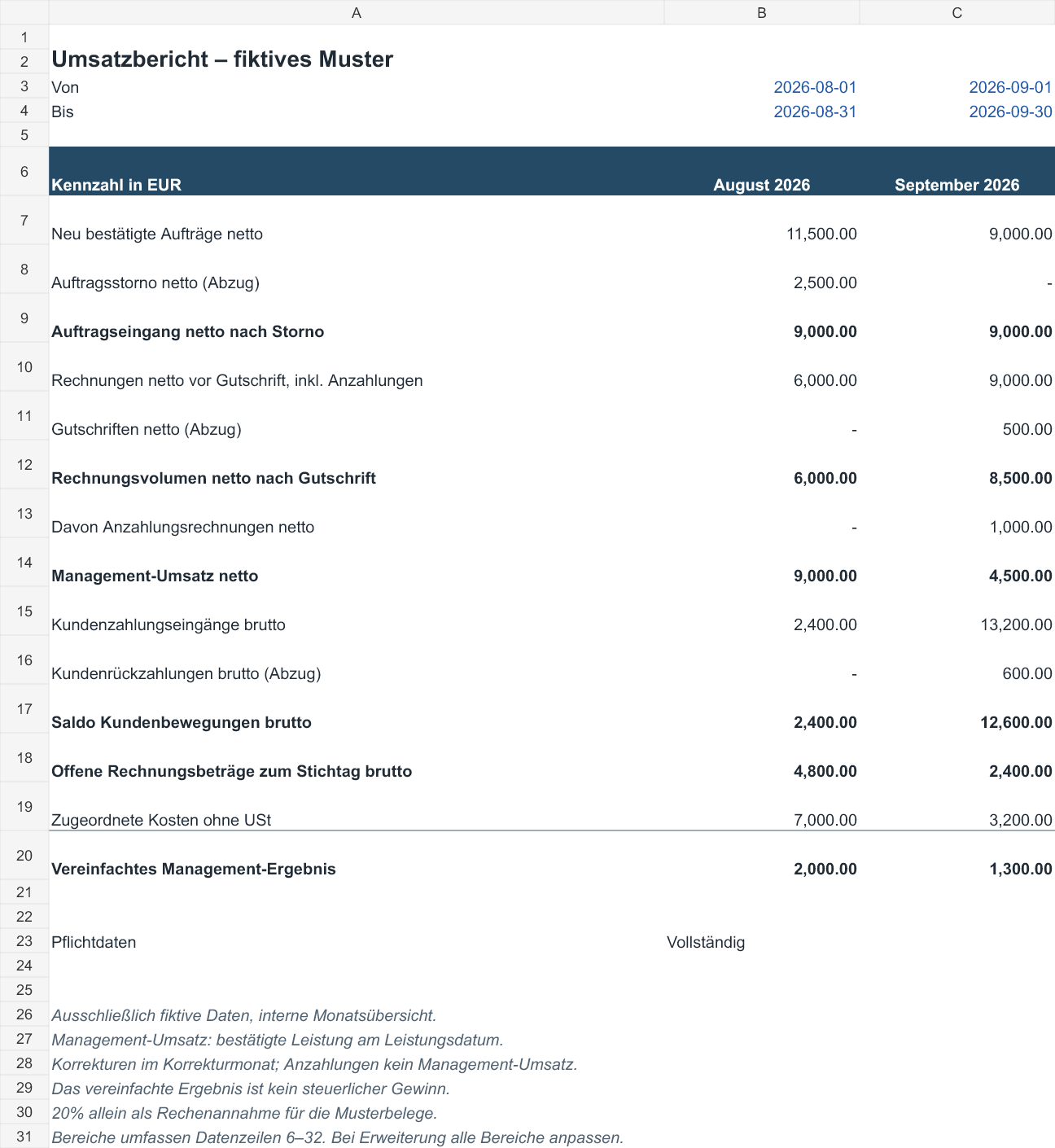
The monthly overview
| Metric in EUR | August 2026 | September 2026 |
|---|---|---|
| Newly confirmed orders, net | 11 500.00 | 9 000.00 |
| Order cancellations, net (deduction) | 2 500.00 | 0.00 |
| Net order intake after cancellations | 9 000.00 | 9 000.00 |
| Net invoices before credit notes, including advances | 6 000.00 | 9 000.00 |
| Credit notes, net (deduction) | 0.00 | 500.00 |
| Net invoice volume after credit notes | 6 000.00 | 8 500.00 |
| Of which: advance invoices, net | 0.00 | 1 000.00 |
| Net management revenue | 9 000.00 | 4 500.00 |
| Gross customer receipts | 2 400.00 | 13 200.00 |
| Customer refunds, gross (deduction) | 0.00 | 600.00 |
| Gross customer transaction balance | 2 400.00 | 12 600.00 |
| Gross outstanding invoice amounts at month end | 4 800.00 | 2 400.00 |
| Allocated costs excluding VAT | 7 000.00 | 3 200.00 |
| Simplified management result | 2 000.00 | 1 300.00 |
Adding these rows together does not produce a meaningful total. Several describe the same event from different angles, so adding them would count it more than once. For example, the advance invoice is already included in invoice volume. [a]
Orders and confirmed work
| Order | Confirmed on | Net value, EUR | Date work performed | Note |
|---|---|---|---|---|
| A01 | 05.08.2026 | 6 000.00 | 20.08.2026 | Work confirmed |
| A02 | 08.08.2026 | 3 000.00 | 28.08.2026 | Work confirmed; invoice in September |
| A03 | 12.08.2026 | 2 500.00 | not performed | Cancelled on 14.08.2026 before work began |
| A04 | 03.09.2026 | 5 000.00 | 22.09.2026 | Work confirmed |
| A05 | 05.09.2026 | 4 000.00 | not yet performed | Advance payment; no management revenue |
A03 was cancelled in full before any work was performed, invoice issued or payment received. The cancellation reduces August order intake from EUR 11,500.00 to EUR 9,000.00 net. It does not reduce management revenue already recorded, because none arose for A03.
A05 explicitly says 'not yet performed'. An empty work date alone would be less clear: it could also mean that evidence is missing. Make this distinction identifiable in your own list. [b]
Invoices and credit note
| Document | Date | Reference | Net EUR | VAT EUR | Gross EUR |
|---|---|---|---|---|---|
| R01 | 21.08.2026 | A01 | 6 000.00 | 1 200.00 | 7 200.00 |
| R02 | 02.09.2026 | A02 | 3 000.00 | 600.00 | 3 600.00 |
| R04 | 12.09.2026 | A05 | 1 000.00 | 200.00 | 1 200.00 |
| R03 | 23.09.2026 | A04 | 5 000.00 | 1 000.00 | 6 000.00 |
| G01 | 25.09.2026 | R01 | -500.00 | -100.00 | -600.00 |
R01, R02 and R03 are invoices for confirmed work. R02 is not issued until September for work A02 performed in August. August management revenue therefore already includes the EUR 3,000.00, while invoice volume includes it only in September.
R04 is an advance invoice for A05 and increases September invoice volume by EUR 1,000.00 net. As the work has not yet been performed, no management revenue arises in the template. When the work is recorded later, the advance does not count again as new work. [a]
G01 is a subsequent discount on R01: −EUR 500.00 net, −EUR 100.00 VAT and −EUR 600.00 gross. In the template, this credit note reduces both September invoice volume and September management revenue. Record the later refund in the payment overview.
Payments with individual IDs
| Payment | Date | Reference | Gross amount, EUR |
|---|---|---|---|
| Z01 | 25.08.2026 | R01 | 2 400.00 |
| Z02 | 10.09.2026 | R01 | 4 800.00 |
| Z05 | 15.09.2026 | R04 | 1 200.00 |
| Z03 | 20.09.2026 | R02 | 3 600.00 |
| Z06 | 26.09.2026 | G01 | -600.00 |
| Z04 | 30.09.2026 | R03 | 3 600.00 |
Together, Z01 and Z02 settle R01: 2,400.00 + 4,800.00 = EUR 7,200.00 gross. Each payment is recorded exactly once. R01 remains one invoice. The two payments do not double management revenue either.
Z05 pays advance invoice R04. Z04 is a part payment on R03, leaving EUR 2,400.00 gross outstanding. Z06 is the refund for credit note G01, so it carries a negative sign. After the credit note and refund, R01 is settled: 7,200.00 − 600.00 − (7,200.00 − 600.00) = EUR 0.00.
Costs and the separate question of profit
| Costs excluding VAT, EUR | August 2026 | September 2026 |
|---|---|---|
| Materials | 4 000.00 | 1 600.00 |
| Staff | 2 000.00 | 1 000.00 |
| Overheads | 1 000.00 | 600.00 |
| Total | 7 000.00 | 3 200.00 |
The costs are also entirely fictional and allocated to the relevant month. The template does not analyse their payment dates. The result is calculated as follows:
August: 9,000.00 − 7,000.00 = EUR 2,000.00.
September: 4,500.00 − 3,200.00 = EUR 1,300.00.
This simplified surplus does not show whether a real business's costs are complete and correctly allocated. The USP distinguishes several methods of calculating profit for tax purposes, each with different requirements for books and records. [3] The result in this template does not tell you which method applies to your business.
Check totals without counting twice
Management revenue comes only from the list of work performed and the associated revenue adjustments:
August: work A01 6,000.00 + work A02 3,000.00 = EUR 9,000.00 net.
September: work A04 5,000.00 − adjustment G01 500.00 = EUR 4,500.00 net.
September invoice volume uses a different calculation: R02 3,000.00 + R03 5,000.00 + R04 1,000.00 − G01 500.00 = EUR 8,500.00 net.
The September payment balance is different again: Z02 4,800.00 + Z03 3,600.00 + Z04 3,600.00 + Z05 1,200.00 − Z06 600.00 = EUR 12,600.00 gross.
Across both months, management revenue totals EUR 13,500.00 net and the simplified result is EUR 3,300.00. The two monthly payment balances total EUR 15,000.00 gross. Keeping each total's label makes it clear what it means. They measure different things. [a]
Reconcile outstanding invoices at the reporting date
The outstanding invoice balance can be reconciled from the opening balance and transactions up to the reporting date. All amounts must be on the same gross basis:
Outstanding invoices at period end = outstanding invoices at period start + new gross invoices − gross credit notes − gross receipts + gross refunds.
In August, the sample balance starts at zero: 0.00 + 7,200.00 − 0.00 − 2,400.00 + 0.00 = EUR 4,800.00 gross.
For September, the reconciliation is: 4,800.00 + 10,800.00 − 600.00 − 13,200.00 + 600.00 = EUR 2,400.00 gross. The remaining amount relates entirely to R03. The refund is added back here because the earlier credit note has already reduced the outstanding invoice balance.
The check above applies to the events in the template. Other changes in the invoice balance also need supporting documents for the reconciliation to balance. Unresolved overpayments and customer credit balances remain separately visible. [b]
Your revenue report in six steps
Start with the period, the date to which the data is current and the metrics you need. For outstanding invoices, include the opening balance too. Older documents that have not yet been paid in full remain part of this overview.
Record orders and work performed separately from invoices, credit notes and payments. Each group needs unique IDs. One invoice can have several payments; its full amount must not be added to the total again for every payment.
Before analysing the data, check for duplicate IDs, missing amounts and unknown document references. Dates written in different formats can also make allocation harder. Keep missing information marked: an empty amount field means something different from a deliberately entered zero. And a total of zero does not confirm complete data.
Each metric has its own source. Order intake comes from confirmed orders and order cancellations, while invoice volume comes from invoices and credit notes. Payments and refunds form the payment balance. Management revenue counts confirmed work and its revenue adjustments.
Allocate costs to each period using the same fixed rule. Mark estimates. If significant costs are missing, the result remains unresolved; income alone does not establish a profit.
In the final reconciliation, IDs must match and net plus VAT must equal gross. It must be possible to allocate part payments and the outstanding remainder to the invoice. Include the outstanding invoice balance in this check too. Record any remaining differences before using the report to make decisions. [b]
The Excel file provides 'Check' warnings for missing required amounts and duplicate event IDs. If you change a part payment, the calculations affect the payment balance and outstanding invoice balance; management revenue already confirmed remains unaffected. You can follow this distinction using R01 and its two payments, for example. [a]
The file cannot, however, detect whether an event is missing from an export. You need to compare it with your original lists. And although you can copy the tables in the article, they do not calculate automatically here.
What the monthly comparison tells you
In the template, management revenue falls from EUR 9,000.00 to EUR 4,500.00 net. The change is (4,500.00 ÷ 9,000.00 − 1) × 100 = −50 per cent. Net order intake, by contrast, stays at EUR 9,000.00 in both months. September's higher payments also include settlement for earlier work.
The two months are a checking exercise. They do not yet show whether seasonality or an advertising campaign changed the figures. Longer data series using the same rules, suitable figures from the previous year or clearly defined targets can help put them in context. If revenue in the previous period was zero, no meaningful percentage growth rate can be calculated. [b]
A clearly defined period makes it manageable to get started. Once the related events are reconciled and unresolved data questions remain visible, you can better judge what the figures tell you about your business. [b]
Related templates
- Create an order form: to record confirmed orders in a traceable way.
- Create a project status report: to show progress on the work, separately from invoices and payments.
- Write a payment reminder: to give a factual reminder of an outstanding invoice amount that has already been reconciled.
Sources and counting rules
Primary sources checked on 16.10.2026:
- WKO: Cash flow principle in income and expenditure accounting
- USP: Income and expenditure accounting and exceptions
- USP: Methods of calculating profit for tax purposes
The figures come solely from the fictional dataset in the supplied file. Recognition on the basis of work performed and the treatment of later adjustments are rules defined for this internal exercise. The report does not certify profit for tax purposes or replace legally required records. [a]
Editorial version dated 16.10.2026. Numbers lead to sources; letters explain editorial examples or recommendations. Each source note states what the source supports.
[b] Practical recommendations. The suggested processes and decision aids are editorial applications of the principles cited. Their specific effect on enquiries or orders has not been measured here.
[a] Editorial examples. Content described as a sample or fictional illustrates possible situations. It does not represent real client cases or evidence of a measured effect.
Sources and context (3 sources)
- Einnahmen-Ausgaben-Rechnung — Unternehmensserviceportal (USP); content responsibility: Federal Ministry of Finance
Confirms the general basis of actual cash flows, subject to exceptions, and that gross includes VAT while net excludes it. This does not confirm that the 20 per cent assumed in the template is the tax rate for any particular service. Checked: 2026-10-16.
- Das Geldflussprinzip in der Einnahmen-Ausgaben-Rechnung — Wirtschaftskammer Österreich (WKO)
Confirms the general cash receipts and payments principle for income and expenditure accounting for tax purposes, and its exceptions. Does not establish an individual method of calculating profit, any management metric or any figures in the fictional workbook. Checked: 2026-10-16.
- Steuerliche Gewinnermittlung — Unternehmensserviceportal (USP); content responsibility: Federal Ministry of Justice and Federal Ministry of Finance
Confirms different methods of calculating profit and the record-keeping requirements that depend on them. This overview does not establish the tax treatment of the reader's business or confirm the simplified management result. Checked: 2026-10-16.