Full version with all templates and detailed checks. Back to the main article
Optimise your Google Business Profile: key steps for your business
People who find your business on Google often want to know a few simple things first: do you take on the work they need, will you travel to the project location, and how can they reach you? A well-maintained Business Profile should answer these questions. An old phone number can matter more than a missing project photo.
It is worth following a clear order when updating the profile. Start with ways to get in touch and details that reflect the actual business. Then work on the description and suitable images. Finally, check whether customers can see the changes you saved. The checklist below helps you keep track of open tasks. [b]
This BrandHoop guide is for small trades businesses in Austria that already have a profile. Google My Business is now called Google Business Profile, or Google Unternehmensprofil in German. [1] A fictional bathroom renovation business serves as the example.
What your Google profile can do
The profile shows information about your business directly in Google Search and on Maps. [1] A potential customer should be able to tell whether your services fit their project. If customers can visit you, they also need clear information about the arrangements for visits and, where relevant, how to make an appointment.
Google names relevance, distance and prominence or popularity as the main factors in local search results. Relevance describes how well your profile matches the search. Complete, accurate details help Google make this connection. They do not entitle you to a particular position in Google Maps. [2]
The service area describes the places where you take on jobs. [3] Listing a large area does not guarantee equal visibility in every municipality either, because distance from the person searching remains one of the factors named. [2] The details should therefore reflect the work your business actually does.
Maintaining the profile is part of local SEO, or search engine optimisation for your region. A thorough website update and collecting new customer reviews are related but remain separate tasks. This guide focuses on your existing listing and helping customers find the right information there.
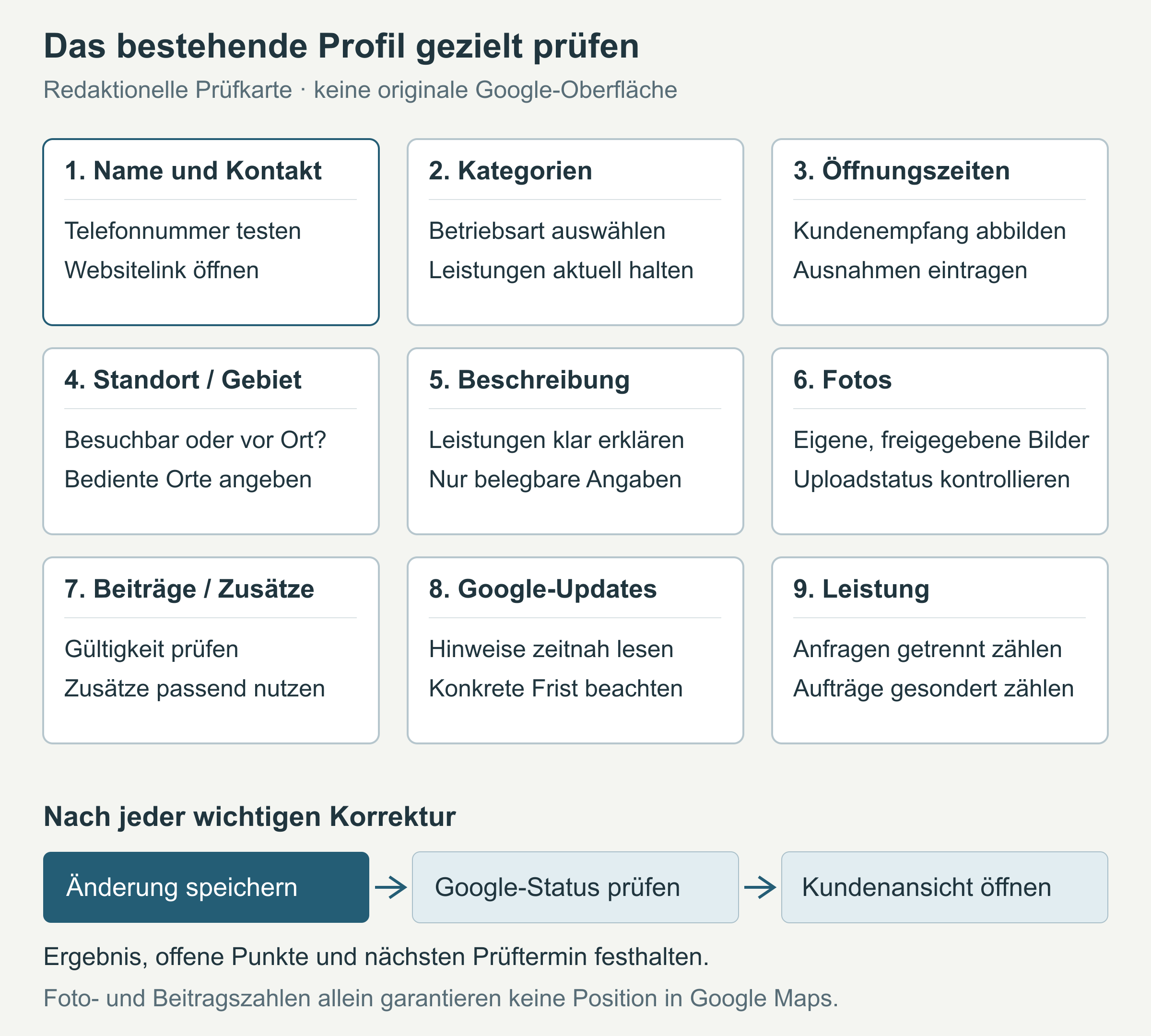
The graphic is our own checklist showing the areas of your profile. It does not show a Google interface. Your own profile shows which features you can use and what they look like. [c]
Before you start: open your profile
You can edit an existing profile in Google Search or Google Maps. You need the Google Account linked to the profile. The features available may differ by interface and operating system. In Search, select ‘Edit profile’, change the details and then select ‘Save’. Google reviews changes before publication. [4]
If you do not have access or the listing has not yet been verified, resolve that first. A second profile does not solve the problem. If you move, update the existing profile; individual services offered by the same business do not get their own profile either. [5] For a business without a listing, see the guide to creating a Business Profile.
Before making major changes, take a brief look at the current situation: which detail is wrong, where does the correct information come from, and who will deal with it? Include the date. You can then use your mobile phone to check the customer’s experience. The call button should dial the right number, and the website link should open a working page for your business. Services, the visible address and hours must reflect what the business actually offers. [b]
Make your name, contact details and services clear
Use the name your business also goes by outside Google, such as on signs or business materials. Do not add place names, services or advertising slogans solely to improve your search position. A term that is genuinely part of the name in use can be included. [6]
The phone number and linked website must lead to the relevant business or location. [6] A practical test shows whether the extension, recorded message and call forwarding are still correct. Check that the website link actually opens a current page about this business and its services. At the same time, compare any old contact details with your own website.
Your name, address and phone number are often called NAP details, short for Name, Address and Phone. They should describe the same business and lead to the right phone line or place. A different spelling, such as ‘Str.’ instead of ‘Straße’, does not by itself prove an automatic drop in rankings. A wrong number is a specific fault in the way customers reach you. [b]
After changing the name, check the profile status too: Google may require reverification. [4]
Choose suitable categories and services
The primary category describes the type of business you run. Select it from Google’s list to match your core business as closely as possible. A few suitable additional categories can cover other areas; you cannot create a category of your own. Google may require reverification after a change. [7]
Use the choices available in your profile today. A term from an older blog article may be missing or unsuitable for your business. List individual types of work under services, if the feature is available for your category. Under ‘Edit services’, you can maintain the work you offer and extra information such as descriptions or prices. Prices and phone numbers must not be included in the name of a custom service. [8]
A fictional bathroom renovation business plans bathrooms, replaces sanitary fittings and renovates existing showers. It does not offer a round-the-clock emergency service. Its service list therefore contains the work it actually takes on. It does not add ‘24-hour emergency service’ to cover more search queries. [a]
Your own service list should also show which jobs you currently accept. If other trades are involved, a clear description of your own part helps. Add new services when you actually offer them, and remove those that are no longer available.
Show opening hours and public holidays accurately
The hours in your profile must explain when customers can reach or visit the listed business. A staffed office and a showroom may have different visiting arrangements. Having your team working on a building site does not mean someone is available to receive customers at your own premises. Continuous opening or an emergency service must also reflect what you actually offer.
Google does not provide for regular opening hours for businesses that work exclusively by appointment. There is therefore no basis for inventing shop opening hours to make the business appear open more often. [6] If you have regular hours, the website, recorded phone message and displayed notice should give the same information.
For public holidays, Google recommends confirming hours even when the usual hours apply. Special hours are intended for limited exceptions and closures of up to six consecutive days. For at least seven days or an indefinite closure, Google specifies the ‘temporarily closed’ status. [9]
A business holiday notice can supplement these details. The correct entry in the opening hours section is still needed. Ideally, decide on these exceptions before the public holiday or business holiday begins. [b]
Distinguish your address from your service area
A place where you carry out work is not automatically a business location. If you do not receive customers at your business address, it should not be shown publicly in the profile. Instead, enter the places you actually serve. A business that receives customers at its own premises and also travels to them is classed as a hybrid business and can list both its address and its service area. [3]
A rented postal address without actual business activity is not an eligible location. Google requires permanent signage for premises customers can visit; a hybrid business must have staff there to receive customers during the stated business hours. [6] The map pin and entrance should match where customers are received. Directions to a private address do not help customers if visits are not possible there.
Service areas can be entered as cities, postcodes or other areas, but not as a radius. [3] Your selection should match the places you travel to and the information on your website. Listing the whole of Austria would be misleading for a business that serves a much smaller region.
The fictional bathroom renovation business works in the Vienna area and selected surrounding municipalities. It lists the areas it actually serves. It adds other places only when it offers services there too. This does not promise the same position in Google Maps in every municipality. [a]
Describe your business clearly
The description gives you space for a brief explanation of the work you take on, the customers you serve and your region. You can also explain how working together begins, such as with a scheduled site visit.
Google allows no more than 750 characters and no website addresses or HTML code. The focus should be on information about the business. [4] Under the guidelines for representing a business, advertising special promotions, low prices and offers does not belong in this field. [6] You therefore do not need to use all the available space.
Specific services say more than ‘everything for your home’. Technical terms are fine if your customers understand them. Keywords are the search terms people enter in Google. Repeating the same words constantly does not make the description clearer for the reader. Claims such as ‘the best business’ need a basis, as do stated qualifications or many years of experience. Accessibility and complete services should also be mentioned only when they actually apply. [b]
Fictional sample description, for use only if it matches the services actually offered:
‘We plan and renovate bathrooms in the Vienna area and selected surrounding municipalities. Our services include replacing sanitary fittings and renovating existing showers. We agree the scope of the work at a scheduled site visit. Contact our office to discuss your project.’
Before using the sample, check it against your own services and the way you actually work. [a]
Photos: show your business and completed work
A photo can answer a question that a short description leaves little room for. For a showroom customers can visit, photos of the entrance and interior are useful. A team photo fits if it shows the contact person. With project photos, where they were taken also matters. [b]
Photos or videos of the interiors of private homes must not be published on Google Maps or in a Business Profile. This includes a bathroom in a private flat. The Maps policy also excludes images from other areas not accessible to the public and no-photography zones. At other private places, it requires the owner’s consent. [10] Permission therefore does not make photos of home interiors eligible for the profile.
Google recommends sharp, well-lit photos that show things realistically. The selected cover photo is not necessarily displayed first. Uploaded media may initially be pending or not approved; only ‘Live’ status means it is shown to customers. [11]
Choose your own photos that you have permission to publish. First establish which people and rooms may be shown. Private customer details and building site addresses should not appear in the image. Google prohibits private and confidential content in the profile. [6] AI images and catalogue photos cannot serve as evidence of projects actually completed.
For a permitted before-and-after comparison, it must be clear that both photos belong to the same project. Replace images that no longer accurately represent the business with suitable photos of your own. A changed team, a new location or a different range of services may be the reason. A set number of photos does not secure a search position.
Treat project images on your own website separately from these Google uploads. You need publication rights and permissions there too. For help explaining your own part in completed work, see the guide to project examples on your website.
Keep posts and additional details up to date
Posts let you share current updates directly in the profile. [12] Changes to arrangements for customer visits or a completed project can be a good reason for a post. Existing posts and links also need attention: an old holiday notice or expired offer no longer accurately describes the business as it is today. A scheduled check can help with this work; a particular posting frequency does not guarantee a search position. [b]
Attributes are additional features of your business. Which ones you can edit depends on factors including category and location. [13] Additional links and contact options are not equally available for every profile either. [4] What matters is which features your own profile offers and which details are accurate. An additional way to get in touch also needs a person responsible for answering incoming enquiries.
Reviews are part of ongoing maintenance. Factual replies can address feedback without making private job details public. The guide to collecting Google reviews explains how to ask for honest feedback. Set up your review link and QR code separately; for help with wording, see examples of review replies.
Track Google updates and pending changes
Google also uses user reports and other sources to update profile details. You can view these Google updates in the profile, but you cannot manage all of them there. [14] A notification is therefore a reason to compare the detail concerned with the actual business. If your website also contains old information, correcting that is part of the task too.
For certain notified suggestions for changes, you currently have four days to accept or reject them. Google may then publish the update automatically if other publicly available information, such as your website, supports the suggestion. This deadline applies to the notifications described, rather than every update. Follow the specific message; it should not wait until the next monthly check. [14]
Saving and publication are also two separate steps for your own changes. Google reviews edited details before they go live. [4] For an open task, it helps to record what was saved, the status Google shows and whether the correct information is publicly visible. If it has not yet been published, the task needs a date for the next check. [b]
Distinguish clicks from real enquiries
The ‘Performance’ section shows data for verified profiles. You can select a period there; not every metric is available for every business. Performance data includes organic search results and Google Ads. Here, organic means without a paid advert. The totals therefore cannot be described as results from organic search alone. [15]
The metrics initially describe actions in the profile. The following overview shows why they need to be read separately from enquiries and jobs actually received. [15]
| Metric | What it shows | What you cannot infer from it |
|---|---|---|
| Calls | Clicks on the call button | That a conversation took place |
| Website clicks | Clicks on the website link | That an enquiry was submitted |
| Directions | Requests for directions | That someone visited the business |
| Views | Counted visitors to your Business Profile | How many jobs resulted |
You also need your own business records: how many real enquiries arrived, and which fit your services and service area? Asking where people found you can help. If you do not know the source, keep it labelled as unknown. [b]
A potential customer might, for example, open the website link first and call later. Profile interactions, real enquiries and confirmed jobs are therefore separate measures. [a] Comparable periods help you interpret the data. Seasonality, business holidays and advertising can influence the picture. If figures rise after new photos are added, the timing alone does not prove that the photos caused it.
Checklist to copy
The table brings together the eleven review areas. Put ‘OK’ or the specific correction needed in the second column. A person responsible and a date for the next check turn it into a task list that can be kept up to date after a change. [b]
| What was checked? | What needs correcting? | When should it be checked again? | Responsibility |
|---|---|---|---|
| Business name | |||
| Phone number and website link tested | |||
| Visible address and map pin | |||
| Actual service area | |||
| Primary and additional categories | |||
| Services offered | |||
| Regular hours and upcoming exceptions | |||
| Description and additional details | |||
| Photos and existing posts | |||
| Google updates and pending changes | |||
| Performance and actual enquiries kept separate |
Completed example for a fictional bathroom renovation business:
What was checked? Phone number tested using the call button.
What needs correcting? The recorded message still gives the old contact hours; update it and check the website for consistency.
When should it be checked again? Call again after the correction; next routine check in one month.
Responsibility: Office, with approval from the owner.
In a second example, the business has saved its new website address. Customers still see the old address, though. The task stays open until the person responsible has checked Google’s status and the customer view again and the correct information is visible. [a]
How to keep your profile up to date
The following intervals are a suggestion for organising work in a small business. Google does not require them:
As soon as something changes: check any new phone number or changes to services, arrangements for customer visits or service areas.
Before public holidays and absences: prepare the appropriate opening hours and notices.
When a notification arrives: review the suggested change promptly and observe any deadline shown.
Monthly: review pending changes, ways to get in touch and performance data.
Quarterly: check the whole profile against the checklist, especially categories, services, the description and photos. [b]
The owner decides which jobs the business takes on and which areas it serves. A named person can maintain the profile and track open tasks. If several people are involved, they need to agree who approves changes and who checks the customer view afterwards.
Choose the next task by the specific error. A wrong number or inaccurate opening hours takes priority over additional project photos. The checklist records who will make the correction and when its result will be checked again.
Guides for related tasks
Create a Google Business Profile: for businesses without an existing listing.
Collect Google reviews: ask customers for honest feedback.
Create a review link and QR code: take customers directly to the page where they can leave a review.
Reply to Google reviews: respond to praise and criticism in a factual way.
Project examples on your website: describe your own projects clearly.
Sources and publication date
The linked Google help pages on features and rules were checked on 16 October 2026. The checklist and maintenance routine are BrandHoop working aids. The bathroom renovation examples are fictional; the graphic is an editorial checklist.
Sources for the previous version checked on 16 October 2026; editorially revised on 17 October 2026. Numbers link to sources; letters explain editorial examples or recommendations. Each note states what the source supports.
[b] Practical recommendations. The suggested processes and decision aids are editorial applications of the principles cited. Their specific effect on enquiries or jobs has not been measured here.
[c] Editorial illustration. The illustration explains a relationship. It is neither a real customer project example nor evidence of a measured effect.
[a] Editorial examples. Content labelled as a sample or fictional illustrates possible situations. It does not describe real customer cases or provide evidence of a measured effect.
Sources and context (15 sources)
- Business Profile: definition — Google
Confirms the former name Google My Business and the display of business information in Google services. Makes no claim about the success of a particular profile. Checked: 2026-10-16.
- Improve your local ranking on Google — Google
Confirms the importance of complete and accurate information, along with relevance, distance and prominence/popularity. The conclusion that rankings cannot be guaranteed throughout an area follows from these factors together; Google does not provide a complete ranking formula here. Checked: 2026-10-16.
- Manage service areas for service-area and hybrid businesses — Google
Confirms areas actually served, a hidden address where customers are not received, hybrid businesses, and cities/postcodes/other areas rather than a radius. No promise of the same search position throughout the area. The existing URL with its language parameter is retained and was readable in German. Checked: 2026-10-16.
- Edit your Business Profile — Google
Confirms editing through Search/Maps, the account required, review before changes go live, possible reverification after a name change, the description limit and feature limitations. The linked status workflow requires sign-in; an additional attempt to retrieve answer/3038311 timed out. No real profile was accessed and no actual change was checked. Checked: 2026-10-16.
- Resolve duplicate profiles and ownership issues — Google
Confirms how to handle an existing listing, a move and different services offered by the same business. These statements concern the same business, rather than separately eligible businesses or distinct locations. Checked: 2026-10-16.
- Guidelines for representing your business on Google — Google
Confirms the actual business name, associated contact details, location requirements, treatment of appointment-only hours, description limits and private/confidential content. Advice on image permissions is cautious editorial guidance and does not constitute complete legal advice; abbreviations in NAP details and the effect of individual photos are not assessed empirically here. Checked: 2026-10-16.
- Manage your business category — Google
Confirms selection from an existing list, the closest possible primary category, a few additional categories, no custom-created category and possible reverification. No specific trades category is claimed to be currently available. The canonical page was read in English. Checked: 2026-10-16.
- Manage your services on your Business Profile — Google
Confirms limited availability by category, the service editor, descriptions/prices as additional details and the exclusion of prices/phone numbers from custom service names. The bathroom renovation services are a fictional example. The canonical page was read in English. Checked: 2026-10-16.
- Set special hours — Google
Confirms holiday confirmation even when hours are unchanged, special hours for closures of up to six days, and ‘temporarily closed’ for seven days or more or an indefinite closure. The review dates suggested for organising work in the article are not a Google requirement. Checked: 2026-10-16.
- Privacy – Maps User Generated Content Policy — Google
Confirms the prohibition on photos/videos of the interiors of private homes, other places not accessible to the public and no-photography zones. Other private places are treated separately: publication with the owner’s consent. Do not generalise this to all private property or your own business website. The relevant English paragraphs were read in full; retrieval in German failed with UnexpectedStatusCode. Checked: 2026-10-16.
- Manage photos and videos in your Business Profile — Google
Confirms realistic photo quality, no guaranteed position for the cover photo and upload status. Selection ideas and guidance on evidence of real projects are editorial recommendations; the help page does not establish that a particular number of photos affects rankings or enquiries. Checked: 2026-10-16.
- Create & manage posts on your Business Profile — Google
Confirms current updates through posts in Search/Maps. No required posting frequency or jump in rankings is inferred from this. The canonical English help page was read; additional features restricted to certain regions are not generalised in the article. Checked: 2026-10-16.
- Manage your business attributes — Google
Confirms additional business features and differences in which can be edited by place/country/category. No particular attribute is promised to be available for Austrian trades businesses. The canonical English help page was read. Checked: 2026-10-16.
- Google updates for Business Profiles — Google
Confirms external sources, limited management options and a four-day response period only for certain notified user suggestions. Automatic publication is possible if other public information supports the suggestion; Google can also make changes for policy reasons without prior review. There is no general four-day deadline for all updates. Checked: 2026-10-16.
- Business Profile performance and insights — Google
Confirms verified profiles, differences in available metrics, organic and Ads data, and definitions of views, directions, calls and website clicks. A call click does not measure a conversation; attributing real enquiries and jobs requires your own data. No causal analysis of a real business was carried out. Checked: 2026-10-16.