Full version with all templates and detailed checks. Back to the main article
No enquiries from your website? How to find out why
Your website is online, yet hardly anyone gets in touch. Perhaps too few relevant people find the business, or the offer is unclear. But potential customers may already be writing, with their messages landing in the wrong inbox.
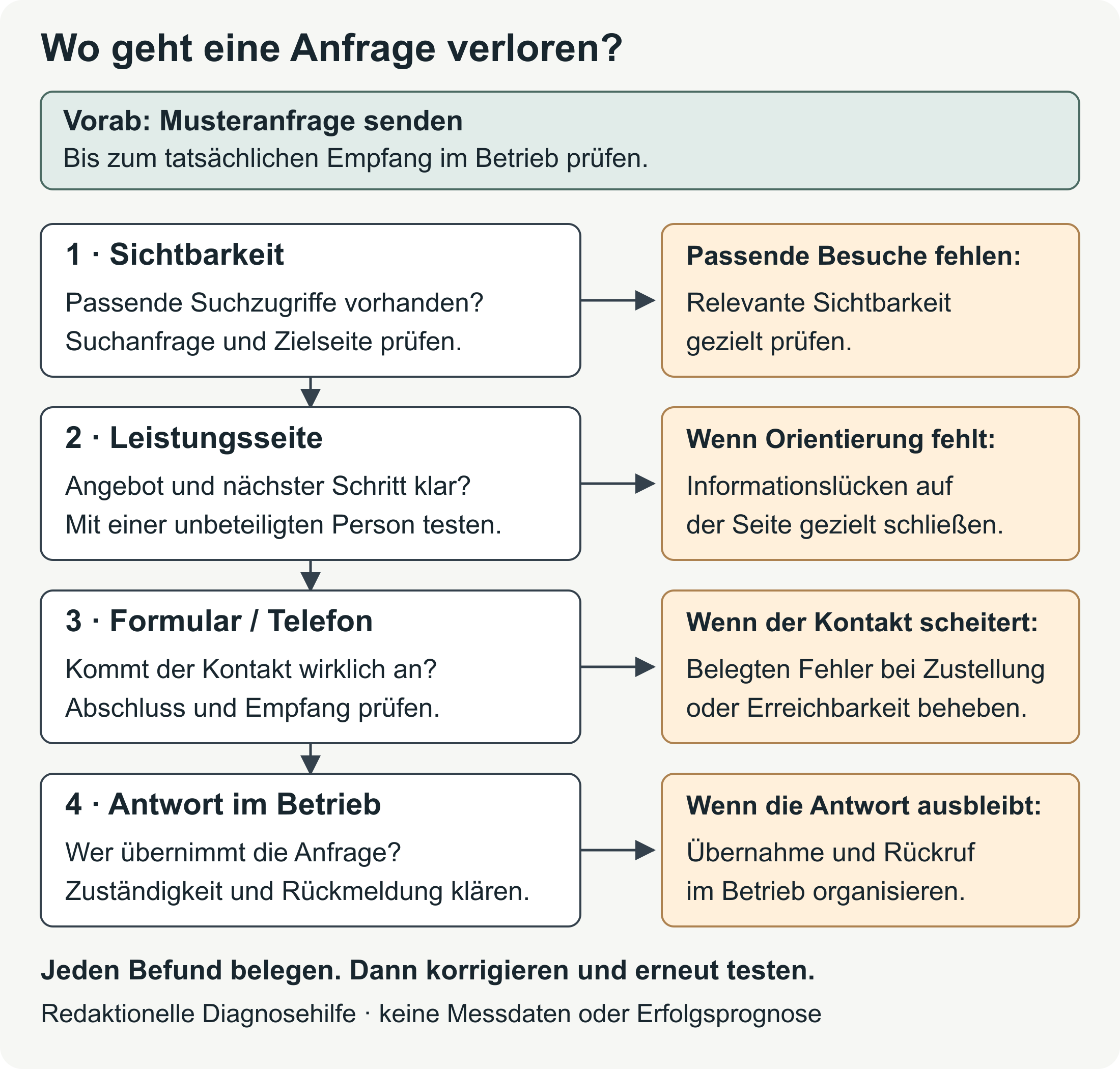
An enquiry clearly marked as a test is therefore a good place to start. It follows the process from the service page, where you explain work such as bathroom renovation, to the person responsible in your business. A success message after submission does not confirm receipt: only the intended inbox shows whether the message arrived and can be answered. [b]
What ‘no enquiries’ means for your business
‘No enquiries’ may mean nobody gets in touch, messages go unread or most people ask for work you do not offer. Each case needs a different response.
To compare enquiries, first decide what you are counting. For a plumbing business, this might be a project description with a working number for a callback. A supplier’s message belongs in a different category. A phone click, a conversation and a suitable enquiry are also different things. And even a suitable enquiry does not necessarily become a job. Google Analytics also separates a recorded contact (lead) from the assessment of whether it is suitable and the later conversion into a customer. [1]
Review the form submissions and emails received, along with conversations and callback requests, over a defined period. In a simple record, note whether the service and location fit, how the business replied and what next step was agreed. Count someone who writes and then calls once. Keep your own tests and spam separate. [b]
It is also worth looking at visitor data. An Analytics dashboard is the overview in your visit-tracking programme. If it is empty, it remains unclear whether there are no visits or tracking is not working. You can test the contact process independently of this.
Problems at a glance
The table helps you decide on the next step. In your own notes, you can use confirmed, assumption or unknown as labels: a wrong recipient address you have found is confirmed. Too few relevant visits is initially an assumption; without reliable data, the number remains unknown. [b]
| Signal | Specific check | Next action |
|---|---|---|
| No form messages received by the business | Send a test enquiry and check whether the message reaches the business after the confirmation appears | Fix the fault found in the form, recipient details or sending process |
| The phone number gets clicks, but there are no conversations | Compare the displayed and dialled numbers; check whether someone can be reached and whether the callback works | Correct a wrong number or a problem with availability; analyse clicks separately |
| No reliable data on website visits | Check which reports you can open, what period they cover and what information they contain | Note which data is missing and look into suitable tracking |
| Few visits that are demonstrably relevant | Compare search queries with the advertised services and the pages visitors land on | Once the contact process works, check whether suitable potential customers find your website |
| Visits are recorded, but visitors cannot explain the offer | Ask someone unfamiliar with your business to check the important service page | Explain the service, area covered and next step more clearly |
| Visitors ask for information the page leaves out | Compare questions from real conversations with the content | Add projects you can substantiate, explain the process and answer outstanding questions |
| People start the form, but completion is unclear | Test the process on a smartphone, including error messages | Change the part that makes contact difficult during the test |
| Suitable enquiries have arrived but remain unanswered | Check within the business who received the enquiry, who is handling it and whether a reply was sent | Decide who replies and what process is workable in day-to-day business |
Several problems may exist at once. Correcting a recipient address says nothing about whether visitors understand the offer. The table alone therefore does not justify a new website.
Contact and follow-up: Where an enquiry gets stuck
Someone wanting to get in touch from a service page needs a clear process through to submission or a phone conversation. The test should therefore include the transitions between steps and use on a smartphone. [2]
Contact form: Check submission and receipt
An enquiry clearly marked as a test does not need real customer data. Tell the business beforehand so that it does not turn into a job booking. With the page address, device, date and time, you can trace and repeat the attempt later. [b]
Use this checklist as you go through it:
- Are required fields and the information requested clear? [3]
- Does the form show a helpful error message for missing or incorrect entries? [4]
- Can you correct your entries without the process becoming confusing?
- Does a clear confirmation appear after submission?
- Does the complete message arrive in the intended inbox or system?
- Can the person responsible read and answer the enquiry?
The W3C guidance on form notifications explains clear error messages and confirmations. If the test message is missing from the business’s inbox, check the recipient address, spam folder and forwarding rules. If you can access sending information, it can help narrow down the fault. A failed send needs a different fix from a message in the wrong folder. After fixing the problem, send the same test enquiry again. [b]
Smartphone: Go through the whole process
On a smartphone, a potential customer must be able to get from the menu to the contact method. The text must remain readable, the necessary content must load and the submit button must not be obscured. It should remain within reach even with the keyboard visible. Appropriate field types can help with mobile input. [5]
Even if it works on a computer, the same process can still get stuck on a smartphone. To find the cause, it helps to know the device, browser and step where this happens.
Test phone and email
The displayed phone number should match the number actually dialled, and the details on your most important pages should agree. A test call shows whether someone can be reached or the caller can clearly request a callback. Make sure you actually receive that callback as part of the test. A phone click does not necessarily lead to a conversation. [b]
For email, compare the displayed address with the recipient in the link. The email programme opening does not tell you whether the message was sent and received.
Who takes responsibility for an enquiry once it arrives
Once the message reaches the right inbox, the person responsible can deal with the potential customer. They need a reply and a next step. Your records will later show when and how the enquiry arrived and how far it has progressed. A reason such as ‘outside our service area’ or ‘we do not offer this service’ explains why an enquiry is unsuitable. [b]
In day-to-day business, it should be clear who reads the central inbox, who returns calls and who covers absences. An automatic acknowledgement does not replace a substantive reply. An extra contact button does not solve the lack of follow-up. If most enquiries concern work you do not offer, it is also worth comparing your advertising with your website content.
Fictional example: The enquiry lands in the old inbox
A small bathroom renovation business says: ‘Our website generates no enquiries.’ The test enquiry is confirmed on the website but lands in an old inbox that nobody reads. The business corrects the recipient address and tries again. This time, the person responsible confirms receipt. This example is fictional. [a]
Some earlier messages concern work the business does not offer. The service page therefore gets a more specific description. How many relevant people visit the website remains unknown. These website visits are also known as traffic. Before planning more marketing, the business needs to establish how the visits are tracked. Extra visitors would have changed nothing about the unread inbox.
Are your visitors a good fit for what you offer?
Someone reading a guide may not currently be looking for a trades business. Other visitors live outside the area you cover. The number of visits alone therefore says little about whether you are reaching suitable potential customers.
The Google Search Console Performance report shows part of this process: impressions are appearances in Google search results, and clicks are visits to your website from those results. You can view the data by search query, page, country or device. This is explained in the official Performance report help. [6]
This lets you compare search queries with the pages visitors land on. The report does not, however, cover all website visits or enquiries received. Even with the country filter set to ‘Austria’, you cannot tell whether visitors come from your local service area. [6] On the landing page, visitors should find the service they searched for and the area you actually cover. This also applies to links from your business profile, social media and advertising. An advert for a particular type of work might, for example, lead to the general homepage without the advertised offer being clear there. [b]
A URL is the address of an individual page. If important URLs have little visibility, URL Inspection can help: it gives information about the version indexed, or stored, by Google and offers a live test. A positive result guarantees neither inclusion in the search index nor appearance for a particular search. See Google’s guidance on the URL Inspection tool. [7]
If the contact process works and reliable search data shows few relevant visits, work on visibility is worth considering. SEO stands for search engine optimisation: you work on helping relevant people find your pages through search engines. If those visitors are already arriving, look at the offer next.
Do visitors understand your service?
Someone outside the business does not share your background knowledge. If they could be a customer, they can carry out a specific task on the page visitors actually arrive at. Giving no explanation beforehand reveals what they understand for themselves. [8]
After reading, they should be able to explain the service, suitable projects and area covered in their own words. How to get in touch and what happens afterwards should also be clear. Unclear passages give you a starting point for revisions. A single session, though, cannot show how all visitors behave or establish an abandonment rate.
‘Quality through passion’ does little to answer these questions. Specific examples of work and a clearly labelled contact button give visitors more guidance.
A fictional example for a bathroom renovation business reads: ‘Bathroom renovation in Vienna and the surrounding area. Describe your project and its location; we will then establish whether it falls within the scope of our services.’ This is sample wording, not a real client project. [a]
The page should also explain the limits of the service. If you need measurements, photos or a site visit to prepare a price, the process should make this clear and avoid promising an instant price.
Your own work and a clear process
A project reference shows previous work. Your own projects, with suitable photos, can make the offer easier to understand when your business’s contribution is also clear. You must be able to substantiate the work and testimonials and have permission to publish them. A team introduction can add to this. [b]
Explaining the process tells people more about working with you than ‘the highest quality’: what information do you need after the enquiry, and what happens before a quote is prepared? Only promise stated response times if your business can meet them.
Recurring questions in conversations reveal what is still missing, perhaps about project size, the area covered or working with other trades. Add those answers to the relevant page. A better-looking design alone does not establish trust or predict future enquiry numbers.
Conversion rate: Measuring enquiries correctly
Here, lead generation means the process of making contact with a potential customer. A lead is a recorded contact with possible interest; whether it is a good fit remains to be established. [1]
The conversion rate is the proportion of recorded visits that include a defined action. Before comparing figures, decide whether you are counting a click, a form completion or a suitable enquiry. A session groups a user’s interactions over a period of time. [9] For form completions, you could calculate this session-based rate:
Recorded sessions with at least one successfully confirmed form completion ÷ all recorded sessions in the same period × 100.
The numerator and denominator must come from the same tracking and the same period. With zero recorded sessions, the rate cannot be calculated. Unattributed calls do not belong in this numerator. Tracking must also reliably identify successful form completions. Enquiries actually received remain separate. [b]
An event is an action recorded by the tracking programme. Google recommends generate_lead for a submitted form or a request for information, and other events for later handling stages. They need to be set up appropriately and are not sent automatically. Their meanings are given in the official list of events. [1]
DebugView is a testing view that shows events recorded in Google Analytics while debug mode is active. Browser privacy settings can prevent them from appearing. The same applies when consent to Analytics cookies is missing and consent mode is configured. If an entry is absent, the cause still needs to be established. See Google: Monitor events in DebugView. [10]
No single target is given here for every trades business. Compare the same type of completion over similar periods and look at the case numbers too. With few sessions, a single enquiry changes the rate considerably. Assess separately whether an enquiry is a good fit for your business.
Fix a fault, improve SEO or renew the website?
A website relaunch renews the website as a whole. It is an option here if the necessary changes cannot reasonably be made with the existing structure or technology. The right action therefore depends on where the problem lies. [b]
| Action | Relevant finding | What it checks or fixes | Prerequisite |
|---|---|---|---|
| Fix an individual fault | The form, number or receipt within the business fails in repeated testing | The point where an enquiry fails | Repeat the same test before and after the fix |
| Revise the service page | Visitors do not understand the offer or the next step | Unclear statements and a lack of guidance | Document the questions and difficulties observed |
| Make targeted SEO improvements | The contact process works, and reliable evidence shows few relevant search visits | Whether potential customers find the relevant services you offer | Know the search data and index status for the right URLs |
| Prepare a relaunch | Required features or changes cannot reasonably be delivered in the existing system | Renew the structure or technical foundations | Explain which changes are needed and account for existing search traffic during the move |
This overview gives neither fixed prices nor guaranteed enquiry numbers. If the cause is unclear, further tests are needed. For a confirmed visibility problem, see the SEO basics for trades businesses; if renewal is justified, use the website relaunch checklist.
What to improve first
A contact or follow-up fault you have identified takes priority. Another run through the process shows whether the fix works. Then address unclear statements and missing information on the pages people visit. [b]
Once you understand the problem better, you can also plan more sensibly how to attract further visitors. Content marketing uses helpful content to reach potential customers. Social media and advertising also need a clear target audience and a landing page that suits them.
Brief notes will help you review the work later: record the problem and the change, the person responsible and the result of the repeat attempt. When the cause is suspected, a limited change is easier to assess than simultaneous changes to copy, advertising and contact methods. More enquiries afterwards may also be related to the season, campaigns or different visitors. The increase alone therefore does not show what part your change played. [11]
When the test gets you no further
A customer reports a form error
The page address, last step before the error, message displayed, device and browser help reproduce it. Your own test data is enough for this. Personal content and login details do not belong in the error report; customer data in a screenshot should be redacted. [b]
Even if it works on another device, the customer may have experienced the fault described. If you cannot yet reproduce it, note what information and conditions are missing.
What your provider needs to know
A provider also needs the date, expected behaviour and a description of the known route to the recipient. Send only the necessary information through the agreed channel. [b]
‘After submission, the confirmation appears, but our clearly marked test message is missing from the intended inbox.’ This describes the fault more precisely than ‘The website is useless’.
Contact methods lead to different recipients
You can offer several contact methods if the person responsible finds the enquiries. The form’s recipient address, displayed email address and phone line must match the intended responsibilities. Try each contact method separately. A working form address tells you nothing about the phone number on file. [b]
Your next step
An enquiry clearly marked as a test on your most important service page shows how far the contact process works. Wherever it gets stuck, make that your next focus and agree who will deal with it. If the cause is still unclear, use the relevant check in the table.
For form problems, see the guide to building an enquiry form. If a service page is unclear, the guide to structuring a trades business website offers guidance.
Sources and practical checks
These guides explain the reports and form notifications used here:
- Google Search Console: Performance report · Clicks, impressions and search data dimensions.
- Google Search Console: URL Inspection tool · The indexed version and a live test of a URL.
- Google Analytics: Recommended events · The meaning of
generate_leadand later lead stages. - Google Analytics: DebugView · Checking events in debug mode and accounting for consent.
- W3C WAI: Form notifications · Clear error messages and confirmation of completion.
The sources used here were checked again on 16 October 2026. The diagnostic overview, checking order and decision table are editorial working aids; the examples are fictional.
Editorial version dated 16 October 2026. Numbers link to sources; letters explain editorial examples or recommendations. Each note states what the source supports.
[b] Practical recommendations. The suggested processes and decision aids are editorial applications of the sources cited. Their actual effect on enquiries or work won has not been measured here.
[a] Editorial examples. Content labelled as a sample or fictional illustrates possible situations. It does not describe real client cases or provide evidence of a measured effect.
Sources and context (11 sources)
- [GA4] Recommended events — Google Analytics Help
Supports the recommended generate_lead event, qualification and later lead stages, and the setup required. A triggered event proves neither email receipt nor the quality of any resulting business. Checked: 2026-10-16.
- 4. Make the service simple to use — GOV.UK Service Manual / Government Digital Service
Guidance for GOV.UK services: check every part of the process that users interact with, and the relevant devices. Applying this to a trades business’s contact process is an editorial recommendation, not a binding Austrian standard or empirical evidence of an effect. Checked: 2026-10-16.
- Form Instructions — Forms Tutorial — W3C Web Accessibility Initiative
Supports guidance on required information and data formats. Makes no claim about increasing the conversion rate. Checked: 2026-10-16.
- User Notification — Forms Tutorial — W3C Web Accessibility Initiative
Supports clear error messages and feedback after form completion. The tutorial explicitly provides no evidence that a particular message was actually delivered; testing receipt within the business is editorial advice. Checked: 2026-10-16.
- Labeling Controls — Forms Tutorial — W3C Web Accessibility Initiative
Supports clear field labels and the relationship between appropriate field types and the mobile keyboard. The article uses only this limited practical connection, without claims about percentages or success. Checked: 2026-10-16.
- Performance report (Search results): Overview and basic setup — Google Search Console Help
Supports the scope of the search performance report, clicks, impressions and dimensions. The country filter does not establish a local service area; this limitation is inferred from the country dimension. Does not measure enquiries received. Checked: 2026-10-16.
- URL Inspection tool — Google Search Console Help
Supports the distinction between the indexed version and a live test, and the lack of a guarantee of indexing or appearance in search. Makes no claim about future enquiries. Checked: 2026-10-16.
- Using moderated usability testing — GOV.UK Service Manual / User research community
Supports observing specific tasks, choosing actual or likely users, and setting clear, neutral tasks. The questions for trades businesses are our own adaptation. One person cannot establish an abandonment rate or support generalisations about all visitors. Checked: 2026-10-16.
- Analytics sessions — Google Analytics Help
Supports the definition of a session as a period of interaction. The article’s form completion rate is its own clearly defined calculation example, with no claim that it is a standard metric defined identically everywhere. Checked: 2026-10-16.
- Monitor events in DebugView — Google Analytics Help
Supports the requirement for debug mode and the documented effects of client-side privacy settings, or missing consent to Analytics cookies when consent mode is configured. Does not prove delivery. Checked: 2026-10-16.
- A/B and multivariate testing — GOV.UK Data Community Technical Documentation
Supports random assignment to variants and statistical analysis for a defined goal. This is used to explain the limited conclusions possible from a simple before-and-after comparison. Provides no evidence of an effect on this website and does not require an A/B test to be set up. Checked: 2026-10-16.