Full version with all templates and detailed checks. Back to the main article
Project examples on your website: how to present your work
A finished bathroom can look good in a photo. A potential customer may still be unsure which work your business carried out and whether you can take on their project too. A clear project example gives the photo this context: it explains the starting point and your contribution before showing the result.
A small job can work well for this too. Replacing a bath with a shower can often be described more precisely than a major renovation where your own contribution is unclear. What matters is the work actually carried out and suitable photos you are allowed to publish. The two templates in this article help you prepare these details for a project of your own. [b]
What a project example shows
A project example on your website describes a job your business actually carried out. It makes a service you offer tangible through a specific case. A customer quote can add their experience of working with you. What was built or changed still needs its own description. [b]
Bathroom renovations often involve several businesses. If yours laid the tiles while another replaced the plumbing, that division belongs in the project text. Trades are the different specialist areas of work, such as tiling or electrical installation. The overall photo may show the combined results of several trades; the accompanying text should make your own contribution clear. [a]
You can also describe the result more precisely than “top quality” or “a more usable bathroom”. A changed room layout describes a specific alteration. A “level-access shower”, however, does not establish that the whole bathroom is accessible: other requirements apply, including space to move around and ease of use. [1] Include properties, dimensions or dates in the project example only when your documentation confirms them for that job. [b]
The same principle applies to a website or SEO project. SEO means search engine optimisation. This kind of project description could explain which pages were revised or which technical fault was fixed. A working contact form needs different evidence from an increase in visitors from Google Search. In each case, the description follows the documented result. This is an example of how to present a project, not an account of a completed agency job. [a]
Which projects are suitable
For your first project example, choose a completed job with good records. The work should match a service you offer today. A typical starting point can be especially helpful: a partial renovation in an occupied home addresses a different need from a completely new build. A particular solution is interesting when it answers a question your target audience can relate to. [b]
A small selection is enough to start with. Each case should explain something distinct and make your contribution clear. Several almost identical cards would make the collection larger without showing the service more clearly. Choose projects whose results you can substantiate and for which you have clear, relevant photos. [b]
Choosing a project also means considering what can be made public. Unresolved image rights are a reason to keep a project internal for now. The same applies if the story only makes sense with confidential details. A broad region and documented completion year may be enough to provide context; you usually do not need the exact address or private details about the residents. This is advice on selecting information. Names and addresses can be personal data, as can information that only identifies people when combined with other details. [2]
A short project card or a dedicated page?
A short card in the project gallery provides the initial context. A descriptive title names the project type, with an approved region if relevant. Add a brief account of the starting point and your own scope of work, including its main limitation. A confirmed result and a photo cleared for publication, with a caption, complete the card. [b]
For straightforward work, that may be enough. Difficult conditions or coordination between several trades often need more room. A dedicated project page takes the story further: it explains the approach and gives space to limitations and suitable evidence. These descriptions are also called case studies. This structure does not need a fixed word count. [b]
| Reader's task | Gallery with short cards | Dedicated project page |
|---|---|---|
| Choose a relevant project | A photo, project type and brief account of your contribution give a quick overview | You can explain the starting point and the project's relevance in more detail |
| Identify your contribution | The card must clearly state the main limit of your scope | You can describe the trades involved and your own scope of work separately |
| Understand the approach and limitations | A small card leaves little room for this | Conditions and decisions have their own sections |
| Understand what the photos show | Each image needs clear context and an indication of the project stage | Images can sit directly beside the relevant explanation |
| Reach a service page or make an enquiry | Link the card to a suitable destination | Lead from the project story to the relevant service and contact option |
This comparison helps you choose the format. An additional detail page complements the gallery; the gallery remains the entry point to the collection. With many projects, a service filter can organise the selection. With only a few, a clearly labelled gallery is enough. The content should also be accessible on a phone without having to interact with an animation first. [b]
Connect the project example to your services
A service page explains the work you offer. A project example shows a completed case of that work. If both pages exist, they can usefully link to each other. The link text should name the destination, such as “View the partial renovation with a shower”. Google recommends descriptive link text that fits the destination page's content. [3] The link with local search is covered in the overview of SEO for trades businesses.
The project story can end with a way to get in touch that fits your existing services. Include promises about advice or response times only if your business actually makes them. The wider site structure is explained in the guide to websites for trades businesses. [b]
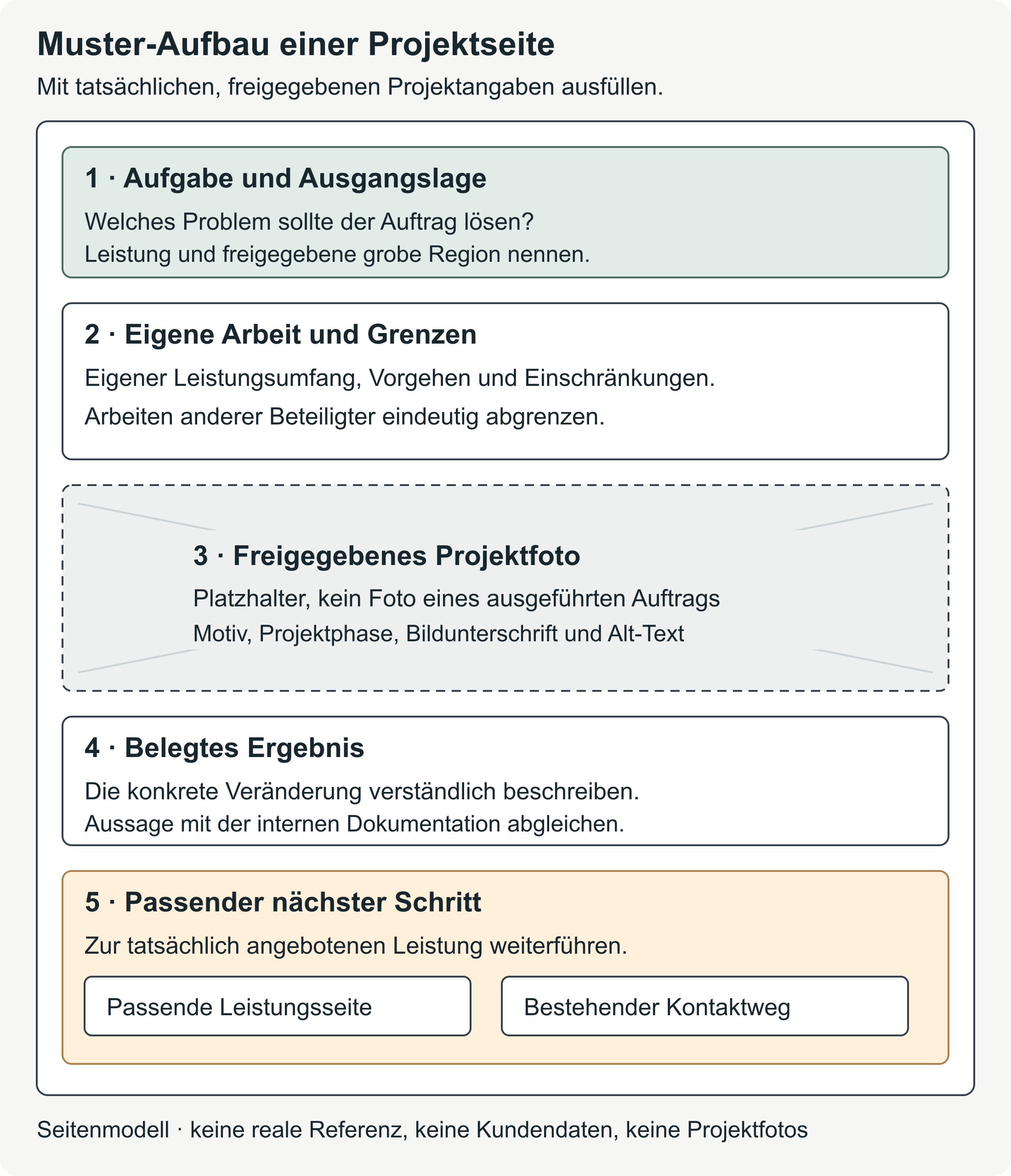
Template for your project description
The table gathers the details you can later use to create a card or project page. The labelled fields are for you to fill in. Only information about your own job turns it into a project example; you can omit fields that do not apply. Where evidence is missing, leave the question open until it is resolved. [b]
| Field | Entry for your project |
|---|---|
| Project title | [Enter the service and main change; mention the region only to the extent approved.] |
| Short description for the card | [Summarise the task, your contribution and the result in a few sentences.] |
| Region and timeframe | [Enter the approved broad region and documented completion year or period.] |
| Task and starting point | [Describe the condition or problem the job addressed.] |
| Goal of the job | [State the agreed improvement without claiming new goals afterwards.] |
| Your own scope of work | [List the work your business actually carried out.] |
| Other trades and limits of your scope | [Name the work carried out by other businesses; use their names only when their use has been cleared.] |
| Conditions and limitations | [Describe relevant technical or organisational limits; leave out private details.] |
| Work carried out | [Give a factual account of the approach, solutions used and important decisions.] |
| Confirmed result | [Describe the change you can substantiate; include dimensions or dates only with suitable documentation.] |
| Basis for the statement about the result | [Record internally what supports the statement, such as documented work, a measurement or a confirmed handover. Do not put confidential original records on the website.] |
| Photos and captions | [For each approved image file, record the subject, project stage, caption and alt text; use the photo template below.] |
| Optional genuine customer quote | [Use only words the customer actually said and whose use has been cleared; otherwise leave out the quote.] |
| Internal publication status | [Record internally the responsible person, reviewed text version, selected images and review date. Also record the basis on which you may publish the content. Do not display these administrative details publicly.] |
The task, your own scope and the result form the core of the story. If you cannot fill in these fields yet, more images will do little to help. Your business first needs to establish what was actually agreed and carried out. [b]
The public description and your internal records serve different purposes. On the website, you explain the project. Invoices, full handover records and client approvals stay internal as supporting evidence; you do not have to make them publicly available to download for this presentation. [b]
Choosing and describing photos
A project photo should explain something about the work. An overall view can show a change to the space; a close-up might show a junction or a made-to-measure element. Nielsen Norman Group reports from its own eye-tracking studies that informative images received attention, while purely decorative ones were often ignored. [4] When choosing photos, it therefore helps to ask what information each image adds to the project story. A photo taken during the work can also be suitable if taking and publishing it are permitted. [b]
Before-and-after photos must show the same project and the area described. Similar viewpoints make the change easier to compare. The caption names the stage so a photo of work in progress does not look like the finished result. Editing must not misrepresent the work shown. [b]
Captions and alt text serve different purposes
The caption puts the photo in the context of the story. It might explain, for example, that the shower has replaced the bath and which work another business carried out. Google considers captions and surrounding text to understand the image's subject, and recommends placing images near the relevant text. [5]
Alt text is the text alternative for people who cannot see the image, for example when using a screen reader, a program that reads content aloud. For a project photo that conveys important information, it briefly communicates the relevant visual details. How much detail it needs depends on the image's purpose and the accompanying text already available. [6] Google recommends helpful, informative alt text and warns against overloading it with keywords, meaning search terms. [5] The image best practices from Google Search Central explain this guidance in more detail.
Photo template to copy
Each planned photo needs its own record. The caption and any required photo credit can later appear on the website. Document the origin, rights and approvals internally. [b]
| Field | Entry for each photo |
|---|---|
| Project and file reference | [Enter the project ID and image file; do not use customer names in the public filename.] |
| Subject and stage | [Name the visible area and stage: before, work in progress or completed.] |
| Your own work visible in the photo | [Describe which part of the photo shows your work and which visible parts are outside your scope.] |
| Caption | [Describe the visible change and project stage in one clear sentence.] |
| Alt text | [Briefly describe what is actually visible in the image; do not add unsupported claims about quality or location.] |
| Photo origin and usage rights | [Name the photographer or rights holder. Record the basis for using the photo on your website. Also note permitted edits and the required photo credit.] |
| People and private details | [Check recognisable people, reflections, documents, addresses and other identifying features.] |
| Publication review | [Record which version of the image is permitted. For personal data, record the appropriate lawful basis; also note any further agreements and the review date.] |
A fictional caption might read “After: shower with a glass screen in place of the bath”. The corresponding sample alt text would be “Shower with a glass screen beside a washbasin”. Both descriptions are suitable only if a genuine photo, cleared for use, shows exactly this content. [a]
Stock photos from image libraries, visualisations and images generated with artificial intelligence (AI) do not substantiate a completed job. If used to explain something elsewhere, their origin must be clearly stated; in a project example, they must not appear to be genuine photos of that project. That is why the page model above uses a labelled photo placeholder. [b]
Adding a genuine customer quote
A testimonial can describe someone's experience of working with you. Praise for good coordination does not establish particular technical properties or the accessibility of a bathroom. The project details and their supporting evidence remain the basis for those claims. [b]
For a quote, you need the customer's actual words and clearance for use on your website, including how their name appears. Any shortening should preserve the meaning. A written agreement makes it possible to establish later which version was agreed. If processing personal data relies on consent, you must be able to demonstrate that consent; a signature is not required in every case. The WKO also mentions electronic and oral consent. [7]
Without a suitable testimonial, simply leave the project example without a quote. Even an anonymised quote must be genuine; the rest of the text must not undo the intended anonymisation. The project story on your website and a Google review are separate publications. The process for collecting honest Google reviews covers how to ask for voluntary feedback after a completed job. [b]
A publicly visible review does not automatically permit you to reuse it, together with a name or photo, on your own website. Further processing still needs an appropriate lawful basis, even when personal data has already been published. This is explained in the WKO guidance on lawfulness under the GDPR. [8]
Are you allowed to publish the photos?
Client approval and the photographer's usage rights address different questions. A client's approval therefore does not automatically replace permission to use someone else's photo. Where people are recognisable, their rights and data protection also need to be considered. [9] For a project in a private home, agreeing on the exact text, selected images and how names appear is a sensible starting point. [b]
Photo usage rights
For photos taken by someone else, usage rights must cover publication on your website. A photo credit alone does not replace this permission. The WKO also points out that content shown in a photo may involve separate rights. [9] Preparation therefore includes clarifying which edits are allowed and which photo credit names the photographer or source. You still need to check the content and people shown in photos you take yourself. The WKO information on copyright and business websites explains these different aspects. [9]
Recognisable people and protection of their image
Protection of a person's image concerns the legitimate interests of the people depicted. Section 78 UrhG prohibits the public distribution of images of people where it would violate those interests. The legislation in the RIS contains this rule. [10]
For photos of people used in advertising, the WKO requires permission from the person shown. Processing their personal data also requires an appropriate lawful basis. Protection of a person's image and data protection are therefore considered separately, as the WKO guidance on processing images for advertising purposes explains. [11]
Personal data and the purpose of publication
Personal data is information about an identified or identifiable person. It can include a name, a recognisable photo of a person, or details that only identify a resident when combined. [2] The appropriate lawful basis for processing depends on its purpose and the specific circumstances. A renovation contract therefore does not provide blanket permission to use personal details obtained during the job for website advertising. [8]
Consent must be freely given and informed, and relate to a specific purpose. The person actively agrees; you must be able to demonstrate that agreement. The WKO also explains that consent can be withdrawn at any time. Processing for that purpose must then stop. The information on consent as a lawful basis for processing sets out the requirements. [7]
This does not create a general consent requirement for every photo showing only objects with no link to a person. However, a photo without visible people can still be linked to someone through additional information. [2] Confidentiality agreements must also be respected. For the proposed publication, review the text and version of the image together. While rights or permission to publish remain unresolved, keep the content concerned internal. [b]
Fictional example: improving a project card
The following example is entirely fictional, including its result. It does not relate to a real job and contains neither a project photo nor a genuine customer quote. [a]
Weak sample card
“Dream bathroom. Beautiful result and top quality.”
The wording says very little about the work. It leaves unclear what changed and which part of the job the business carried out. Adding a glossy photo would still leave those questions unanswered. [a]
Improved sample card
Sample: fictional partial renovation of an existing bathroom
Task: The bath is to be replaced with a shower. The existing washbasin is to be retained.
Own scope of work: In the example, the plumbing business removes the bath and fits the agreed shower.
Limits of scope: Another business handles the tiling. Electrical installation is not part of the job described.
Conditions: The existing room layout and washbasin limit the design. Work outside the agreed area is not part of the example.
Work carried out: The assumed sequence includes checking the connections. The plumbing business removes the bath and fits the shower. Subsequent work by other trades is attributed separately.
Assumed result: In the example, the shower takes the place of the bath. No real evidence is available. For a genuine project, the business would need to confirm what was completed before making a corresponding statement about the result.
Planned caption, as sample text only: “After: shower in place of the bath; tiling by another business.” No photo is included here.
Customer quote: No customer quote available.
The completed fields become a short text for the project gallery:
Fictional project card: a shower in place of a bath. The plumbing business checked the connections, removed the bath and fitted the agreed shower in its place. The existing washbasin is retained. It and the existing room layout limited the design. Another business handles the tiling; any subsequent work by other trades is described separately. Electrical installation and work outside the agreed area are not part of the job. No project photo or customer quote is available for this example.
For a real job, the person responsible would check this short version against the documented work. Confirmation of what was completed and the supporting records, such as invoices, full handover records and client approvals, stay internal. The website receives the checked project description. [a]
Checklist before publishing
Use these points to review the finished preview with the person responsible in your business. The list brings together the preparation for the text, images and website. [b]
- The task, your own scope of work and other trades are clearly described.
- Results, dimensions and dates match the documentation.
- Confidential records and unnecessary personal details stay internal.
- Photo origins, website use, credits and any other required rights have been clarified.
- Captions, alt text and project stages match the actual photos.
- Any customer quote is genuine and its specific use has been cleared.
- The gallery, detail page and existing contact options work on a phone.
It also helps to have someone who does not know the job review it. From the preview, they should be able to explain what your business did and what the project's limits were. If this is still difficult to understand, you can add detail to the relevant passage. [b]
An approved, completed job is a manageable place to start. The two templates keep together the information you can use to create your first project card or detail page. Before publication, the person responsible checks the description against the internal evidence. [b]
Sources and publication date
Sources on images, links and publication rights checked on 16 October 2026. The templates, comparison and page model are editorial working aids; the sample project remains explicitly fictional.
Sources in the previous version checked on 16 October 2026; editorially revised on 17 October 2026. Numbers lead to sources; letters explain editorial examples or recommendations. Each source note states what the source supports.
[b] Practical recommendations. The suggested processes and decision aids are editorial applications of the principles cited. Their specific effect on enquiries or jobs has not been measured here.
[a] Editorial examples. Content labelled as a sample or fictional illustrates possible situations. These are not real customer cases or evidence of a measured effect.
Sources and context (11 sources)
- ÖNORMEN für barrierefreies Bauen — oesterreich.gv.at; Bundesministerium für Arbeit, Soziales, Gesundheit, Pflege und Konsumentenschutz / Austrian Standards Institute
The official overview lists space to move around, ease of use and other requirements. It supports the limited conclusion that a single feature, such as a level-access shower, does not confirm that the whole bathroom is accessible. It does not assess a specific bathroom, reproduce paid standards or make a statement about any particular Austrian province's building regulations. Checked: 2026-10-16.
- Was ist Datenschutz? — Österreichische Datenschutzbehörde
Supports the definition relating to identified or identifiable natural persons and the need for a lawful basis. The examples combining a project photo, name and address apply this definition. This does not determine whether a specific image actually relates to an identifiable person. The point about photos showing only objects concerns consent under data protection law, not other rights relating to the image or its subject. Checked: 2026-10-16.
- SEO-Link-Best-Practices für Google — Google Search Central
Supports the recommendation for descriptive, concise link text that fits its destination. Linking a service page, project example and contact option is an editorial suggestion for the site structure. It does not promise rankings or enquiries. Checked: 2026-10-16.
- Photos as Web Content — Nielsen Norman Group
NN/G reports from its own eye-tracking studies that people paid attention to images relevant to their task and often ignored purely decorative ones. The public research summary was read, rather than the full methodology report. This is not a measured effect for Austrian trades project examples or evidence of additional jobs won. The advice on choosing project photos is an editorial recommendation. Checked: 2026-10-16.
- Best Practices für die Suchmaschinenoptimierung für Bilder — Google Search Central
Supports the statements that Google considers captions and page text, recommends placing images near relevant text, and calls for helpful, informative alt text rather than keyword stuffing. It does not demonstrate a specific ranking change, establish image rights or show how a project page affects jobs won. Checked: 2026-10-16.
- Informative Images — W3C Web Accessibility Initiative (WAI)
Explains the purpose of text alternatives for informative images and how they depend on the image's purpose and adjacent text. Supports the guidance for a project photo that conveys important information. It does not require every decorative image to be described literally or provide a full assessment of a website's accessibility compliance. Checked: 2026-10-16.
- Einwilligung als Basis zur Verarbeitung personenbezogener Daten — Wirtschaftskammer Österreich (WKO), DSGVO4KMU
Supports the requirements for freely given, informed, active consent for a specific purpose; possible written, electronic or oral forms; evidence; and withdrawal, followed by ending processing for that purpose. Applies to consent under data protection law; it does not replace a review of photo usage agreements, protection of a person's image or other lawful bases. Written documentation is recommended as practical advice, not a general requirement as to form. Checked: 2026-10-16.
- Rechtmäßigkeit im Sinne der DSGVO — Wirtschaftskammer Österreich (WKO), DSGVO4KMU
Supports the dependence of the lawful basis on the purpose and circumstances, and the continuing need for legal permission when data is public. Reusing a review on another website and the comparison with a renovation contract apply these principles. It does not determine a lawful basis for a specific business or grant a licence for other people's review text or profile pictures. Checked: 2026-10-16.
- Urheberrecht und Website eines Unternehmens — Wirtschaftskammer Österreich (WKO)
Supports the need for usage rights for other people's photographs, rights relating to image content and separate questions of personality rights and data protection, as well as clarification of online use and photographer credits. A source credit does not replace permission to use an image. The precise extent of permitted editing follows from the applicable right or contract, not this general checklist. Client approval does not provide blanket permission to publish. Checked: 2026-10-16.
- Urheberrechtsgesetz § 78 – Bildnisschutz — Rechtsinformationssystem des Bundes (RIS), Bundeskanzleramt der Republik Österreich
Section 78(1) protects legitimate interests when images of people are publicly distributed. The article's summary is limited to this rule. The need for permission for advertising is also supported by the WKO; section 78 alone is not used to infer a general consent requirement for every photo of an object. Checked: 2026-10-16.
- DSGVO: Fotos und Videos bei Veranstaltungen und für Werbung — Wirtschaftskammer Österreich (WKO), DSGVO4KMU
Uses the separate section on advertising: a lawful basis for photos containing personal data and additional permission under the protection of a person's image. The special rules or balancing of interests for event documentation are not applied to trades projects in private homes. Consent under data protection law and other permission or usage agreements remain separate concepts. Checked: 2026-10-16.