Full version with all templates and detailed checks. Back to the main article
Website relaunch and SEO: a checklist for a safe transition
Someone opening an old link to your bathroom renovation page should still reach the right service after the changes. They still need a clear explanation of your work and a working way to get in touch. The new appearance is only part of this transition.
A website relaunch may change the content, page addresses and technology. Preparation therefore starts with the existing website: which pages will stay, which will get a new address and what is no longer needed? Mapping the old addresses to the new ones makes these decisions clear to the team doing the work.
This guide is for small trades businesses in Austria. It takes you from the inventory to the follow-up checks and includes a downloadable sample worksheet and a checklist to copy. The bathroom renovation example is fictional. Here, ‘safe’ means checking the important steps. Search traffic and Google rankings can change even when a move has been carefully prepared. [1]
What should change on your website?
A relaunch is a reworking of your website. Perhaps customers struggle to find an important service. Perhaps the form is hard to complete on a phone, or adding new projects in the existing system is awkward. These problems can form a useful brief: what should work better after the changes, and how will you recognise that?
The website’s age alone does not answer that question. Sometimes a targeted improvement is enough. If more extensive work is needed, useful content and working enquiry routes should keep their place in the new plan. On an existing bathroom renovation page, that includes the scope of services and the area you actually cover. [b]
A domain is the name of your website, for example handwerk.example. You manage text, images and pages in the content management system, or CMS. Changing the domain, CMS and design at the same time combines several tasks. Google recommends making such changes one at a time where possible. [1]
Relaunch, redesign or CMS change?
A redesign mainly changes the appearance. A relaunch may also change the menu, content or technology. A CMS change moves the website to another system and may form part of the relaunch. The terms overlap, so the brief needs to specify the work actually planned.
A URL is the full address of an individual page. If these addresses change, the move also needs to be planned. This move is called a migration. A domain change alters the name of the whole website; new paths within the same domain are also URL changes. [1]
The table helps you discuss the scope with your provider. Even if addresses stay the same during a redesign, the published pages still need to be checked before sign-off. [b]
| Question to check | Redesign | Relaunch | CMS change |
|---|---|---|---|
| Why is the change needed? | Change the appearance or usability. | Several planned changes to the website’s appearance, content or technology. | Move the content and operation of the site to another system. |
| What happens to the URLs? | Existing addresses can stay; check them anyway. | Record what happens to each URL and why. | Addresses may stay or change because of the new system. |
| What needs to be retained? | Useful content and working ways to get in touch. | The purpose of the content, necessary functions and useful existing pages. | Content, media, page details such as titles and descriptions (metadata), and accessible destination pages. |
| What needs technical checking? | Mobile usability, appearance and the contact route. | Page address mapping, redirects, requirements for search indexing and the full sign-off checks. | Generated URLs, preferred page address signals (canonicals), links, forms and permissions. |
| When can the work be signed off? | The agreed changes and enquiry route have been checked. | The planned move has been carried out and there is evidence that the agreed sign-off criteria have been met. | The transfer and the actual settings of the published website have been checked. |
Plan SEO before the design work
SEO stands for search engine optimisation. For a relaunch, this includes deciding early which service pages to keep and how customers will reach them through the new menu. If these questions are only settled after the layout, the team may have to rework finished pages. The guide to page planning for trades businesses helps you prepare. [b]
Your business assesses the service content and offering. The team doing the work handles the technical checks. This division of responsibilities should be clear in the brief.
Collect the existing pages
The inventory records what will carry over from the existing website into the new plan. This includes service pages and project examples, as well as important images, PDFs and earlier downloads. Google lists the CMS, sitemaps, access logs and link data among the sources for finding old addresses. [1]
The visible menu alone is not enough as a working document. A crawl, the automatic retrieval of accessible pages, adds to the list. It may miss pages with no incoming links. A sitemap is a file containing page addresses for search engines. Known addresses from search data and backlinks, links from other websites to yours, as well as earlier campaigns, add to the inventory. [b]
For working together, it helps to record the following for each URL:
- the existing full address and the page’s topic;
- the page’s purpose, such as service information or enquiries;
- existing search traffic and important external links, where known;
- the decision about the content and the planned destination URL;
- the person responsible and the evidence to be recorded after checking.
The agency collects the technical details. Your business adds which services and service areas are still accurate and which projects may be shown. Each page then gets a reasoned decision: keep, revise, merge or remove. Even a page with no measured visits may answer an important customer question. Missing data alone is not a good reason to remove it. [b]
What already works well?
Save search data as a basis for comparison
Before making changes, look at the pages through which prospective customers already find your business. The Google Search Console Performance report shows search queries and pages, along with clicks, impressions, click-through rate and average position, among other data. Impressions count appearances in search; the click-through rate compares clicks with those impressions. [2]
Save the date range and device and country filters with the export. Using the same settings later helps you compare the results. Existing analytics data, information about how the website is used, can add to the starting picture. Missing data should remain visible as a gap. [b]
Search traffic, enquiries and jobs describe different steps. A click on the phone number does not confirm a conversation, and an enquiry received may fall outside the services you offer. Your review therefore needs both search data and the enquiries that actually reached your business and can be attributed to the website with supporting evidence. [b]
Keep the useful answers
In the fictional bathroom renovation business, an existing page explains in detail what work is possible to make a bathroom more accessible. The new design says only, ‘We create your dream bathroom’. The design may look cleaner, but the practical answers are missing. They should have a clear place in the new version again. [a]
The same applies to relevant project examples and established contact routes. The reworking gives you a chance to correct information and make it clearer. It does not require replacing all useful content.
Map page addresses and search topics
URL mapping records each old page address alongside its future address or the decision to remove it. Redirect mapping shows where a redirect is needed. A redirect forwards visitors from one address to another.
Keyword mapping answers a different question: which page explains which search topic? Keywords are words or phrases from search queries. A focus keyword is the main search term for the page. Similar phrases can be covered on the same page if they address the same need. This mapping is a working aid for the content. [b]
The two lists must agree. A new destination page should still fulfil the purpose of the previous page. Your business checks the service and the area covered; the agency documents the mapping and its implementation.
Old addresses and 301 redirects
If a page keeps its existing address, a new design alone does not require a redirect. If the address changes permanently, Google recommends using a permanent server-side redirect with 301 or 308 where possible. The web server then takes requests for the old address to the new destination. [3]
Example: old URL → new URL → check
The four fictional cases show how different the decisions can be. The table uses relative paths, the part after the domain name. Your own worksheet should contain full URLs including the domain.
| Existing URL | New URL or decision | Expected evidence from the check |
|---|---|---|
| /badsanierung/ | Keep /badsanierung/ | Status 200, relevant content, intended indexability |
| /bad-renovieren.html | /badsanierung/ | 301 or 308 directly to the destination page; destination returns 200 |
| /barrierearmes-bad/ | /badsanierung/barrierearm/ | Direct permanent redirect; previous service information is present at the destination |
| /aktion-fruehjahr-2022/ | Remove, no suitable replacement | Actual status 404 or 410; decision documented |
The URL mapping worksheet (CSV) contains these four cases on handwerk.example. The ending .example and its subdomains are reserved for special use according to IANA. This is a sample with fictional URLs. [4]
The expected_status column gives the HTTP status to be checked later; check_evidence describes the corresponding check. The owner and date fields are still blank, and status is ‘open (sample)’ in each case. No real website has been tested. The CSV is a worksheet and does not set up redirects itself. To use it, replace the sample addresses with your full URLs; when importing into a spreadsheet, use UTF-8 and a comma as the separator.
Check the right destination and the actual status
An HTTP status code describes the web server’s response. A successful response with status 200 alone proves neither that the content is right nor that the page is in the search index. Content removed without a replacement should return an actual 404 or 410 response. Google may treat a visible error message with status 200 as a soft 404. The Google documentation on HTTP status codes explains these differences. [5]
A blanket redirect from old service pages to an unrelated homepage may also be treated as a soft 404. Merging pages with relevant content is possible, though. Google recommends direct routes to the final destination instead of redirect chains. [1]
Sign-off therefore involves more than the response number. The team checks the destination and status of every mapping, as well as any chains or loops. Important destination pages are also read in the browser: a visitor to the old page about a more accessible bathroom should find the relevant service information at the new destination too. [b]
Check the new website’s technical setup
Keep the test environment and public website distinct
The new website is often built in a test environment first, also called staging. Access protection can protect this environment against unauthorised visits. A noindex rule has a different purpose: it tells Google not to include the content in the search index, but does not prevent visitors from opening it directly. Google explains the difference between password protection and exclusion from search. [6]
On the public website, the intended service pages must be accessible without signing in. The robots.txt file controls retrieval by search engines, known as crawling. By contrast, noindex concerns inclusion in the index and can appear in the HTML or the HTTP response header. Google must be allowed to retrieve the page to detect this rule. noindex in robots.txt is not supported. [7]
What matters is the page actually served, including its response headers, the technical information from the server. Checks must therefore go beyond a tick in the CMS. Remove only accidental blocks on public content. Protected areas and content deliberately excluded should keep the appropriate rules. [b]
Align canonicals, internal links and the sitemap
When the same or very similar content appears at several addresses, this is called duplicate content. With rel="canonical" you can specify the preferred address. This is a signal for Google; it does not delete a page or redirect visitors. The Google guide to canonicalisation describes the options. [8]
After the change, the intended destination pages should name their own preferred URL. Accidental references to staging, an old domain or another service page need correcting. Internal links should also lead directly to the new destinations. [8] [1]
The XML sitemap contains the full addresses of the intended preferred pages. [9] Comparing it with the approved page plan reveals incorrect entries. Staging addresses, removed pages and old addresses that now only redirect do not belong in this new destination list. [b]
Retain page titles and links between content
The page title, often called the SEO title, describes the page. The meta description is a short summary. Both can influence how the page appears in search; Google also uses other page content for the title and description. [10]
Comparing titles side by side helps you spot placeholders and details assigned to the wrong page. Established titles can stay if they still fit the content. The main heading and subheadings should also explain what visitors will find in each section. [10]
The route to an important service matters too. The work customers are looking for should be accessible from the service overview, and a project example should lead to the relevant service. Testing shows whether a bathroom refurbishment example leads usefully to bathroom renovation or ends only at the homepage. [b]
Use the website on a smartphone
Google uses the mobile version of the content for indexing and ranking. Important information must therefore be accessible there too. [11]
A real smartphone shows whether text is readable, menus open and forms can be completed. It also reveals covered contact buttons or content that shifts as project photos load. These observations add to the measurements. [b]
Core Web Vitals describe loading performance, responsiveness and visual stability. [12] Google’s ranking systems take these metrics into account. Good scores do not guarantee a top ranking; content and actual usability also matter for sign-off. [13]
Follow enquiries and measurement through to the end
The contact route includes receipt at your business. A clearly labelled test enquiry starts on the service page, goes through the contact route and ends with confirmed receipt in the correct inbox. The phone number must also remain easy to find in the new design. The enquiry form guide describes the checks in more detail. [b]
Measurement needs the same definitions before and after the changes. The conversion rate compares desired actions with a defined base, for example enquiries as a proportion of website visits. If the counting method changes, the figure may change without any additional jobs being won. Record the agreed actions and counting rules in the log. [b]
Who approves the launch?
Launching the new website is also called going live. Before then, your business and the team should know who will sign off the content, fix technical errors and approve publication. This includes clear access arrangements for the domain, hosting and reporting tools. Hosting is the service where the website is stored. Your business should keep the access it needs. [b]
Choose a launch date when the responsible team will be available afterwards. Agree the backup and recovery arrangements too: what can actually be rolled back, and who decides? Having a backup does not replace this discussion. [b]
If an important service page is missing, an accidental setting blocks large parts of the website from Google, or the enquiry form does not work, the launch should wait. Minor design requests can continue as outstanding work. This distinction makes approval more concrete than a general agreement on the new appearance. [b]
Cost and timing depend in part on the website’s size, existing content and any system change. The brief should name the inventory review, implementation, redirects and follow-up checks. This checklist does not provide a fixed price or date for your business. For ongoing work after the change, see the website care overview.
SEO checklist to copy
The 15 checkpoints bring the sign-off checks together in a project log. Each point needs a person responsible, date, and evidence or an unresolved error. A tick means a check has passed; ‘Not applicable’ needs a short explanation. [b]
Project / domain: ____________________
Planned launch / actual launch: ____________________
Approved by / technical contact: ____________________
Agreed follow-up checks until: ____________________

For each checkpoint: status / person responsible / date / evidence or unresolved error.
Before go-live
- ☐ URL inventory cross-checked: CMS, crawl, sitemap and known old addresses included; remaining gaps identified.
- ☐ Content approved: scope of services, service area and important project examples present and accurate.
- ☐ Mapping agreed: every old URL stays, leads to a relevant destination or is removed with a recorded reason.
- ☐ Redirect test passed: direct routes to the expected destination, correct destination content and status, no loops.
- ☐ Technical setup checked: intended canonicals and indexing rules; staging protection and live settings kept separate.
- ☐ Contact and recovery prepared: mobile enquiry route tested, inbox receipt confirmed, backup and responsibilities documented.
At launch on the real domain
- ☐ Live URLs checked: key service pages serve the right content; redirects retested on the public domain.
- ☐ Blocks and canonicals checked: no accidental noindex, robots.txt or access blocks on public destinations; no staging references.
- ☐ Links and sitemap updated: internal links lead directly to the destinations; new sitemap accessible and submitted.
- ☐ Search Console access checked: existing verification still valid; required properties verified for a new domain. A property is the entry for a website or part of a website in Search Console.
- ☐ Live enquiry route passed: test message received, phone number and agreed measurement checked; launch time and open points logged.
After launch
- ☐ Unexpected errors investigated: 404/410 responses, server errors and incorrect redirects cross-checked against the mapping.
- ☐ Important destinations checked: URL Inspection and indexing data documented; responsibility assigned for unexplained differences.
- ☐ Search traffic compared: same filters and suitable date ranges; technical errors and other possible causes investigated separately.
- ☐ Follow-up checks completed: corrections retested, remaining work agreed and redirect retention clarified.
After launch: check errors and search data
Check the published version
The preview and public domain may be configured differently. Approval is therefore followed by a check of the website that has actually been published. Server or crawl results and a browser review of important destination pages help with this. [b]
The Search Console URL Inspection tool distinguishes stored information about Google’s index from a live test of the current page. A successful live test does not show that the page has already been indexed, nor does it predict which canonical address Google will choose. Keep the two results separate in the log. [14]
If you change domain or subdomain, the Change of Address tool may also apply. A subdomain comes before the main domain. You must manage both properties as their owner using the same Google account. The tool is used after the move and redirect setup. It is not intended for new paths within the same domain, hosting-only changes without URL changes, or HTTP to HTTPS moves. Nor is it intended for changes between www and non-www on the same domain. [15]
Investigate unusual results and check corrections
A practical plan for a small business is to run technical live tests on launch day, review open errors on the next working day, then review results weekly during the agreed care period. These are agreed checks, not deadlines for changes in Google’s results. A known technical error needs attention as soon as it is found. [b]
The Page indexing report lists possible reasons why pages are not indexed. An old redirecting address or a page deliberately removed without a replacement does not itself need to be in the index. Focus on the important new destinations and any unexpected exclusions. [16]
Monitoring means continuing to observe the website after launch. Additional SEO tools can provide technical checks or estimated rankings. Keep the metric definitions the same for the old and new versions so they can be compared. The person responsible investigates an unusual result and checks whether a correction has resolved it. [b]
If visits from search, called traffic here, fall, start by identifying the affected pages. Is content missing, are redirects wrong, or have pages been blocked? Then investigate changes in measurement, seasonal demand and changes in the services offered too. The timing of a drop alongside the relaunch alone does not establish the cause. [b]
Google recommends keeping redirects for as long as possible and generally for at least a year. [1] If you change domains, this also means keeping the old domain running. Links in your own profiles, ads and other contact points should also be updated to the new destinations. [b]
Discussing the work with your provider
Your existing website and the improvements you want provide a concrete basis for discussing the scope. The page list shows what will stay. The mapping explains the route from old addresses to new ones. The check log records who signs off the work and who will be available afterwards.
You can also use this to assess the quote: does it include the necessary work and follow-up checks? Where does the team need service information or approval from your business? The checklist provides a starting point for discussing your website. [b]
Further reading
- Plan a website for your trades business: agree the pages and content before design begins.
- Check your enquiry form: follow an enquiry from a smartphone through to an actual response.
- Website care: clarify ongoing tasks and responsibilities after the project.
Sources and publication date
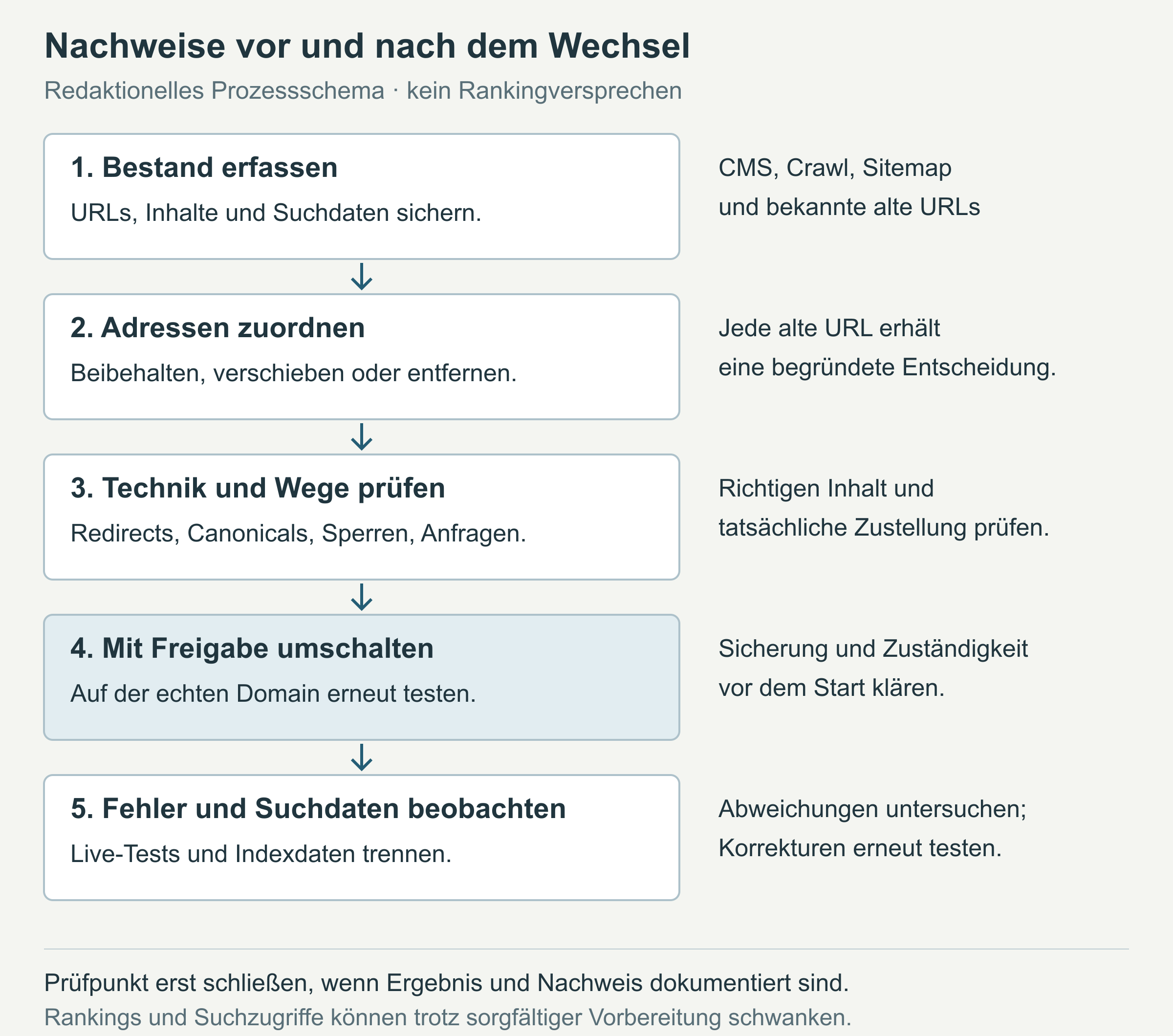
The linked Google help pages and the IANA registry were checked on 16 October 2026. The sample addresses, process diagram and check log are editorial working aids.
Editorial version dated 16 October 2026. Numbers link to sources; letters explain editorial examples or recommendations. Each note states what the source supports.
[b] Practical recommendations. The suggested processes and decision aids are editorial applications of the cited guidance. Their specific effect on enquiries or jobs has not been measured here.
[c] Editorial illustration. The illustration explains a relationship. It is neither a real client project nor evidence of a measured effect.
[a] Editorial examples. Content labelled as a sample or fictional illustrates possible situations. These are not real client cases or evidence of a measured effect.
Sources and context (16 sources)
- Site moves with URL changes — Google Search Central
Supports the recommendations to make changes in stages, compile a URL inventory, use relevant direct redirects, check the live site and keep redirects generally for at least a year. Describes possible fluctuations; no fixed recovery period or ranking guarantee is inferred. Our checklist is an editorial application of the guidance, not a Google sign-off procedure. Checked: 2026-10-16.
- Performance report (Search results): overview and basic setup — Google Search Console Help
Supports the descriptions of search performance metrics, dimensions, filters and export options. Does not provide evidence of business enquiries or jobs; saving filters for a consistent comparison is this guide’s working method. Checked: 2026-10-16.
- Redirects and Google Search — Google Search Central
Supports the recommendation to use permanent server-side redirects for permanent URL changes and the codes 301/308. Does not provide evidence that the fictional CSV rows have actually been configured or executed. Checked: 2026-10-16.
- Special-Use Domain Names — IANA
Confirms the special reservation of example. and that it also applies to subdomains. The four CSV rows, their fields and open statuses were read separately in the local download; IANA does not provide evidence of website tests. Checked: 2026-10-16.
- How HTTP status codes affect Google’s crawlers — Google Crawling Infrastructure
Supports the explanation of server responses, the limits of a successful 200 response, soft 404s for error content returned with 2xx, and 404/410 responses for content that does not exist. No live status measurement. Checked: 2026-10-16.
- Control what you share with Google — Google Search Central
Supports the distinction between password protection and exclusion from search with noindex; noindex does not prevent direct visits. Does not provide evidence of a full security sign-off for a test environment. Checked: 2026-10-16.
- Block search indexing with noindex — Google Search Central
Supports the need for crawling access so Google can detect noindex, its implementation as a meta tag or HTTP header, and the lack of support for noindex in robots.txt. The project team should remove only accidental blocks on public pages. Checked: 2026-10-16.
- Specify a canonical URL with rel="canonical" and other methods — Google Search Central
Supports the use of a canonical as a signal for the preferred URL of similar content and the need for consistent information, including self-referencing canonicals. The canonical element does not redirect visitors; Google makes its own canonical selection. Checked: 2026-10-16.
- Build and submit a sitemap — Google Search Central
Supports the use of absolute URLs and the inclusion of preferred canonical pages. Excluding staging addresses, removed pages and addresses that only redirect is the resulting check of the new destination list; a sitemap does not guarantee indexing. Checked: 2026-10-16.
- Search Engine Optimisation (SEO) Starter Guide — Google Search Central
Supports clear, descriptive page titles, headings and meta descriptions, and the possible use of other sources for the title link and snippet. The side-by-side check is an editorial working suggestion. Checked: 2026-10-16.
- Mobile site and mobile-first indexing best practices — Google Search Central
Confirms that Google uses the mobile version for indexing and ranking, and that important content should be accessible there. The smartphone test in this guide is an additional editorial sign-off practice, not evidence of better rankings. Checked: 2026-10-16.
- Core Web Vitals and Google Search results — Google Search Central
Supports the descriptions of loading performance, interactivity/responsiveness and visual stability. No new thresholds or measurement results have been introduced into the article. Checked: 2026-10-16.
- Understanding page experience in Google Search results — Google Search Central
Confirms that ranking systems use Core Web Vitals and that good scores do not guarantee a top ranking. Makes no claim about a measured conversion effect on the specific website. Checked: 2026-10-16.
- URL Inspection tool — Google Search Console Help
Supports the distinction between stored index information and the live test, the test’s limits, and its inability to predict canonical selection. A positive result does not guarantee inclusion in the search index. Checked: 2026-10-16.
- Change of Address tool — Google Search Console Help
Supports use after a domain/subdomain move and redirect setup, along with the exceptions for HTTP to HTTPS, path changes, www/non-www changes and hosting changes without URL changes. Additional property and ownership requirements apply; the guide does not claim that a change of address has been carried out. Checked: 2026-10-16.
- Page indexing report — Google Search Console Help
Supports the explanations for pages not being indexed and the distinction between important destinations and addresses legitimately excluded, removed or redirected. For the status of a particular page, the help page refers to URL Inspection. There is no requirement to index all old addresses. Checked: 2026-10-16.