Full version with all templates and detailed checks. Back to the main article
Enquiry form for trades businesses: structure and example
A customer wants to renovate their bathroom and gets in touch through your website. Your business initially needs enough information to understand the project and reply. In our example, their name, email address, project location and a short description are enough. If they request a callback, their phone number is added; the email address remains an alternative if they cannot be reached by phone. [a]
This starts the conversation about a project. A measured survey, detailed planning and agreement on the job follow later. An enquiry form can prepare for this first contact if its fields suit your business and someone handles incoming messages.
The setup also includes what happens after submission. A clear message on the website is the first part; the test enquiry must also arrive in the intended inbox or system. The following template therefore combines the choice of fields with testing through to your reply. It is a practical aid for an Austrian trades business. [b]
When you need a dedicated form
A general contact form leaves room for different enquiries. For a particular service, targeted questions can prepare for first contact. For a bathroom renovation, for example, the project location and work requested show whether the project fits your services and service area. These details shape the questions for the first conversation.
A dedicated form makes sense if you regularly have to ask for the same basic information. If enquiries vary widely, a selection that includes ‘Other enquiry’ may be enough to start with. This also gives someone a suitable way to get in touch when they cannot yet name the service they need. [b]
The scope depends on what you need for an initial assessment. A measured survey and billing details can wait until a later discussion. Preparation also means assigning someone to read and answer enquiries, with cover for absences.
Where this contact method belongs on your website is explained in the website planning guide for trades businesses. Once you have agreed the job with the customer, record it separately. You can use the work order form template.
The fields your enquiry form needs
A required field must be completed before the form can be submitted. [1] Which details are appropriate depends on the purpose. The principle of data minimisation applies to personal data: collection must be limited to what is necessary for the particular purpose. [2]
Our example uses four core details: name, email address, postcode and town, and the enquiry itself. This selection belongs to the process described here; it is not a generally prescribed number of fields. A business that only calls customers back and does not communicate by email needs a choice of fields to suit that approach. [a]
| Field | Why you need the information | Required in the example? | Help for customers |
|---|---|---|---|
| Name | Address the customer and find their message again | Yes | One ‘Your name’ field is enough; first name and surname do not have to be separate. |
| Email address | Reply to the enquiry, provide an alternative after unsuccessful phone contact for a callback, and acknowledge receipt if applicable | Yes | Explain that if the customer chooses email, you will reply personally to that address. For a callback, the address remains an alternative if phone contact cannot be made. |
| Project postcode and town | Check the service area | Yes | For first contact, the town is usually enough; you can confirm the exact address later. |
| Enquiry details | Initial assessment of the work requested | Yes | ‘What would you like to change? What matters most to you?’ |
| Service required | Identify which service the customer needs | Optional | Offer ‘Not sure yet / other enquiry’. |
| Preferred contact method | Prepare for an email reply or callback | Optional, email selected by default | Offer only methods that your business handles. |
| Phone number | Call the customer back if requested | Only if a callback is selected | Explain next to the field when the customer needs to complete it. |
| Preferred timeframe | Understand the customer’s timing preferences | Optional | Allow ‘Still open’; a selection does not promise a date. |
| Photos | Get an impression of the existing bathroom | Optional | State the file formats and sizes actually accepted. |
For some projects, a budget, type of home or exact measurements can help even with an initial assessment. In that case, these questions have a specific purpose. Technical questions also need an answer such as ‘I don’t know yet’ if the customer does not need to know the detail at this stage. The table is a starting point for your process. [b]
What customers should know beforehand
A short explanation above the form is enough to say what it is for and what happens after submission. The language can reflect the questions customers use to describe their renovation. ‘What would you like to change in your bathroom?’ works better here than a technical phrase such as ‘qualified lead capture’.
Required fields need a recognisable marker, such as the word ‘required’ or an asterisk explained beforehand. Optional information and accepted data formats should also be clear. This follows the W3C recommendations for form instructions. [3] For photos, it helps to explain what kind of shot is enough for an initial assessment, together with a request to leave people and unnecessary personal documents out of the picture. [b]
Any stated response time must fit the way your business works, including weekends and absences. The preferred timeframe in the form initially describes the customer’s expectations. It does not yet reserve a date for the work.
A working phone number and email address provide another way to get in touch. For urgent enquiries, what matters is which one someone actually handles. A business without an emergency service should not promise one in the form. [b]
Template for a bathroom renovation enquiry
You can adapt the following wording for your business. The blank lines stand for the input fields that will be added later; your website support provider turns them into a working form. The image shows how the details can be arranged.
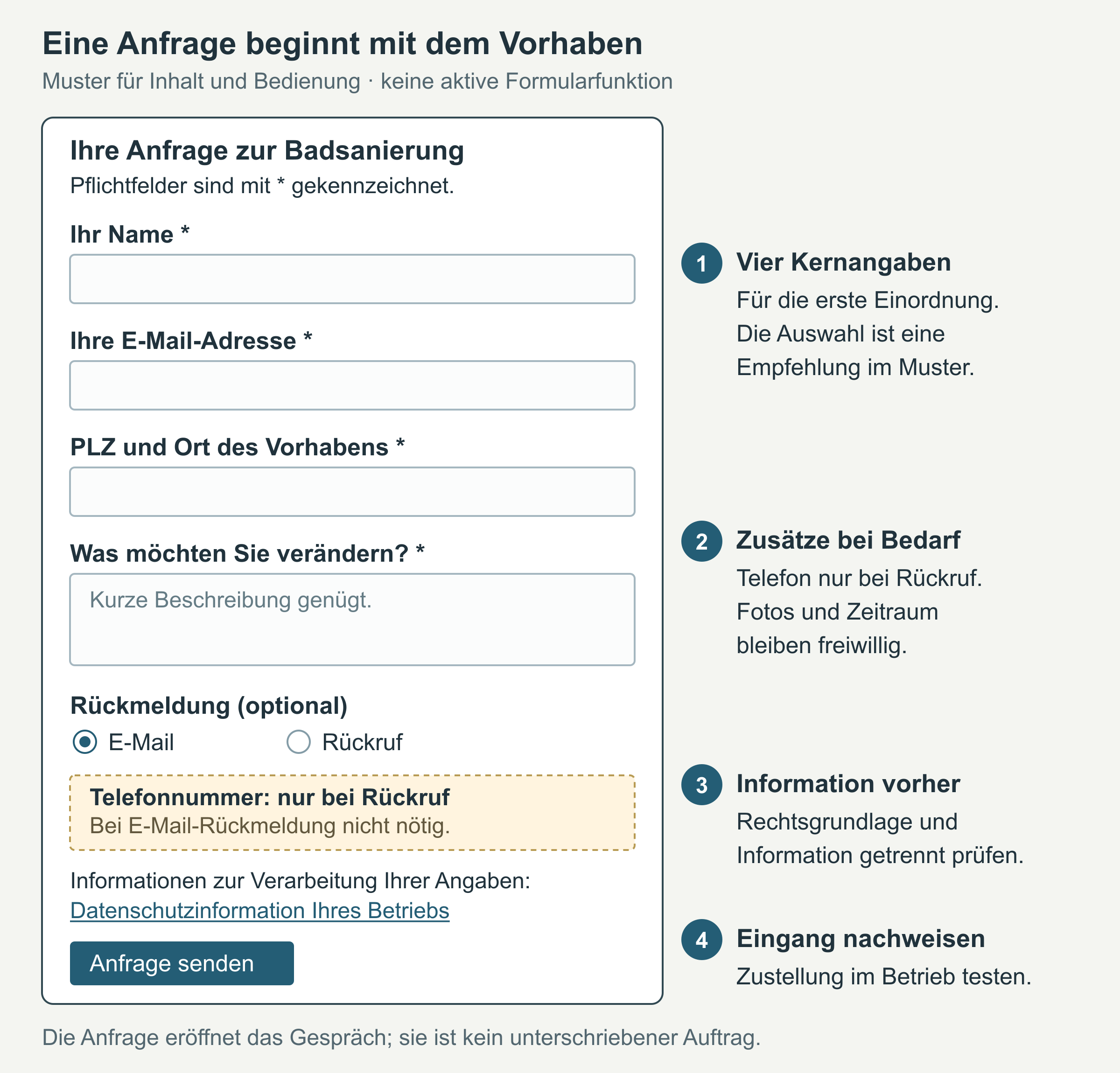
Text above the form
Your bathroom renovation enquiry
Briefly describe what you would like to change in your bathroom and where the project is located. We will review your enquiry and discuss the next steps with you. Photos are optional. Please send only the information we need for this enquiry.
Fields and labels to copy
Your name (required): ____________________
Your email address (required): ____________________
Help: If you choose email as your contact method, we will send our reply to this address. If we cannot reach you for a requested callback, we will contact you personally at this address about the same enquiry. If an acknowledgement is set up, you will also receive it here.
Project postcode and town (required): ____________________
What would you like to change? (required): ____________________
Help: For example, replace a shower, renovate part of the bathroom or discuss a complete renovation. You do not need detailed plans yet.
Service required (optional): Complete renovation / Partial renovation / Not sure yet / Other enquiry
How would you like us to reply? (optional): Email / Callback
Default: Email.
Phone number (required if a callback is selected): ____________________
Help: We use this number to handle this enquiry.
Preferred timeframe (optional): ____________________ / Still open
Photos of the existing bathroom (optional): Choose file
Help in the example: General views are enough for a first impression. JPG and PNG files are allowed, up to 5 MB per file.
Notice before submission: You can find information about how we process your details in our privacy information.
Button label: Send enquiry
‘Privacy information’ needs a link to your business’s statement describing the actual processing. The information it needs to contain is explained in the WKO guidance on information duties and privacy statements. [4]
JPG, PNG and the 5 MB limit are settings used in this example. They are suitable only if the website accepts the same files. An upload is the function for sending files to the website. If this function is missing or no automatic email is set up, any wording you copy must be adapted accordingly. [a]
Example of a completed project description
Fictional example: ‘We would like to replace the bath with a shower in our existing bathroom. The property is in 1010 Vienna. The timeframe is still open. Please let us know what information you need for an initial conversation.’
A short description is enough for this first enquiry. In the fictional example, the customer needs neither technical terms nor exact measurements. [a]
Label fields and explain errors
In web development, the text identifying a field is called a label. It describes the information expected and must be technically associated with the correct input field. The W3C WAI explains how form labels are associated with fields. [5] Example text inside an empty field can help explain what is meant. This placeholder is not enough as the only label. [3]
Missing required information and errors in the format of an email address can be checked during entry. This check is called form validation. The server processing the message must also check the information: a check in the browser alone can be bypassed. This is explained in the W3C guide to form validation. [1] Whether an inbox actually exists and a message reaches it is a separate check.
The callback option must have the same effect in both checks: anyone who selects ‘Callback’ must provide a phone number. This belongs in your website support provider’s technical test, together with the upload rules and spam protection. Spam protection is intended to block unwanted messages. [b]
If something is missing, a message that names the affected field and explains the correction helps. The W3C WAI describes clear error and success messages. [6] For example, the following wording would suit the template:
- ‘Please enter your name.’
- ‘Please check your email address.’
- ‘We need your phone number for the callback you requested.’
- ‘The website could not accept your file. Please check the stated format and size limit.’
The notice belongs next to the affected field and should explain the error in words too. A red border alone does not replace this explanation. [6] Information already entered should be kept while the customer corrects an error, so they do not have to rewrite the whole message because of one mistake. [b]
Test on a smartphone and with a keyboard
A smartphone test shows whether the form also works under the customer’s conditions. In portrait orientation, labels, help text and the button must remain readable without being cut off at the sides. A single-column layout is a sensible starting point. [b] The W3C WAI notes that labels above fields can reduce horizontal scrolling; the right arrangement also depends on the rest of the layout. [5]
The test includes tapping the selection fields and button, and checking that the on-screen keyboard suits the input. Appropriate field types can display a suitable keyboard for the information being entered. [5] Autofill also needs a test: the name and email address should end up in the correct fields. Include uploading a photo directly from the phone and submitting without an attachment. [b]
On a computer, add a test without a mouse. It must be possible to complete and submit the form using a keyboard, including correcting errors. [7] A visible indicator shows which field or button is currently selected. This selection is called focus. [8]
These trials reveal individual problems; they are not enough for a full accessibility assessment. The W3C WAI’s easy checks are also explicitly intended as an initial overview. [9]
Does the enquiry reach you?
After submission, the customer needs clear feedback on whether the enquiry was sent successfully or an error occurred. [6] The wording must match what the website can actually confirm.
Example after confirmed acceptance: ‘Thank you. The website has received your enquiry. We will review it and get back to you using your chosen contact method.’
An additional acknowledgement email can help the customer understand that the enquiry was received, if the email actually reaches them. A short message stating the confirmed status, the next step and a contact method that someone handles is enough. Photos and the full project description do not automatically need to be sent again. Include a response time only if your business has set one and can meet it. [b]
For the test within the business, it is the original enquiry in the intended inbox or system that counts: are the details complete, and can the person responsible access them? The message on the website or an email to the customer does not replace this check. [b]
Example for a submission that has definitely failed: ‘The website could not send your enquiry. Your entries have been kept. Please use the alternative contact method provided if needed.’
If the connection is interrupted, the outcome can remain unclear. The message must then express this uncertainty, for example: ‘We could not confirm receipt of your enquiry. Please use the contact method provided to check whether it arrived.’ Repeated submission without checking can create duplicate enquiries. [a]
How to test the form
Fictional project details and a test email address of your own whose inbox you can check are suitable for the test. A made-up address cannot prove delivery. The label ‘FORM TEST – not a customer job’ in the subject or enquiry details makes the message’s purpose clear within the business. [b]
Deliberate faults belong in a test environment. There is no need to change a live recipient address for this. Your website support provider can agree with you which errors to trigger there without affecting real customer enquiries.
| Test | Method | Passes when |
|---|---|---|
| Required details and callback | Submit with the core fields empty; then select a callback without a phone number | The relevant field has a clear notice; the message is kept. |
| Mobile submission | Send a marked test enquiry from a smartphone, with and without a test photo | The controls work. The website displays the expected message. |
| Receipt at the business | Find the same test enquiry in the intended inbox or system | All details and permitted attachments are present; a responsible person has access. |
| Customer acknowledgement | Check the test inbox you control if an acknowledgement email is intended | The correct acknowledgement arrives; the reply method and next step are right. |
| Errors and uncertain outcomes | Test an error or a connection interruption in the test environment | No false success message appears; it is clear what has happened to the data and which contact method to use next. |
| Follow-up | The person responsible replies to the test enquiry | For email, your reply reaches the test address. For a callback, the agreed phone contact works. |
The six cases make up a practical test process of their own. A short record of the date, device, case and result makes it repeatable later. If the message is missing at the business, the delivery test has failed, even if the website says ‘Thank you’. To investigate, your website support provider follows the path from acceptance of the enquiry through sending the notification to its arrival in the inbox. [b]
After changes to the form, website or email configuration, this process needs to be tested again. This also applies to a connected system. Day to day, someone still needs to be responsible for open enquiries and cover during absences. A clear system for managing customers and enquiries helps you find the right message again.
Explain data protection clearly
Names and email addresses are personal data: information about an identified or identifiable person. [10] When you collect such details directly from a person, they must generally be informed about the processing at that time. For an online form, the WKO recommends a notice that customers can see and read before submitting. [4]
Information and consent serve different purposes. For a project enquiry, Article 6(1)(b) GDPR may be an appropriate legal basis: the processing must be necessary for steps taken before entering into a contract, at the data subject’s request. These are steps before a possible contract. The WKO explains contract performance and steps before entering into a contract. [11]
This basis does not automatically suit every contact. But if it covers the processing needed for the enquiry, using an online form alone does not create an additional requirement for consent. The actual purpose of the processing remains decisive. [11] [12]
| Item | What it means | In the enquiry form |
|---|---|---|
| Privacy notice | Explains what happens to the data | Provide a visible link before submission; the notice is not consent. |
| Consent | One possible legal basis for a specific purpose | Use it only if you need it for this processing. A required checkbox is not automatically necessary for every enquiry. |
A checkbox saying ‘I agree to the GDPR’ replaces neither information about the processing nor an appropriate legal basis. [4] [12] An additional purpose, such as a newsletter, needs separate consideration. The WKO explains the requirements for consent: it must be freely given for a specific purpose, based on prior information and confirmed by a clear affirmative action. [12]
For your privacy information, you need to establish, among other things, the purpose and legal basis, recipients, retention period and the rights of the people concerned. [4] This includes looking at the actual processing involved in uploads and spam protection. You can then check the template wording against what your website does. [b]
Where to start
A useful start is to compare your form with the field table. Information that does not help with first contact can be removed; missing explanations belong where the customer needs them. A marked test enquiry then shows whether the whole process works.
The test ends with your reply through the chosen contact method. If the enquiry reaches the business in full and the reply also works, you have checked the process from completing the form to receiving a response. [b]
If you need help with the technical setup or delivery, you can find out more about BrandHoop’s services . In your enquiry, describe the fields and messages you need, and the path the message takes through to your reply.
Related guides
- Plan a website for tradespeople: add a contact method that fits the service pages.
- The website brings no enquiries: check for causes along the whole path to getting in touch.
- Manage customers, enquiries and jobs: assign someone to take responsibility for new contacts.
- Create a work order form: document the agreed job separately later.
Sources and publication date
The content of the original version was checked on 12 October 2026. Sources were read again and the text revised on 16 October 2026. The field matrix, form wording and test process are editorial practical aids.
Sources as checked for the previous version dated 16 October 2026; editorially revised on 17 October 2026. Numbers lead to the sources; letters explain editorial examples or recommendations. Each note states what the source supports.
[a] Editorial examples. Content labelled as an example or fictional illustrates possible situations. It does not describe real customer cases or provide evidence of a measured effect.
[b] Practical recommendations. The suggested processes and decision aids are editorial applications of the principles cited. Their specific effect on enquiries or jobs has not been measured here.
[c] Editorial illustration. The illustration explains a relationship. It is neither a real customer reference nor evidence of a measured effect.
Sources and context (12 sources)
- Validating Input — W3C Web Accessibility Initiative
Explains required fields, checks of common input formats and the need for server-side validation in addition to checks in the browser. A format check confirms neither that an inbox exists nor that an email has been received. Checked: 2026-10-16.
- Datenschutzgrundsätze im Überblick — Wirtschaftskammer Österreich
The WKO explains that personal data should be limited to what is necessary for the purpose. This does not establish a general rule of four form fields or mean that the example fields are lawful in every case. Checked: 2026-10-16.
- Form Instructions — W3C Web Accessibility Initiative
Supports making required and optional information recognisable, explaining data formats and recognising the limits of placeholder text as a substitute for labels. Does not prescribe a binding choice of fields for trades businesses. Checked: 2026-10-16.
- Datenschutzerklärung DSGVO: Pflichten für Unternehmen — Wirtschaftskammer Österreich
Supports the timing and content of information when data is collected directly, and a form notice visible before submission. The article covers selected points and does not provide a complete privacy statement for a business; statutory exceptions may still apply. Checked: 2026-10-16.
- Labeling Controls — W3C Web Accessibility Initiative
Supports associating a label with its input field, positioning labels above fields and providing mobile input assistance. Does not measure conversion or provide evidence for a particular form. Checked: 2026-10-16.
- User Notification — W3C Web Accessibility Initiative
Supports clear error and success messages, notices next to the affected field and an explanation of the correction needed. The source does not test inboxes or email delivery; the delivery test in this article is a separate practical aid. Checked: 2026-10-16.
- Understanding Success Criterion 2.1.1: Keyboard — W3C Web Accessibility Initiative
Explains operation through a keyboard interface. Applied in this article to form entry, submission and error correction; does not provide test evidence or a complete WCAG conformance assessment. Checked: 2026-10-16.
- Understanding Success Criterion 2.4.7: Focus Visible — W3C Web Accessibility Initiative
Explains the visible indication of keyboard focus. The example in this article refers to the field or button currently selected; it does not amount to an assessment of a real website. Checked: 2026-10-16.
- Easy Checks – A First Review of Web Accessibility — W3C Web Accessibility Initiative
The page, labelled Draft when accessed, explicitly explains that simple checks identify only some problems and do not replace a full assessment. Cited only to establish this limit. Checked: 2026-10-16.
- DSGVO Begriffe einfach erklärt — Wirtschaftskammer Österreich
Defines personal data and gives names and email addresses as examples. Used in this article in the context of an identified or identifiable person making an enquiry. Checked: 2026-10-16.
- Vertragserfüllung als Basis zur Verarbeitung personenbezogener Daten — Wirtschaftskammer Österreich
Explains necessary steps before entering into a contract, taken at the data subject’s request, and explicitly refers to Article 6(1)(b) GDPR. Does not automatically provide a basis for every contact or additional purpose. The EUR-Lex legal text could not be read when accessed directly in a separate check. Checked: 2026-10-16.
- Einwilligung als Basis zur Verarbeitung personenbezogener Daten — Wirtschaftskammer Österreich
Supports freely given, specific and informed consent expressed through a clear affirmative action. The WKO page treats a newsletter as a separate case requiring consent. Does not provide a complete guide to advertising law or a specific consent statement. Checked: 2026-10-16.